UX Mind Map: Organize Your Complex User Experience Data
A UX mind map is a visual thinking tool that is capable of organizing complicated User Experience information and relationships in a non-linear structure. Beginning from a central idea/topic and branching out to related concepts, users, flow, features, or research findings to foster brainstorming, collaboration, and clarity in design projects. With this tool, there is no doubt that you can make the information more comprehensive and engaging for the viewers of the map. Now, if you want to learn more about the mind map for UX design and why you need to use it, read this article. We will also give you the best method to create an exceptional mind map for UX design using a remarkable tool. Thus, check this post and learn more about the topic.

- Part 1. Why Use a Mind Map for UX Design
- Part 2. How to Create a Mind Map for UX Design
- Part 3. Tips for Creating a Mind Map for UX Design
- Part 4. FAQs about UX Mind Map
Part 1. Why Use a Mind Map for UX Design
See all the breakdowns below and learn why you need to use a mind map for UX design.
Visualize Complex Ideas
When dealing with UX design, creating a mind map is perfect since it can help you visualize complex ideas. This way, you can see the overall output, which can help you understand your main objectives. You can even see some of the important elements, such as user needs, business goals, technical constraints, and the design pattern. It can also guide you to view the relationship and dependencies at a simple glance.
Improves Creativity
Mind maps encourage free-flow thinking by branching out from a central idea. With this, you can design your own map based on your needs and preferences. You can even generate more ideas, explore alternatives, and avoid linear thinking that can restrict creativity. The good part here is that you can even use various elements during the mapping process, like changing colors, adding images, choosing various styles, and many more.
Enhances Collaboration and Communication
The good thing about mind mapping design is that you can collaborate with your group or team, which is ideal if you want to brainstorm with one another. This way, you can share all your insights, making the task easier and smoother. Plus, it can also improve your communication skills by socializing with others, letting you share your own opinion without facing any issues.
Boost Efficiency in Problem-Solving
Mind maps can even boost efficiency in problem-solving. By effectively breaking down challenges into smaller nodes and branches, a mind map can help you spot the bottlenecks, prioritize tasks, and streamline workflows easily. With this visual thinking tool, you can save more time and ensure that the design decisions are grounded in a better, clearer overview of the project.
Part 2. How to Create a Mind Map for UX Design
As mentioned, using a mind map is helpful for UX design. It can let you see a complex idea in a simpler version. Thus, if you want to create an excellent mind map for UX design, you must use an excellent mind mapping tool, like MindOnMap. This tool is capable of giving you all the features you need when crafting your map. You can access various nodes, lines, arrows, colors, font styles, and more. You can also choose your preferred theme for creating an appealing visual representation. The good part about this tool is that you can navigate all the functions easily, thanks to its easy-to-understand layout.
What's more, MindOnMap can offer its auto-saving feature. This feature is perfect for saving your mind map automatically, ideal for preventing data loss. It also has various templates you can access for a faster mind mapping process. Lastly, you can save your design mind map on various output formats, like DOCX, PDF, PNG, SVG, JPG, and more. Thus, if you want an ideal tool for mind mapping design, use MindOnMap right away.
Core Features
- • The tool can offer its AI-powered technology to produce an accurate visual representation.
- • Various ready-made templates are available.
- • The software can offer its Theme feature for creating an engaging map.
- • It has a Collaboration feature.
- • The mind mapping tool is accessible on browsers, Mac, and Windows.
To create a mind map for design, you can use/follow the simple instructions below.
You can download MindOnMap on your desktop by clicking the Free Download button provided below.
Secure Download
Secure Download
After that, from the primary layout, click the New section and tap the Mind Map feature. After the loading process, the main interface will show up on your screen.
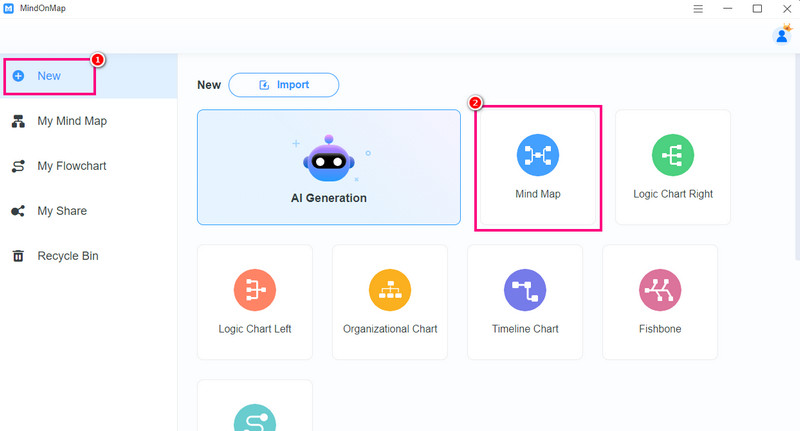
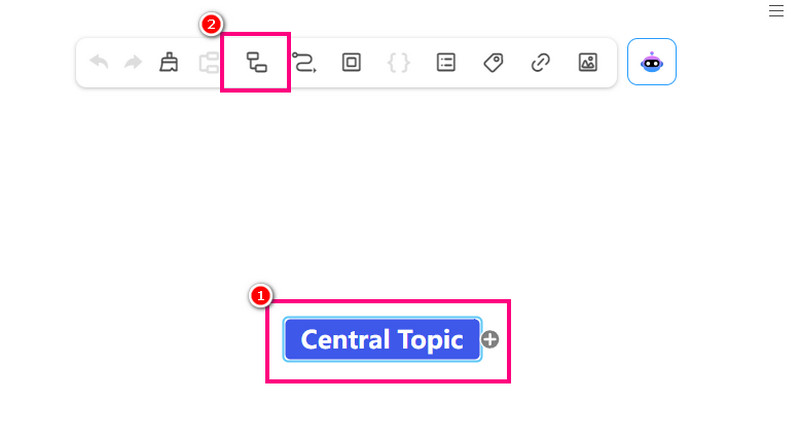
To start the process, double-right-click the Blue box to insert your central topic. Then, use the Subnode function to add more nodes to your map.
If you finish making a mind map for UX design, tap the Save button above to keep the map on your account.
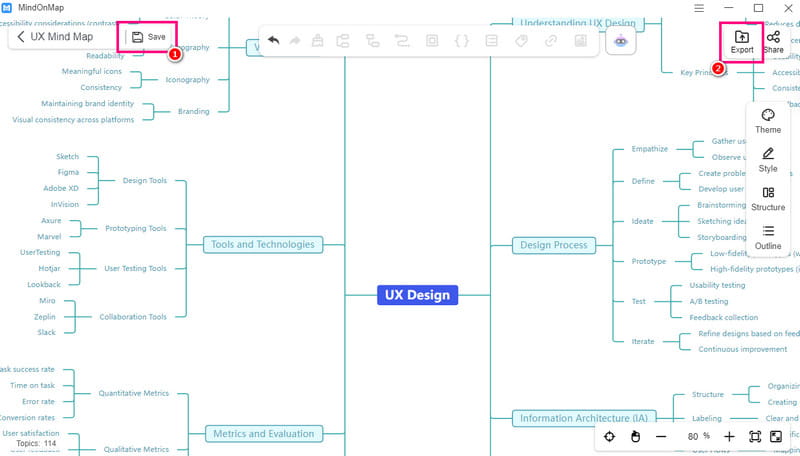
To save the map on your desktop, use the Export button.
Click here to see the mind map for UX design created by MindOnMap.
Thanks to this procedure, you can create the best mind map for UX design. You can even have a smooth creation process since it can give you a simple user interface. What we like here is that you can also create different maps when using the tool. You can create a technology mind map, an SEO mind map, creative maps, and more. Thus, use this tool and obtain your desired output.
Part 3. Tips for Creating a Mind Map for UX Design
Looking for the best tips for creating a mind map for design? Then, read the details below.
- • Always use a simple mind mapping tool for a smoother procedure.
- • You must know your main objective before starting to design your map.
- • It is better to use keywords than sentences.
- • You can apply colors to your map to make it more appealing.
Part 4. FAQs about UX Mind Map
How detailed should a UX mind map be?
It should be high-level enough to show structure, but detailed enough to include key elements like navigation paths, personas, and usability goals.
Can a UX mind map be used in a client presentation?
Definitely, yes. This kind of visual representation is ideal for explaining design logic, showing user flows, and aligning stakeholders. You can also use color coding and icons to make them visually appealing.
When should I craft a UX mind map?
It is always at the start of the project since you have to brainstorm and organize ideas. After that, you can create another map during iteration for refining flows and highlighting the main point.
Conclusion
A UX mind map is beyond sketching ideas. It is about transforming complexity into clarity. Thanks to this article, you have learned why you need a mind map for UX design. Plus, if you plan to create your map, we suggest using MindOnMap. With this tool, we ensure that you can create the best map after the mapping process.