What is the Communication Matrix [Definition and Guide]
A Communication Matrix is a visual representation that shows how information should flow within an organization or a project. It ensures that the right messages reach the right people at the right time. The tool also includes details such as what information is shared, who communicates with whom, and more. If you want to dig deeper into the Communication matrix, it's better to read the entire article. We will provide a detailed description, key components, and a method to build one. For more insights, read this post now.

- Part 1. What is a Communication Matrix
- Part 2. Key Components of a Communication Matrix
- Part 3. How to Build a Communication Matrix
- Part 4. Organize all the Information about the Communication Matrix
Part 1. What is a Communication Matrix
A Communicatiematrix, also known as a Communication Matrix, is a simple tool that shows how information should be shared within a team or organization. It outlines who needs to communicate, what data is shared, and how it is delivered. Organizing these details in one place helps avoid confusion, ensures everyone stays informed, and makes collaboration more effective. In short, it's a clear guide that keeps communication structured and efficient.
Why does the Communication Matrix Matter?
A communication matrix can play a vital role in various fields. Thus, if you want more insight into why it matters, see the details below.
- • Clarity and Role Definition – The matrix shows who communicates, what information is transmitted, to whom, how, and when. This tool can help you clarify responsibilities and avoid missed updates.
- • Flexibility and Adaptability – The tool can be updated as projects evolve, making it a living document, which is ideal for stakeholders.
- • Improved Collaboration – By inserting communication channels, groups/teams and stakeholders can work together. It also helps you to get more ideas during the creation process.
- • Faster Decision-Making – With a well-structured communication flow, stakeholders and decision-makers receive timely updates, enabling them to act quickly.
- • Accountability and Transparency – For each responsibility, a person is assigned. With this tool, everyone knows their role. It can reduce blame-shifting and increase trust in the process.
Part 2. Key Components of a Communication Matrix
See here for more information about the components of the communication matrix.
Stakeholders (Audience)
Stakeholders are the individuals who require information. This list may include team managers, members, external partners, and clients. Knowing who needs all the information ensures that no one is left out.
Messages (Information)
Messages the information each stakeholder needs. The messages can be project updates, risk alerts, changes in requirements, and more. Plus, clarifying the level of detail required for stakeholders to obtain the right amount of information is important.
Channels
Channels are simply the ways we share information with others. They might be emails, meetings, phone calls, instant messages, reports, or even project management tools. Picking the right channel matters because it helps make sure the message is delivered in a way that feels clear, comfortable, and easy for the recipient to understand.
Frequency and Timing
The frequency and timing determine how and when the communication should occur. Some stakeholders may need updates, while others may need seasonal summaries. Ensure the project milestone aligns with the communication schedule so information can be obtained at the right time.
Deliverables
Deliverables are the concrete results of each communication, such as status updates, videos, agendas, or presentations. Defining these deliverables makes it clear what should be provided and helps establish expectations for both quality and format.
Part 3. How to Build a Communication Matrix
Want to learn how to build a communication matrix? Then read the detailed guides below.
Step 1. Define Goals
The first thing you have to do is to define your goals. By clarifying the purpose of your matrix, you can lay a solid foundation for completing your output. You can ask yourself 'Who needs what data/information?'
Step 2. Identify Stakeholders
The next step is to determine your stakeholders. You can list potential stakeholders for your project. They can be the managers, clients, team members, external partners, and more.
Step 3. Select Communication Method
Choose communication channels based on the type of information being shared and your stakeholders' needs. For example, emails or newsletters work well for routine updates; meetings are useful for gathering feedback; project management tools help track progress; and phone calls are best reserved for urgent issues.
Step 4. Set Frequency and Timing
You must ensure how frequently communication should occur. Some stakeholders need daily updates, while others need only weekly or monthly updates.
Step 5. Assign Responsibilities
Then, you can start assigning the responsibilities to a specific person. It creates accountability, ensuring that a particular person completes a certain task.
Step 6. Review and Update
You can always review and update your matrix. It is to ensure that it reflects current stakeholders, responsibilities, and priorities.
Part 4. Organize all the Information about the Communication Matrix
Do you want to organize all the information about the Communication Matrix? Then, you should use MindOnMap. This tool lets you manage everything by using all the features you need. You can access shapes, text, colors, lines, and more. You can even navigate all the functions easily, thanks to its simplicity. It also has the auto-saving feature. With this feature, you can ensure your output is saved automatically during creation. The good thing is that the tool lets you save your final visual representation to your MindOnMap account, ideal for preservation. You can also save it in various formats, such as SVG, DOCX, JPG, PDF, PNG, and more. To test its capabilities, follow the instructions below.
Download MindOnMap on your computer by tapping the Free Download button. Then, start creating your account.
Secure Download
Secure Download
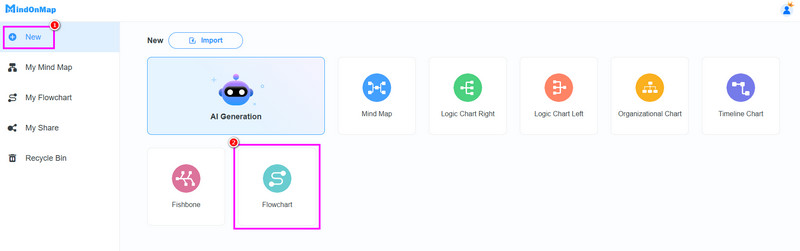
After you launch the interface, proceed to the New section. Then, tap the Flowchart feature to start organizing all the information.
Now, you can start organizing all the data. You can use various shapes from the General section. You can also add the information/text inside the text by double-clicking the shapes.
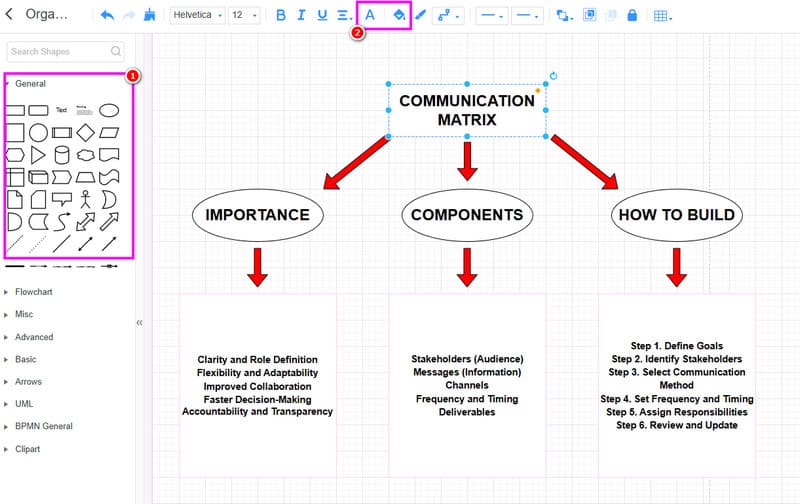
To add color, use the Font and Fill feature.
To save the final output, hit the Save button from the top interface. You can also use the Export feature to save the organized data on your desktop.
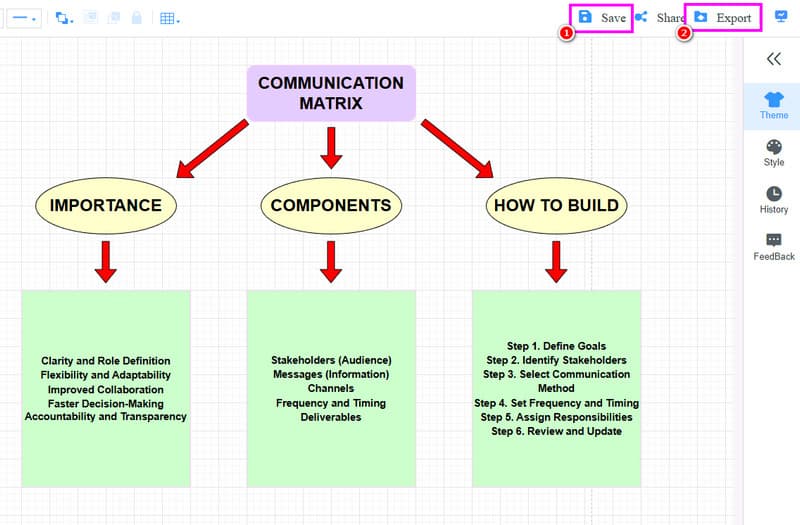
Click here to see the organized information about the communication matrix designed by MindOnMap.
With this method, you can effectively organize all the information you need and produce a well-structured output. The tool can even offer all the functions you need. It can also create various visual representations, such as an SEO mind map, comparison table, tree chart, and more.
Part 5. FAQs about Communication Matrix
Who should use a communication matrix?
Various people can use the tool. Some of them are project managers and team leaders, and organizations of any size can benefit from using it to streamline communication and enhance collaboration.
What are the necessary elements included in the communication matrix?
Some essential elements to include in the matrix are goals, stakeholders, deliverables, frequency, channels, and more.
Can a communication matrix be customized?
Absolutely, yes. It should be tailored to the specific needs of a project or organization, adjusting channels, frequency, and deliverables as needed.
Conclusion
Now you have learned everything about the Communication Matrix, including its key components, importance, and how to build one. Plus, if you want to organize all the information about the discussion, we recommend using MindOnMap. This tool allows you to create well-structured output, providing a better viewing experience.