UPSC Mind Map: How to Create One and Its Importance
Creating a UPSC mind map is an ideal method to simplify complicated topics and arrange your preparation effectively. It guides aspirants to break down a vast syllabus into better, clearer, and interconnected themes that are easier to recall during revision. With that, if you want to learn how to create the best UPSC mind map, we are here to give you the best method using an excellent tool. You will also learn why mindmapping is necessary for preparing for UPSC. Thus, to get all the details, you can check everything in this article.

- Part 1. Why MindMapping is Important when Preparing for UPSC
- Part 2. Draw a Detailed UPSC Syllabus on MindOnMap
- Part 3. FAQs about UPSC Mind Map
Part 1. Why MindMapping is Important when Preparing for UPSC
There are various reasons why mindmapping is important when preparing for UPSC. To explore some of them, you can check all the information we have provided in this section.
Simplifies Complicated Topics
The UPSC syllabus covers diverse subjects. It includes economics, history, polity, and environment, which might be overwhelming to the learners. With that, to make this complicated topic become more comprehensive and organized, the best way is to create a mind map. It is because it can break these vast topics into smaller, interconnected nodes, making complicated topics easier to understand. By visually organizing data, learners and aspirants can quickly grasp the essence of the subject. Plus, this simplification lessens stress and helps retain clarity throughout preparation.
Enhances Memory Retention
Another good thing about mindmapping is that it can help you improve memory retention. Well, mind maps use symbols, keywords, images, colors, and other elements to stimulate both creative and logical sides of the brain. In addition, this dual engagement strengthens memory retention, letting aspirants/learners recall concepts and facts effectively during exams. Instead of memorizing lengthy paragraphs, aspirants can rely on visual cues to trigger recall. Thus, this method builds stronger mental associations, making revision more ideal and productive.
Provide a Bird's Eye View
Mind maps explain how subtopics relate to the primary theme and portray a whole topic in a single visual picture. This overview aids candidates in comprehending the connections between various course topics, such as how governance relates to current events. By emphasizing the larger picture, it avoids fragmented learning. Candidates can approach questions with a more comprehensive knowledge when they adopt this viewpoint.
Boost Revision Efficiency
During the last minute of preparation, flipping through bulky notes might be time-consuming. A well-structured mind map can turn multiple chapters into a single diagram, making revision faster, smoother, and more efficient. Aspirants can quickly scan through key phrases without losing focus on important points.
Encourages Active Learning
Making a mind map requires organizing, summarizing, and linking information, which demands active participation. Unlike passive reading, this active learning approach improves comprehension. By selecting what to include and how to connect ideas, candidates interact with the information. This way, they can learn more efficiently and acquire the analytical capabilities required for UPSC responses.
Personalized Learning Tool
The best part about mindmapping is that aspirants can do whatever they want. You can customize your mind map based on your preferences. You can use various colors for branches, images, keywords, and more. This personalization makes studying motor engaging, enjoyable, and tailored to one's learning style. The flexibility ensures that aspirants can adapt the tool to their unique preparation technique/strategy.
Part 2. Draw a Detailed UPSC Syllabus on MindOnMap
Do you want to create a UPSC syllabus mind map? Creating a syllabus can help transform an overwhelming syllabus into a structured, visual roadmap. You can even see all the subjects comprehensively. Thus, if you are looking for an excellent tool for making a better visual, we suggest using MindOnMap.
This tool is perfect if you want to create a well-structured syllabus for UPSC. It can even offer all the elements you need. It includes shapes, colors, text, connecting lines, arrows, and more. What we like here is that you can even access the Theme feature, allowing you to create a better and more engaging visual representation. In addition, MindOnMap has a simple user interface, making it suitable for both non-professional and skilled users. You can also save the syllabus mind map in various ways. You can keep/save it on your MindOnMap account or keep it on your device in various formats, such as JPG, PNG, DOCX, SVG, PDF, and more. With that, if you are looking for an astounding tool for creating the UPSC syllabus mind map, it would be better to start using MindOnMap.
To start creating the detailed UPSC syllabus mind map, you can follow the simple method below.
You can start downloading MindOnMap by clicking the buttons below. After that, you can start creating your MindOnMap account. You can also connect your Gmail.
Secure Download
Secure Download
From the primary user interface, navigate to the New section and hit the Flowchart feature. Then, the main interface will appear on your screen.

You can now start creating the UPSC syllabus mind map. Go to the General section and use all the shapes you need. You can also double-click the shapes to add all the information.
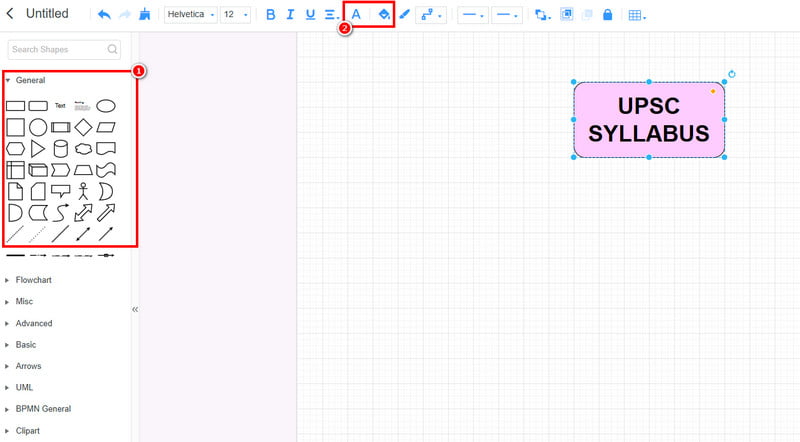
If you want to change the color of the shapes and text, use the Fill and Font features.
Once you are done creating your visual representation, you can start saving it on your account by tapping the Save button above.
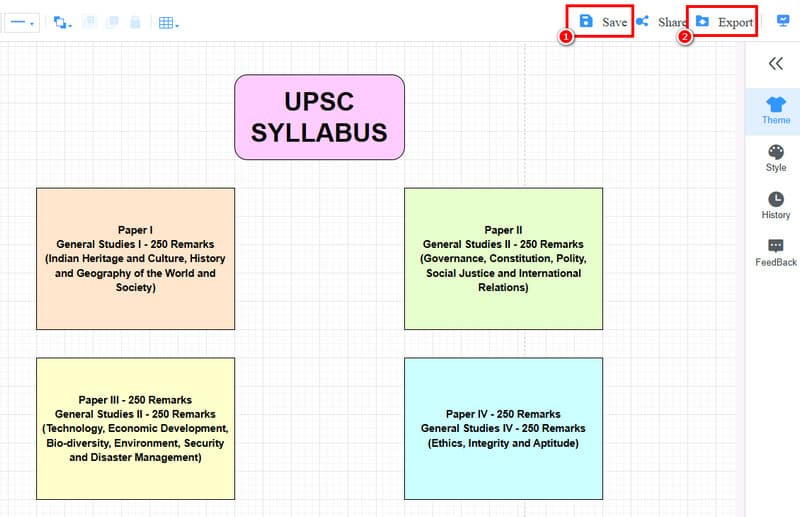
You can also keep the mind map on your device with your preferred format by hitting the Export feature.
Click here to see the whole UPSC syllabus mind map designed by MindOnMap.
With this method, you can ensure that creating a comprehensive UPSC syllabus mind map is a possible task when using MindOnMap. It can even give you a simple layout, allowing you to achieve your desired outcome after the creation process. Plus, it can even create various maps, such as a technology map, sunburst chart, tree chart, diagrams, and more, making the tool perfect for all users.
Part 3. FAQs about UPSC Mind Map
What subjects are best suited for mind mapping for UPSC?
Some ideal subjects are History, Polity, Geography, Ethos, and Environment. These areas are interconnected concepts that can be visually mapped for better comprehension.
Why should I use mind mapping for UPSC preparation?
Mind maps can help you turn complicated topics into a comprehensive visual. It can also enhance memory retention and provide a bird 's-eye view of the syllabus. It can even make the revision quicker and more efficient.
Is it easy to create a UPSC mind map?
Absolutely, yes. If you are using an excellent tool, like MindOnMap, creating the best visual is simple. The tool can even offer an intuitive user interface, helpful features, and a smooth export process.
Conclusion
The UPSC mind map is an excellent visual representation that lets you comprehensively see all the information. Plus, if you want an excellent tool for creating a mind map for the UPSC syllabus, we suggest using MindOnMap. This software is ideal since it can offer all the best features you need, allowing you to get a remarkable mind map after the creation process.