Best 3 AI Tools for Teachers’ Productivity: A Key to Great Education
The process of learning nowadays can take many forms, such as traditional, online, and through the use of artificial intelligence AI. In line with that, there are various tools that can be used by teachers to help you manage information quickly and allow you to be more productive in teaching. In this article, we will discover the best AI tools for teachers as we navigate their features and how they can help in the daily activities of an educator.

- Part 1: How AI Is Transforming Education
- Part 2: What AI Tools Can Do for Teachers
- Part 3: Top AI Software for Teachers
- FAQs about Best AI Software for Teachers
Part 1: How AI Is Transforming Education
Role of AI in Teaching
Artificial Intelligence, or AI, is now reshaping the way educators teach and the way students learn. It is not developed to replace teachers, but to act as a powerful assistant in enhancing the academic process of academics. To specify, here are the roles of AI in teaching:
- • Personalized Learning. AI has the capability to adjust to whatever the student or teacher needs. It balances the lessons and details so that it can be aligned with students’ capacity.
- • Automated Grading: It can help teachers save time by automatically checking the quizzes of the students.
- • Smart Tutoring Systems: It has the capability to give feedback, allowing students to learn independently while the support is still there.
- • Data-driven Insights: It automatically analyzes performance so that the teacher will know the gap immediately.
Benefits for Educators
AI exists not only to help students, but also to provide guidance on teaching methods and empower teachers in many meaningful ways.
- • Time Efficiency. It helps teachers with repetitive tasks and other manageable responsibilities. So teachers can now focus on the more creative side of teaching. Basically, it lessens the tasks you handle and allows you to focus on what’s important.
- • Enhanced Teaching Tools. AI-powered platforms can help you improve your resources, lesson structure, and curriculum goals.
- • Professional Development. AI has the ability to recommend training modules so that teachers will be updated on trends and more effective ways of teaching.
- • Inclusive Education. There are many features that AI can bring in to help every student despite their situation.
Part 2: What AI Tools Can Do for Teachers
Beyond the benefits we saw above, AI can also do specific things for teachers. With that, here are three powerful things it can do:
- • Lesson Planning Support. AI Platforms can do research of structure, resources, materials, double checking the accuracy; generate visuals; and more. This is a great way to help you save time and focus on teaching itself.
- • Student Performance Tracking. It can offer AI dashboards that can help you observe and analyze student progress instantly. Making it easy for you to know where they need help.
- • Classroom Management Assistance. The classroom AI tools can help you with attendance checking, behavior management, and more. This makes it easy for you to focus on the way you teach and not on overwhelming administrative tasks.
Part 3: Top AI Software for Teachers
We shall now proceed to introduce you to the best AI tools for teachers. Discover their features, guide to use, pros, cons, and verdict to make the review complete.
Top 1: MindOnMap
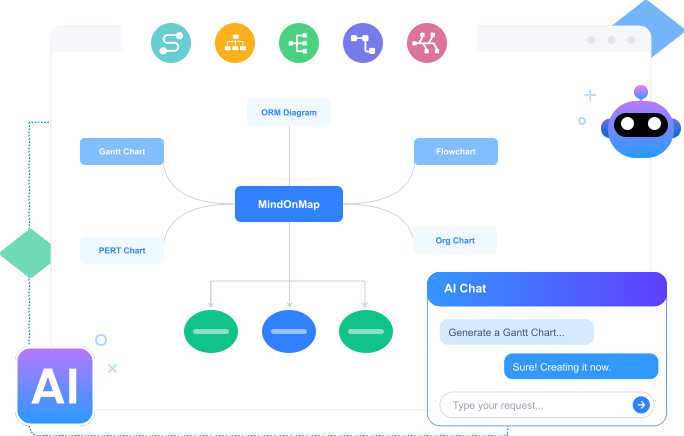
Starting strong with MindOnMap Flowchart Maker. This is a mapping tool that has an AI integration helping teachers in managing every information they create, create presentations, get resources, and composing structural material for teaching. It has a versatile ability that makes it accessible for every teacher. Thus, sharing your output for collaboration is also possible here. Learn the simple way to use it:
Steps to Use MindOnMap
Download and install MindOnMap for free from their official website.
Open the tool and access the AI Tool button. Choose between generating an AI Flowchart or AI Mind Mapping.

Now, type the prompt or anything you want to create using AI. Once you are done, click the Generate Mind Map button.

After that, you will now see a mind map with all of the details you need. You can edit it or click Export to save it in the file format you want.

PROS
- It possesses versatile AI integration tools.
- Easy to use for managing your data.
- Free to download.
- Safe and secure.
- Quickly identify effective learning strategies
Verdict
MindOnMap is a trustworthy tool for managing your classroom. This is indeed an AI tool that exists to help you manage information and other activities you have. You can use it because it is free and available on any device, even in an online browser.
Top 2: ChatGPT
ChatGPT is another flexible AI assistant that helps teachers simplify lesson planning, develop interesting activities, and make difficult subjects understandable for students. It can create worksheets, tests, and even differentiated learning resources for different skill levels.
Beyond classroom material, ChatGPT helps teachers save time by helping them produce professional documents, emails, and parent communications. Because of its flexibility, it is an effective tool for boosting creativity, lowering workloads, and guaranteeing that classes are dynamic and tailored to the needs of each student.

Top 3: Nearpod
Third on the list is Nearpod. It is an interactive teaching platform that uses collaboration boards, polls, quizzes, and multimedia lessons to increase student participation. In order to make learning more data-driven and participative, teachers can conduct live sessions in which students react in real time.
In addition, Nearpod can transform regular teaching methods into immersive experiences with the use of different elements like virtual reality activities and formative assessments. Additionally, it offers analytics that enable teachers to monitor students' comprehension in real time.

FAQs about Best AI Software for Teachers
Do educators have access to free AI tools?
No. However, many AI applications have free versions; more sophisticated analytics, integrations, and more extensive classroom management functions are only available with paid memberships.
How can AI do lesson planning?
AI swiftly creates differentiated activities, worksheets, and lesson plans that are in line with standards, saving teachers time while enhancing the quality of instruction.
Is using AI in the classroom safe for students and teachers?
Yes. Using AI tools in classrooms when platforms abide by GDPR or FERPA is definitely safe. Before using AI outputs in the classroom, educators should check them for accuracy and suitability.
Can teachers be replaced by AI tools in teaching students?
No. AI will never replace teachers in classrooms. Human mentoring, empathy, and critical thinking are still invaluable. But we cannot deny the fact that AI can help teachers in many aspects, like automating chores and offering insights.
Does using AI technologies require training?
There is very little training required. The majority of platforms are easy to use, but professional development courses enable educators to fully utilize AI in the classroom.
Conclusion
In conclusion, AI software for teachers is now getting massive. These tools help teachers in making every responsibility easy and more accurate. In terms of recommendations, many users recommend MindOnMap because of its versatile and easy to use feature for creating your teaching materials. Use it now for free and tell your co-teachers about it.