Craft the Best Mind Map in Bubbl.us [with Best Alternative]
Bubbl.us is an excellent online tool for creating the best mind map. It can even offer various features for an effective procedure. However, some users don't know how to use this tool. Some of them can't even access it smoothly. With that in mind, if you are looking for the best way to use this tool, we are here for you. This post will show you how to create a mind map on Bubbl.us. With that, you can get the result you need. In addition to that, you will also learn another mind mapping tool you can access for a more straightforward process. Thus, to learn all of them, read this guide instantly.

- Part 1. How to Make a Mind Map on Bubbl.us
- Part 2. The Best Mind Mapping Tool for Beginners
- Part 3. FAQs about Bubbl.us Mind Map
Part 1. How to Make a Mind Map on Bubbl.us
Bubbl.us is an effective tool that is capable of creating various mind maps. It can even offer the features you need, allowing you to achieve the results you prefer. You can access multiple shapes, font styles, colors, numerous nodes, images, icons, and more. It can even give you various templates you can access for instant creation. Aside from that, what makes the tool powerful is that you can create an engaging output by changing the background. You can also attach your preferred image as the background for your mind map. What's more, you can access the tool's AI technology to achieve better results. With this feature, you can generate more ideas that you can add to your map. Lastly, you can save your final mind map in various formats, such as PDF, PNG, JPG, etc. Thus, if you need an exceptional mind-mapping tool, consider Bubbl.us.
If you want to learn the best way to create an appealing mind map, you can check the instructions below.
On your browser, proceed to the main website of Bubbl.us . After that, you can start creating and logging in to your account.
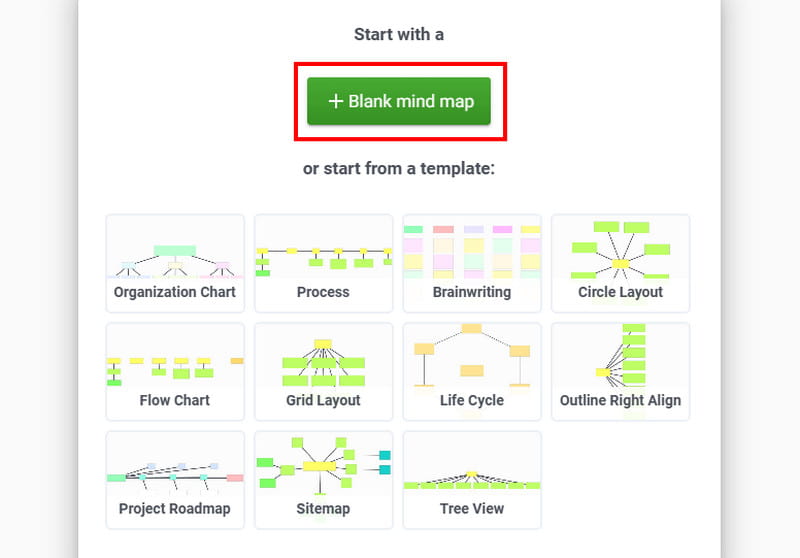
Then, after the loading process, tap the Blank Mind Map option. This way, you can create your mind map from scratch.
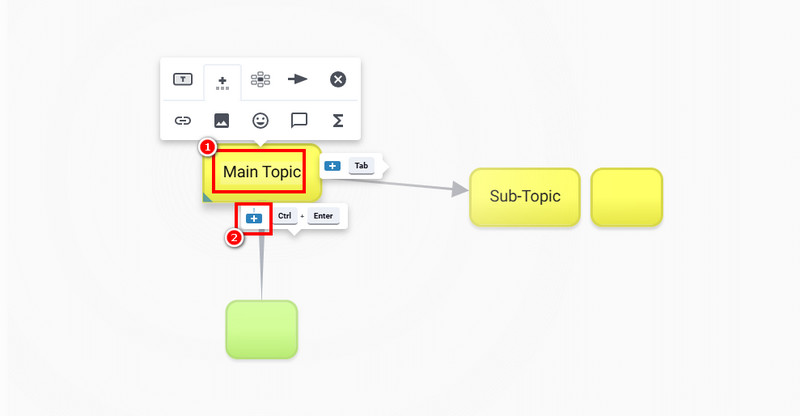
From the Yellow box , you can insert your main topic. Then, to add another box, click the Plus button. You can also use connecting lines if you want to.
After creating a mind map, click the Save as button above and choose your preferred format. Once the saving process is done, you can now view your mind map on your desktop.
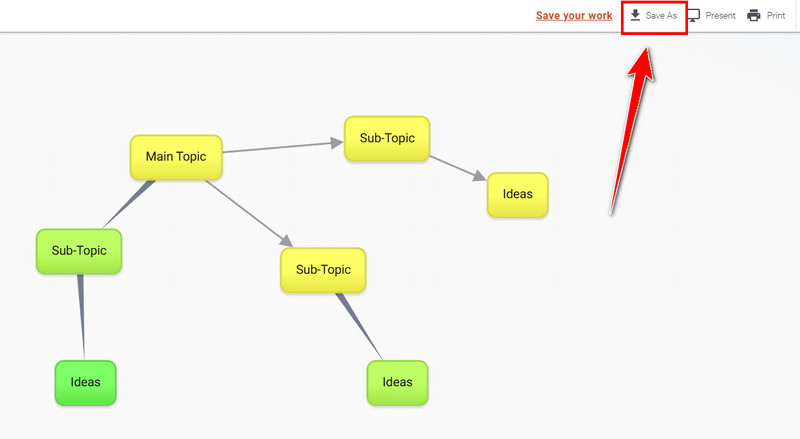
When brainstorming with Bubbl.us, there is no doubt that you can obtain your main result. This mind-mapping tool is reliable for creating the best visual representation. However, you must know that the tool is not that easy to operate. Some of its functions are difficult to use, making it challenging for some non-professional users.
Part 2. The Best Mind Mapping Tool for Beginners
Are you looking for another mind-mapping tool that is easier to operate? In that case, we would like to introduce MindOnMap. This tool is perfect if you want to create a high-quality mind map quickly. The good part here is that all of its features are easy to access, making it suitable for all users, especially beginners. It can even offer various elements you can attach to your map, such as shapes, colors, font styles, connecting lines, images, and more. With that, you can ensure that you produce the best mind map after the procedure. Additionally, MindOnMap offers ready-made templates, allowing you to create different visual representations instantly and effortlessly. You can also save your mind maps in various formats, including JPG, PDF, PNG, DOC, SVG, etc. Therefore, if you want an easy-to-use mind-mapping tool, look no further than MindOnMap.
More Features
• It can offer a straightforward and neat user interface.
• The tool has an auto-saving feature that saves the mind map.
• It can offer various ready-made templates for instant creation.
• Its Collaboration feature is perfect for groupwork tasks.
• The tool can support various output formats.
• The tool is available on Windows, Mac, and browsers.
Follow the simple methods below to create the best mind map using MindOnMap.
First, you have to download MindOnMap on your computer. You can use the buttons below to access it on your Windows and Mac.
Secure Download
Secure Download
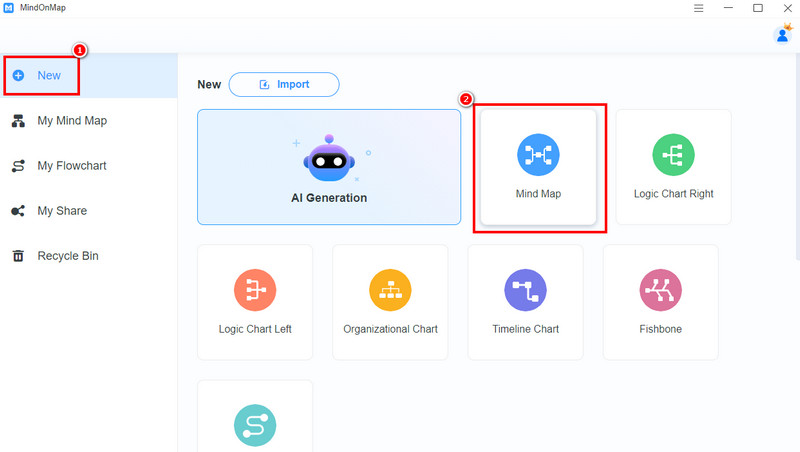
Then, tap the New section and select the Mind Map feature. After that, the tool will load its main interface.
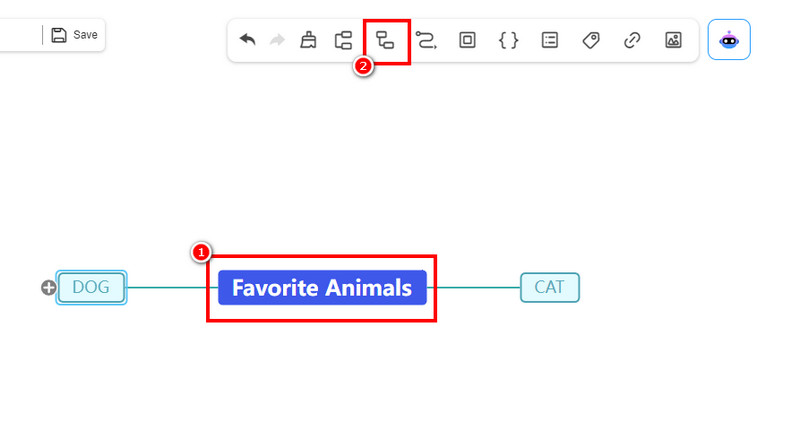
You can start creating your mind map. Click the Blue box to insert your main subject or topic. Click the Subnode function above to insert another box/node to insert the sub-topics.
If you are done crafting your mind map, start saving. Hit the Save button above to keep the output on your account.
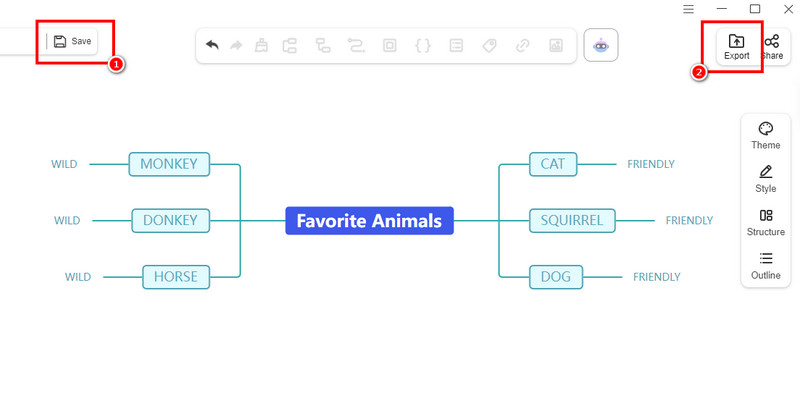
You can also save the mind map on your device by clicking the Export button.
Click here to see the complete mind map designed by MindOnMap.
Good Point about MindOnMap
• With its neat user interface, you can create your mind map smoothly and effortlessly.
• It can offer all the best features you need during the creation process.
• The tool can offer various themes and styles for making an appealing mind map.
• It can also create various visual representations.
Thanks to this tool, creating the best mind map is possible. The best part here is that it can even give you all the features you need, making it more powerful. Lastly, you can also use this tool to create various visuals, including vertical mind maps, family trees, organizational charts, and more.
Part 3. FAQs about Bubbl.us Mind Map
Is Bubbl.us safe?
Absolutely, yes. After using this tool, we can confirm it is safe. You can even create various visual representations without encountering any ads or interferences. It also ensures that none of your work is shared with other users.
Is Bubbl.us free?
What we like about the tool is that it is free to use. All you need to do is create your account or connect your Email. After that, you can save your mind map or any visual representation without spending a penny.
What is the best Bubbl.us alternative?
If you are looking for another tool to replace Bubbl.us, it is best to use MindOnMap. This tool can provide a more intuitive layout, a smoother creation process, and the necessary features. You can access this tool on various platforms, making it the most remarkable mind-mapping tool.
Conclusion
The Bubbl.us Mind Map tool is ideal for creating an excellent mind map. It can even offer various templates to streamline the process. However, some of its features are hard to locate, making it complicated for non-professional users. With that in mind, if you want to create your mind map smoothly, we recommend using MindOnMap. This tool is much easier to access, thanks to its simplicity. It can even give you various functions you can use during the process. Thus, use this tool and achieve your preferred result.