What is Tony Buzan's Mind Map & How to Create a Detailed Map
Tony Buzan's Mind Map is an excellent visual thinking strategy that redefined how people capture, organize, and connect ideas. This map was introduced in the 1960s by Tony Buzan. The method places a central concept at the heart of the page and radiates outward with branches of keywords, colors, and images to mirror the brain's natural, radiant thinking process. Now, are you searching for a detailed explanation of the mind map of Buzan? In that case, you must read this article. We are here to give you complete information about Buzan's mind map and his rules for mind mapping. After that, we will teach you how to create a detailed mind map using an excellent tool. Thus, come here and get more insights about Buzan's mind map.

- Part 1. What is Tony Buzan's Mind Map
- Part 2. Rules of Mind Mapping by Tony Buzan
- Part 3. How to Create a Detailed Mind Map
- Part 4. FAQs about Tony Buzan Mind Map
Part 1. What is Tony Buzan's Mind Map
Tony Buzan's Mind Map is a visual thinking tool designed to mirror the brain's natural way of processing information, using radiant thinking and associations rather than linear note-taking. Introduced in the 1960s by Tony Buzan, an English author and educational consultant, the method organizes ideas around a central concept, branching outward with keywords, images, and colors. One of its main purposes is to stimulate creativity and memory. Buzan argued that traditional lists and outlines restrict the brain's potential, while mind maps encourage connections across multiple directions, reflecting how the brain actually works.
Tony Buzan popularized mind mapping through his books, such as 'The Mind Map Book' and his training courses. It inspires millions worldwide to adopt the strategy for learning, brainstorming, and problem-solving. He emphasized that mind maps are not just note-taking tools. It is also a way to unlock mental literacy, creativity, and innovation. By combining words, symbols, and visual cues, Buzan's approach helps individuals and teams capture complex ideas more clearly and efficiently, making it a cornerstone in education, business, and personal development.
Part 2. Rules of Mind Mapping by Tony Buzan
Tony Buzan created a simple but powerful set of rules for crafting an effective mind map. They emphasize central ideas, radiant branches, keywords, colors, images, and other elements to stimulate creativity and memory. Check all the information below and learn more about the rules of mind mapping by Tony Buzan.
Start with a Central Word/Topic or Image
When making a mind map, one of the main rules of Buzan is to insert the main topic at the center. It will serve as the 'hub' in your map. You can use a single word, your main topic, or an image. After that, when adding sub-topics or sub-ideas, you must create various branches that radiate outward. You can add more branches and expand it, mimicking the brain's associative memory.
One Keyword per Branch
When adding sub ideas, it is recommended to just insert a single keyword or a short phrase. It is to spark associations more freely. It can also make the structure comprehensive to the viewers. Well, adding branches has no limits. With that, you can add more keywords to it.
Use Color Throughout
Colors can stimulate the brain, differentiate information, and make the map more appealing. Adding color can help you create the best and easiest-to-understand mind map. It can also help learners retain ideas in their memories, compared to viewing information in a simple text form.
Add Images and Symbols
Besides keywords, you can also insert photos and symbols on your mind map. It can also improve creativity and memory, making ideas easier to recall and understand.
Emphasize Hierarchy and Connections
Based on Buzan's rules, when making a mind map, you must be aware of the branches. Use a large branch when representing the main theme. Then, use smaller branches when adding more details about the main topic. This way, viewers can identify the major and minor information in your mind map.
Part 3. How to Create a Detailed Mind Map
Are you already aware of the rules for creating a mind map and want to create one? In that case, you must have an exceptional mind mapping tool. If you want the best tool, we suggest using MindOnMap. When it comes to creating a mind map, there is no doubt that you can use all the provided features smoothly. You can access nodes, shapes, lines, images, colors, and many more. What we like here is that the tool can give you a simple layout, allowing you to create a detailed mind map without any problem. You can also use various ready-made templates for an easier and quicker map creation process. What we like here is that you can also access its AI-powered technology to ensure an accurate output. After creating your mind map, you can save it in various formats, like PDF, JPG, PNG, DOCX, and more.
To start the process of mind mapping by Tony Buzan, you can check the detailed steps below.
You can tap/click the Download button below to access MindOnMap. After creating your account, the primary interface will appear on your screen.
Secure Download
Secure Download
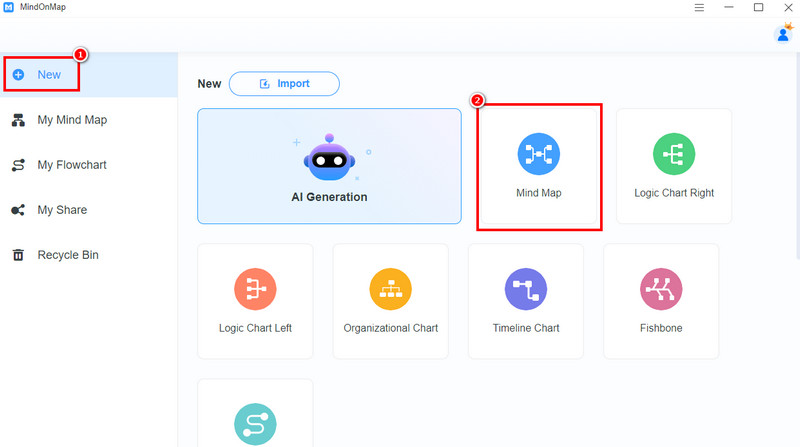
Click the New section from the left interface and tap the Mind Map feature. After the loading process, you can proceed to the next step.
You can start creating your mind map. You can tap the Blue box to start your main topic. You can even attach an image by clicking the Image function above.
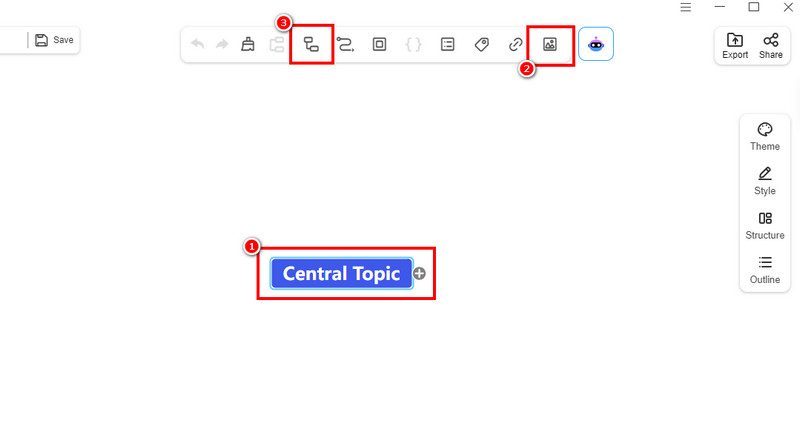
To add more branches, hit the Subnode function.
If you are done making your mind map, you can keep it on your account by clicking the Save function.
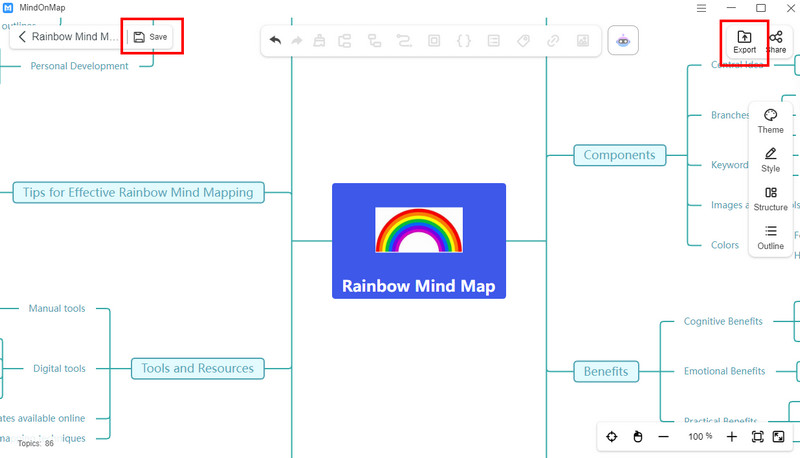
To save it on your desktop, rely on the Export feature.
Click here to see the detailed mind map created by MindOnMap.
Creating an excellent and detailed mind map is a possible task if you have a powerful mind map maker like MindOnMap. Thus, use this tool for an effective creation process. The good part here is that you can access this tool to create various mind maps, such as a visual map, a circle map, a tree map, and more.
Part 4. FAQs about Tony Buzan Mind Map
What are the benefits of a mind map?
There are various benefits you can get. This visual representation can improve memory, enhance problem-solving skills, and turn complex ideas into easier and well-structured data.
Do I need to create a Tony Buzan mind map?
If you want to turn your notes into a better and comprehensive framework, then making a mind map is the best solution. With this visual thinking tool, you can engagingly showcase information.
Why did Tony Buzan emphasize image and color?
Buzan believed that these elements stimulate the brain, creating information more appealing and engaging compared to plain notes or text.
Conclusion
The Tony Buzan Mind Map is an excellent visual tool that helps you create well-structured and comprehensive information. Thanks to this post, you have learned more about the topic, including Buzan's rules in mind mapping. In addition, if you want to craft a detailed mind map, it is better to access MindOnMap. This tool ensures that you can create your masterpiece after the mind mapping process.