Circle Map: Best Visual Tool for Improving Thinking Skills
A circle map is a simple yet powerful visual thinking tool used to define and explore a concept. The procedure is placing the main topic in the center circle and surrounding it with related information, examples, or associations in the outer circle. This visual representation helps to clarify meaning and context. Commonly used in education, brainstorming, and content planning, circle maps encourage deeper understanding by visually arranging ideas around a central theme. In this post, you will learn more about the circle map, including its concept and use cases. After that, you will also learn how to craft an amazing map using the best mapping tool. Without anything else, it would be better to read all the information from this post and discover more.

- Part 1. What is a Circle Map
- Part 2. How to Create a Circle Map
- Part 3. Tips for Creating a Circle Map
- Part 4. FAQs about What is a Circle Map
Part 1. What is a Circle Map
A circle map is one of the eight Thinking Maps introduced by Dr. David Hyerle. This visual tool is designed to guide and help individuals visually organize and define ideas. In addition to that, the circle map focuses on defining a concept in context. It is the main idea or topic placed in the center circle, while the surrounding circle is filled with words, phrases, or examples that describe, explain, or expand upon that central idea. What's more, this structure makes it easier to clarify meaning, brainstorm associations, and build a deeper understanding of a subject by visually mapping out connections.
Furthermore, the concept behind a circle map is rooted in the idea of contextual definition. It doesn't just state what something is. It shows how it is understood within a particular frame of reference. Often, a square frame is drawn around the outer circle to indicate the source of information or perspective being used, such as personal knowledge, research, or expert opinion.
By combining and organizing the central idea, related details, and contextual framing, circle maps provide a simple yet powerful tool for critical thinking, learning, and communication.
When to Use a Circle Map?
Are you wondering when to use a circle map? In that case, you must read all the details below and learn more about its use cases.
Defining a Vocabulary
You can use circle maps if you want to define a single vocabulary. As we all know, there are some words that contain numerous definitions or meanings. With the help of a circular map, you can insert all the information you need, such as meaning, synonyms, examples, and much more.
Brainstorming
If you are brainstorming with your group or team, then use a circle map as your visual representation. This map allows you to insert all the ideas that have a relation to your main topic or subject. What makes it better is that you can even create more circles as you want for inserting more information as needed.
Clarify Concepts
When discussing a certain abstract idea, the circle map allows you to visually explore different perspectives and interpretations. It only means that no matter how challenging the subject or concept is, using a circle map can help you understand and clarify everything.
Enhance Problem-Solving Skills
The good thing about the circle map is that it is reliable in improving problem-solving skills. With this tool, you can effectively solve a certain problem. All you need is to insert the main problem at the center of your circle. Then, surround the problem with various information, such as the contributing factors, possible causes, and possible solutions.
Part 2. How to Create a Circle Map
Want to create a great circle map? When creating an excellent circle map, always consider using a remarkable circle map maker, like MindOnMap. Creating your desired visual representation using this tool is perfect. It is because it can give you all the necessary features you need. You can access the circle shape, colors, text, and many more. What we like here is that you can use the Theme feature to make an engaging circle map. With that, you can expect an astounding output after the creation process. Lastly, after creating your map, you can also save it in various ways. You can save it as PDF, PNG, JPG, SVG, and more. You can also keep it on your MindOnMap account for further preservation. Thus, if you need the best circle map maker, consider using this tool.
More Features
- • The visual thinking tool can offer its AI-powered technology for making a map accurately.
- • Its auto-saving feature is ideal for preventing data loss.
- • It can support various output formats.
- • The software can offer various ready-made templates.
- • It is accessible on both desktop and browser.
To start making a great circle map, you can use the simple and detailed instructions below.
Download MindOnMap on your computer. Then, install it to start creating a circle map. To instantly access the program, use the buttons below.
Secure Download
Secure Download
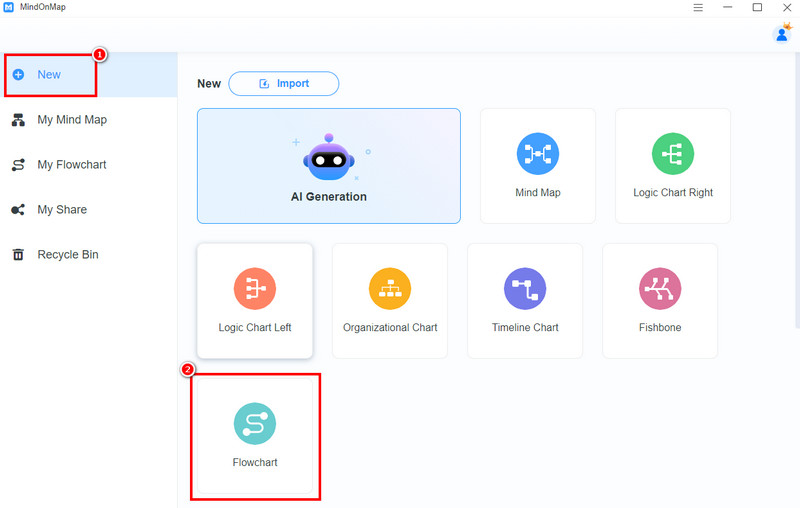
From the primary interface, navigate to the New section. Then tap the Flowchart feature. Once the loading process is done, proceed to the next step.
You can now create your circle map. You can go to the General section and select the Circle shape. Then, double-click the Circle to insert your main topic.
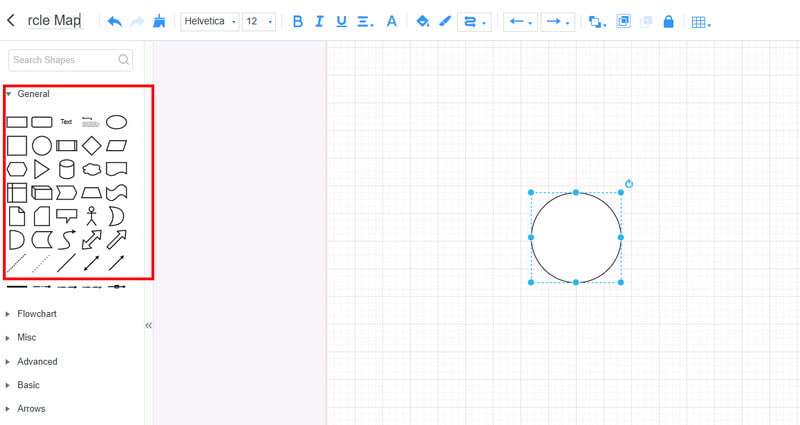
After that, you can also use another circle and attach all the information you need.
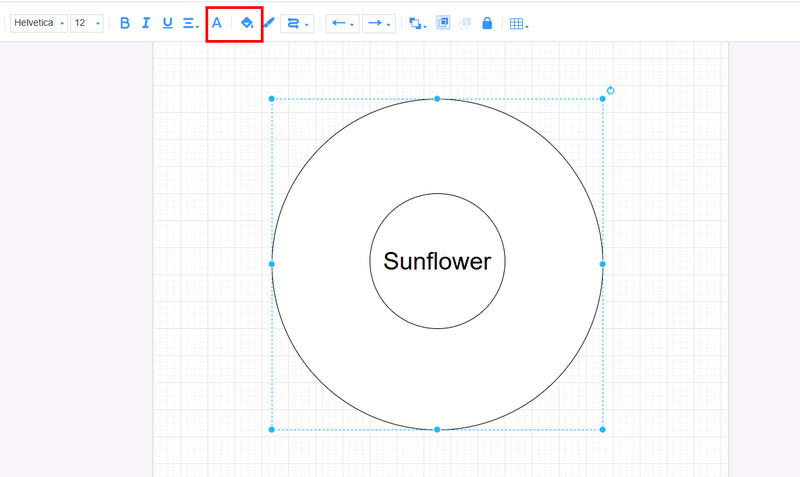
ou can also hit the Fill and Font functions above to add color to the shapes and text from your map. This way, you can create an appealing visual representation.
If you are satisfied with your circle map, you can start saving it. Hit the Save button above to keep the circle map on your MindOnMap account.
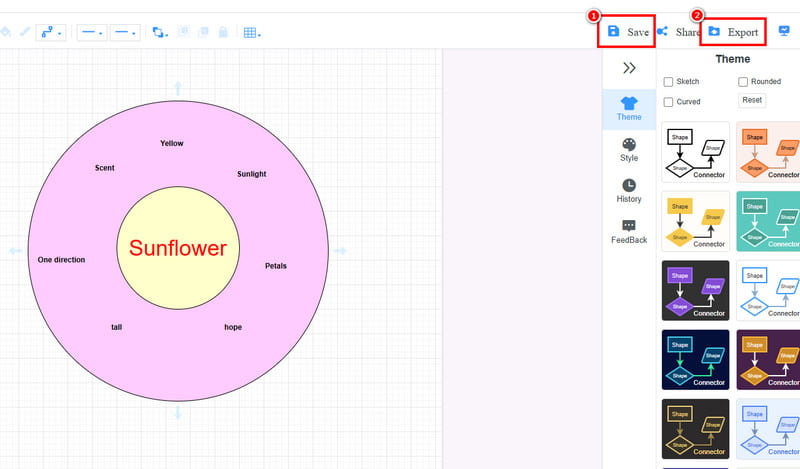
To save the map on your computer, you can hit the Export button. Then, select your preferred output format, such as PDF, JPG, PNG, DOCX, and more.
With this method, you can tell that creating a circle map is possible. MindOnMap can give you all the features you need, making it an exceptional mapping tool. It can also let you create more maps, such as different visual maps, art maps, creative maps, and more. Thus, always rely on this tool and achieve the map you desire.
Part 3. Tips for Creating a Circle Map
When creating a circle map, there are various things you must consider. Come to this section and get more tips on how to create an excellent circular map.
Use a Simple Circle Map Maker
When making a circle map, always consider using a circle map maker. If you are a beginner, using a simple circle map is ideal.
Add Color to the Circle Map
Avoid making a simple circle map. A boring map can't attract viewers. Always add color to the map to make it appealing and engaging.
Use a Keyword
When making a map, it is better to attach a keyword or phrase than a sentence. Keywords are better when making organized information.
Organize Related Ideas Logically
After inserting the main topic, you must organize all the related ideas. Attach a circle with related ideas. For example, when doing a problem-solving method, put the main problem, then surround it with causes, factors, and solutions.
Review and Refine
After making a circle map, you must review it. This way, you can check the overall appearance of the map. Then, you can refine and edit it based on your needs.
Part 4. FAQs about What is a Circle Map
Who can benefit from using a circle map?
Various people can benefit when using a circle map. Some of them are students, teachers, professionals, businesses, and more. Well, a circle map is perfect for clarifying information, brainstorming ideas, and arranging thoughts visually.
Is it easy to build a circle map?
Well, it depends on the tool you are using. If you are a non-professional user, you must access an easy-to-use circle map maker. A simple map maker can let you navigate all the features easily. With that, you can ensure that you can create a circle map without any difficulties.
Can a circle map be created digitally?
Definitely, yes. In this modern era, creating a visual representation tool is easy since there are various online and offline tools you can access to create a circle map, such as MindOnMap, MS PowerPoint, Miro, EdrawMing, and more.
Conclusion
Now you have learned what a circle map is. You also get more insight into when to use it and tips to create an excellent circle map. Plus, if you need the best tool for making a circle map, we prefer using MindOnMap. This tool is ideal since it can offer all the features you need to craft a detailed and engaging circle map.