Start Mind Mapping to Improve Projects and Learning
Mind mapping is a flexible method that helps people and groups increase creativity, productivity, and teamwork by transforming thoughts into understandable, visual diagrams. Mind maps facilitate brainstorming, project planning, problem solving, and knowledge retention by graphically arranging ideas, tasks, and complicated concepts. With its user-friendly features, real-time collaboration capabilities, and export options, tools like MindOnMap improve this process and make mind mapping useful, accessible, and incredibly efficient for both professional and educational workflows.

- Part 1. Mind Mapping Benefits for Everyone
- Part 2. Tips for Implementing Mind Maps on Your Projects
- Part 3. How to Get Started with Mind Mapping
- Part 4. FAQs about the Benefits Of Mind Mapping
Part 1. Mind Mapping Benefits for Everyone
What is Mind Mapping?
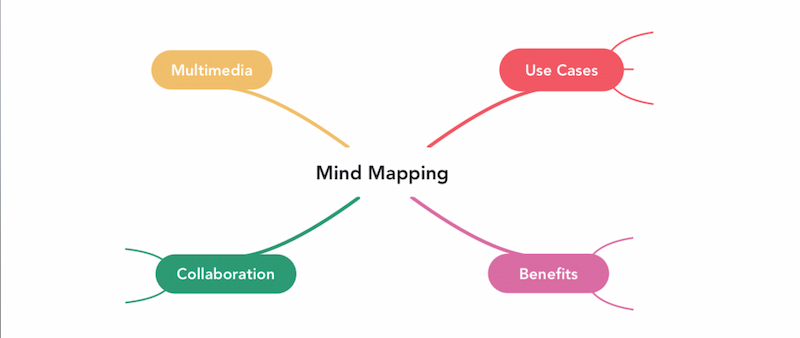
A mind map is a straightforward yet effective graphic that provides a visual representation of your ideas. Making a mind map gives your ideas shape and helps you see each concept and how it relates to the others.
The main idea of a mind map is normally positioned at the center of the diagram, and you can use branches, which are commonly represented by lines, to further develop and expand upon it. Mind mapping is beneficial for ideation and brainstorming because of its straightforward style.
Benefits of Mind Mapping
Many benefits of mind mapping can improve creativity, productivity, and learning. Gaining knowledge of these benefits contributes to a deeper comprehension of what a mind map is. Let's examine:
- • Have Original and Imaginative Ideas. A fantastic method for fostering creative thinking and generating fresh concepts is mind mapping. Teams are encouraged to think creatively and unconventionally by the visual format. Building on the contributions of other team members, it also assists teams in coming up with fresh ideas. For instance, one person’s suggestion for a new software feature may inspire another.
- • Make Difficult Concepts Simpler to Comprehend. A mind map is a straightforward method of dissecting a complicated concept into smaller, easier-to-manage components. Consider the launch of a website. Planning a website launch involves many intricate and technical components, but a mind map makes it easier to see how each component functions as a whole.
- • Planning that Works. Mind maps, which offer a visual road map that aids in communicating the whole scope and chronology of a project, are great tools for project planning, article writing, and strategy creation.
- • Great Collaboration. One great way to start improving teamwork is through mind mapping. By promoting candid conversation and the discussion of novel concepts it facilitates teamwork. Using the appropriate mind mapping tool makes collaboration much simpler. For instance, MindOnMap has robust live and asynchronous collaboration features. You can simply add your mind map to presentations, submit graphic notes, and tag team members in comments.
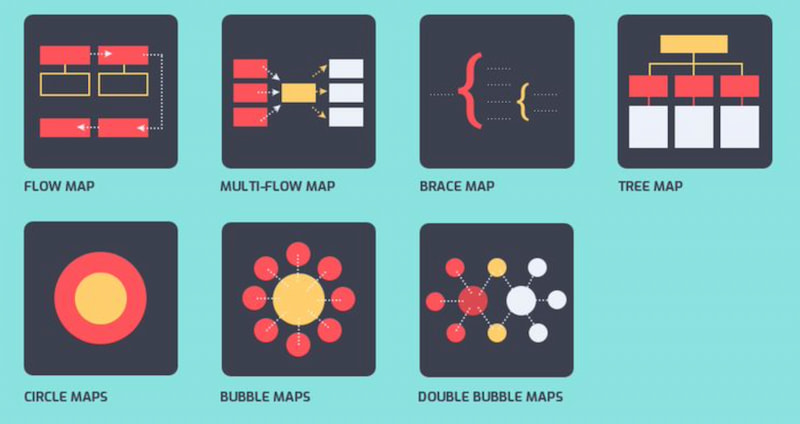
Types of Mind Maps
The design of a mind map aims to mimic how our brains naturally correlate and integrate concepts. They are, therefore, a useful tool for strategic planning, problem-solving, and brainstorming. Here are a few typical situations where a mind map can be useful.
- • Ideation for a Project. To come up with fresh concepts for future projects, use a mind map. You can talk about the kinds of initiatives you should do, the reasons they would help the company, and the details of those projects.
- • Enhancement of Processes. You might find fresh approaches to enhance your current procedures with the use of mind maps. Consider HR procedures as an illustration. A mind map could be used to determine how to expedite the hiring process or enhance onboarding.
- • Development of Products. You can come up with fresh concepts for product creation by using mind mapping. You talk about upgrades, new features, and other pertinent enhancements to your present product line.
- • Solving Problems. Using a mind map might assist you and your team in coming up with fresh solutions to problems. For instance, you can utilize a mind map to determine the root of the issue and come up with a solution if you have a high client turnover rate. Mind mapping helps teams come up with solutions they might not have otherwise considered because it fosters creative thinking.
Part 2. Tips for Implementing Mind Maps on Your Projects
Organization, clarity, and teamwork can all be significantly enhanced by using mind maps in your projects. Teams can easily understand objectives, monitor progress, and manage workloads by visually organizing goals, tasks, and responsibilities. In order to keep projects focused and productive, careful use of layouts, colors, and icons guarantees that information is accessible and actionable.
Establish a Clear Central Goal First
To guarantee clarity, put the primary project goal in the middle of your mind map. All decisions are guided by this main concept, which helps you stay focused, coordinate team knowledge, and avoid distractions as you create related branches and tasks.
Dissect the Principal Elements
The project should be divided into important elements, such as budget, risks, resources, tasks, and deadlines. To make it simpler to manage workloads, comprehend relationships, and determine which areas need the most planning or attention, use branches to graphically organize various areas.
Use Icons and Colors Sensibly
Information like priorities, task status, deadlines, or responsibilities can be categorized using colors, symbols, or shapes. Visual distinctions enhance team member involvement, facilitate quick comprehension of crucial details, and make the mind map easier to read.
Part 3. How to Get Started with Mind Mapping
MindOnMap is a user-friendly web-based mind mapping tool that allows you to transform ideas into visual representations. Whether you're managing duties, learning, planning a project, or generating ideas, MindOnMap offers a straightforward yet creative method of organizing information. Its user-friendly design allows you to create branches, add comments, icons, links, and even attach files with just a few clicks. It will be very beneficial for professionals, students, educators, accountants, and everyone who likes visual learning.
You may view your mind maps at any time and work together in real time because MindOnMap is cloud-based. It is perfect for printing, reporting, and presentations because it can export in a variety of formats.
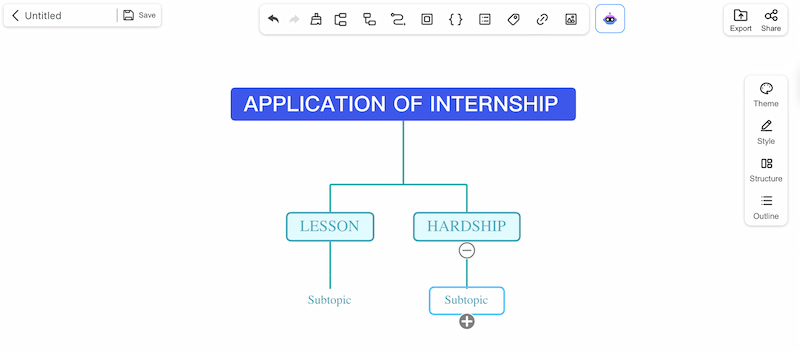
Key Features
- • Drag-and-drop to create branches for simple editing
- • Color-coding and icons for improved visual organization
- • Real-time communication and cooperation through a link or QR code
- • Include comments, attachments, notes, and links.
- • Export as PDF, Word, PNG, or JPG
Steps in Using MindOnMap
Choose Create Mind Map after opening MindOnMap.
After adding your main topic, make branches and sub-branches.
Make your visual map unique, then share it with your team, store it, or export it.
Part 4. FAQs about the Benefits Of Mind Mapping
Can I be more productive using mind mapping?
Yes, mind maps help you concentrate, clear up confusion, and effectively monitor your progress by graphically arranging tasks and priorities.
Does it work well for group projects?
Of course. By promoting cooperation, idea exchange, and clarity, mind maps make sure that everyone is aware of their roles and objectives.
Does making a mind map require any particular skills?
No. Anyone, regardless of expertise level, may easily begin mind mapping thanks to programs like MindOnMap.
In what ways does mind mapping help in problem-solving?
It divides complicated problems into smaller, more manageable parts so that teams can see connections and find innovative solutions fast.
Is it possible to use mind maps for education?
Indeed. They aid professionals and students in better knowledge retention, relationship comprehension, and information organization.
Conclusion
An effective method for enhancing creativity, output, and teamwork is mind mapping. Teams and individuals can clarify difficult concepts, come up with novel solutions, and maintain focus by visually arranging ideas, tasks, and projects. It's simple to get started using tools like MindOnMap, and the advantages are both immediate and long-lasting.