Event To-Do List: How to Plan and Organize a Successful Event
Organizing an event requires meticulous management of every detail to make it successful. Handling these details and important tasks can feel overwhelming, which is why creating an event to-do list is a great way to stay organized and ensure everything gets done on time. In line with that, this article will guide you on how to create your own event to-do list. Discover MindOnMap's best, easy-to-use tool and how it has become one of the leading tools that can help with these kinds of tasks.

- Part 1: What Is an Event To-Do List
- Part 2: Why Event Planning Checklists Matter
- Part 3: Key Tasks in an Event To-Do List
- Part 4: Common Challenges in Event Planning
- Part 5: Best Event Planning Tools for Different Needs
- Part 6: Use MindOnMap to Organize Event Planning Tasks
- FAQs about Event To-Do List
Quick Answer: An event to-do list is a checklist that helps you organize event tasks, deadlines, budgets, and responsibilities in one place. To create one, define your event goals, book the venue, coordinate guests and vendors, set a budget, and track progress. A visual planning tool like MindOnMap can help you manage tasks more clearly.
Part 1: What Is an Event To-Do List
An event to-do list is a visual format and a document where you list all of the activities, tasks, and important things you need to accomplish for your event. This map provides a roadmap and a broader view of what is being accomplished, what still needs to be done, and what comes next. It likely shows everything you need to do, with additional details like deadlines or the people involved in specific tasks.
Part 2: Why Event Planning Checklists Matter
As we move forward, we'll talk about why an event planning checklist benefits you as an event organizer. There are many reasons, but three are the most common. These include ensuring all organizational tasks are completed, saving time (A time management tool is also helpful in this aspect), reducing stress, and managing the event. Here is an elaborated explanation behind it:
Ensure Organization of Tasks
Your checklist keeps all tasks in one place. This can help you avoid overlooking details, especially the important ones. This provides structure and helps the event planner stay on track.
Time Saver
Outlining your responsibilities and deadlines can streamline your workflow. It can also reduce duplication and make delegating tasks easier. Moreover, it speeds up your planning process.
Stress Reduction
Simply put, an event checklist helps you know exactly what you need to do and what needs doing. This can reduce procrastination and last-minute chaos. This can give planners and organizers confidence and peace of mind throughout the event.
Part 3: Key Tasks in an Event To-Do List
When you create your own event task list after a detailed task analysis, it is important to include these three key areas: venue preparation, guest coordination, and budget and schedule management because having these three is a best practice for event planning.
Venue Preparation
You need to secure the location where you will hold the event. This includes arranging seats, decorating, and setting up technical equipment. All of these help ensure the venue is welcoming for guests.
Guest Coordination
An event isn't possible without guests. So add guest management to your to-do list, including invitations, an RSVP list, seating arrangements, and anything else that will make guests comfortable.
Budget and Schedule Management
You also need to track all expenses and your event timeline. This helps you prevent overspending and keep things running smoothly.
Part 4: Common Challenges in Event Planning
We discussed above how the event checklist helps the organizer plan smoothly. Yet things might not always go as expected because you may still encounter challenges along the way. Here are three event-planning challenges most organizers experience.
- • Last-minute Changes. Things may change because of sudden cancellations, weather issues, or technical problems. These issues can disrupt plans and require quick problem-solving.
- • Vendor Reliability. You can encounter late deliveries of goods or materials. You may also receive poor service from suppliers. These two factors can significantly affect the quality and flow of your event.
- • Overrun Budget: This can happen because of unexpected expenses and poor cost tracking. These two things alone can push the organizer to spend beyond limits and create financial stress.
Part 5: Best Event Planning Tools for Different Needs
Choosing the right event planning tool depends on your event type, workflow, and team size. Here are four popular options to help you manage registrations, assign tasks, coordinate schedules, and organize large-scale events.
| Tool | Best For | Ideal Team Size | Key Features |
| Eventbrite | Organizers managing public events, ticket sales, and registrations | Solo organizers to small and medium-sized teams | Event pages, ticketing, registration, and attendee management |
| Asana | Teams coordinating complex events with multiple tasks and deadlines | Small to large teams | Task assignments, project timelines, progress tracking, and automation |
| Trello | Individuals and small teams who prefer visual task management | Individuals to small teams | Kanban boards, checklists, due dates, and task labels |
| Cvent | Professional event planners managing conferences, corporate events, and large gatherings | Medium to large teams | Event registration, attendee management, venue sourcing, and event reporting |
| MindOnMap | Users who want to visualize event tasks, timelines, and planning workflows | Individuals and small planning teams | Flowcharts, mind maps, visual task organization, and export options |
How to Choose: Choose Eventbrite if ticketing and registration are your priorities. Asana works well for coordinating complex projects, while Trello offers a simpler visual workflow. Cvent is better suited to comprehensive corporate event management. If you mainly need to map out tasks and visualize your event plan, MindOnMap is a practical option.
Part 6: Use MindOnMap to Organize Event Planning Tasks
Now we'll explore a great tool for creating your own visual event-planning workflow. MindOnMap makes this easy with helpful features. This tool includes features that make creating your event roadmap easy.
Download and install the MindOnMap tool. Click the download buttons below for an instant download, or visit their official website for more details.
Secure Download
Secure Download
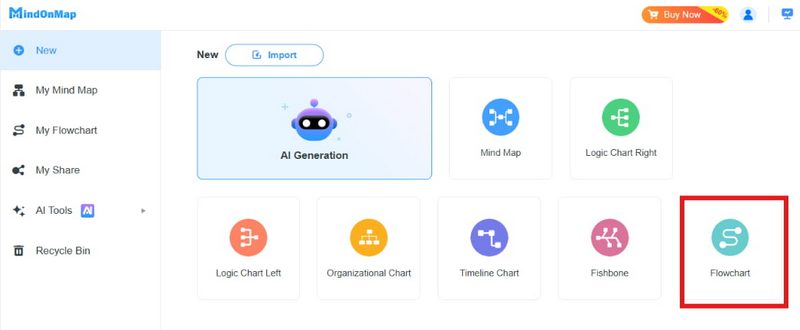
Open the tool on your computer and access the Flowchart feature from its main interface. This helps you create your task map with full control.
You can now use different Shapes to lay out the timeline, budget charts, and other details of your event-planning to-do list.
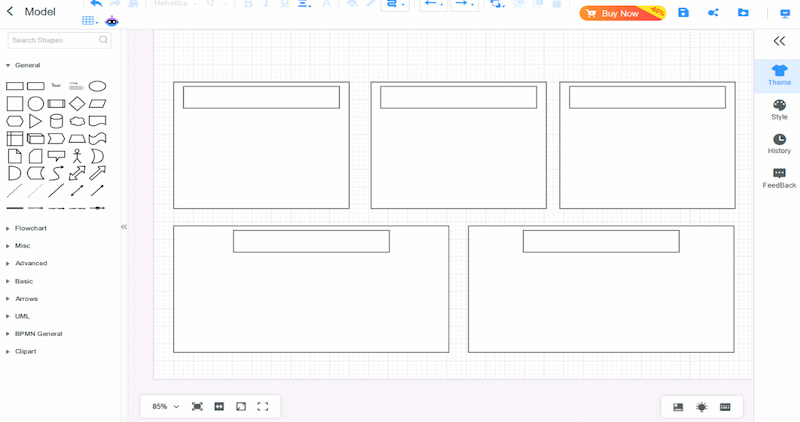
Add more details using the Text features. Make sure you add all the details you need, so you don't miss anything important.
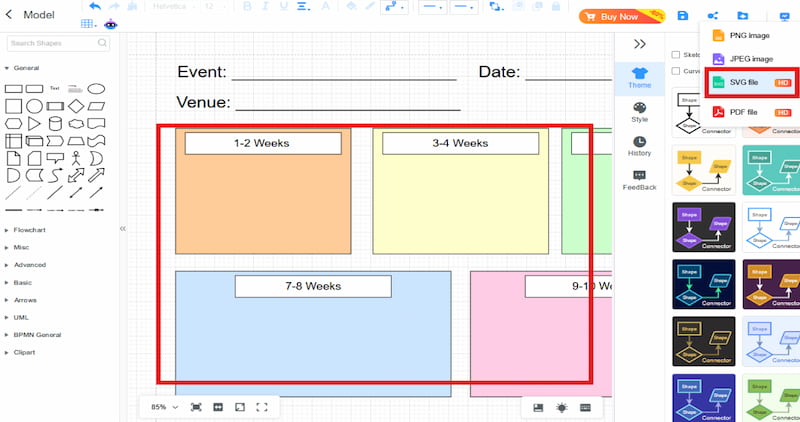
After that, you can now finally choose the Theme of your map to set the total vibe of the map. Click Export to save it in your preferred file format.
FAQs about EventTo-Do List
How detailed should an event to-do list be?
Your event checklist should balance details with usability. Include all critical tasks, but keep it usable so it doesn't slow down planning despite its complexity.
Any tips for prioritizing tasks in an event?
A timeline approach is a great way to do it. List all tasks by urgency and dependencies. Most likely, you need to prioritize booking venues, contacting vendors, and technical details. Then leave decorations and guest gifts for the second portion to finalize.
Will my checklist also help me with risk management?
Yes. This includes contingency tasks, such as backup plans for vendors, emergency contacts, and event safety procedures.
Conclusion
As we conclude this article, an event to-do list is important for planning any event, whether small or large. These details can help you run a successful event without budget overruns, keep tasks on track, and let guests enjoy it. Try it now with MindOnMap and see what it can do for you.