Spaghetti Diagram: Benefits & Steps to Create One
A Spaghetti Diagram is a visual tool ideal for mapping out the physical flow of materials, people, or any information within a process or workspace. The good thing about this tool is that it highlights inefficiencies by showing movement paths that often resemble tangled spaghetti, making wasted motions easy to view. In this post, we will explore more about the Spaghetti Diagram, along with its complete definition, benefits, common use cases, and steps to create one. Thus, check this post and get more insights about the diagram.

- Part 1. What is a Spaghetti Diagram
- Part 2. Benefits of Using a Spaghetti Diagram
- Part 3. Common Applications of a Spaghetti Diagram
- Part 4. Steps to Create a Spaghetti Diagram
- Part 5. Using MindOnMap for Process Visualization
- Part 6. FAQs about Spaghetti Diagram
Part 1. What is a Spaghetti Diagram
A Spaghetti Diagram is a visualization tool that shows the movement of people or information within a workspace. By analyzing these diagrams, businesses or organizations can determine unnecessary travel or complex routes that slow down productivity. The good thing here is that it helps streamline layouts, lessen waste, and improve workflow efficiency.
Part 2. Benefits of Using a Spaghetti Diagram
After knowing what a Spaghetti Diagram is, you can now proceed to the benefits you can get when using one. Proceed to this section and explore all the benefits of using and relying on the diagram.
- • Support Layout Optimization – The visualization tool can help you highlight opportunities to reorganize workstations and equipment or storage to shorten travel distances and streamline flow.
- • Reveal Hidden Inefficiencies – It can also visualize backtracking, convoluted, or crisscrossing movement patterns that are not obvious just by looking at the process on paper.
- • Reduce Waste – The Spaghetti Diagram can directly target ‘transportation’ and ‘motion’ waste. These are two of the classic wastes in Lean manufacturing, resulting in time and cost savings.
- • Improve Safety and Productivity – A simple path can reduce fatigue and the risk of accidents, while speeding up cycle times.
- • Easy to Create and Understand – The diagram doesn’t require any special software or advanced training. You can create a diagram using a simple pen and paper. You can also access reliable tools for creating a digital version of the diagram.
In addition to process mapping, other visual tools can be useful for different purposes. For example, a tape diagram can provide a simple way to represent quantities, proportions, or relationships between different elements.
Part 3. Common Applications of a Spaghetti Diagram
Wondering where you can use the Spaghetti Diagram? Then, check this part and see some use cases where you can use the diagram.
Manufacturing
On a factory floor, the diagram can track the movement of workers and in-process Inventory between machines, materials, storage areas, and workstations. Organizations use this approach to redesign the plant layout into a more efficient cell or flow-based arrangement and reduce material handling costs.
Office Processes
In an administrative setting, Spaghetti Diagrams can track how a document, task, or form physically or procedurally moves between departments, approval steps, or desks. They can even uncover redundant handoffs and approval chains that require walking across the building multiple times.
For data-related processes, an entity relationship diagram can help visualize how different entities are connected and how information is organized within a system.
Healthcare
You can also use the diagram in healthcare. The diagram can map out the paths nurses, doctors, and patients take between rooms, supply closets, and nursing stations during a shift. With the help of a spaghetti diagram, hospitals can redesign unit layouts, relocate supply stations, and reorganize workflows, so caregivers spend more time with patients than on transit.
Part 4. Steps to Create a Spaghetti Diagram
Want the steps to create a Spaghetti Diagram? Then, see the guide below to get more insights.
Step 1. Get a Layout or Floor Plan
You have to start with an accurate, to-scale drawing of the area you are studying, like a factory floor, office layout, or hospital unit. This will act as your base map on which movement will be tracked.
Step 2. Define the Scope
You need to decide what you are tracking: It can be a specific worker, a document, a product, or a patient. You also need to set the time frame or process boundary to make the diagram stay focused.
Step 3. Observe the Actual Movement
Follow the person, product, or item as it moves through space. You can also review process logs if direct observation is not possible. You must record everything.
Step 4. Draw the Path on the Layout
You can now start drawing the path on the layout using a continuous line. Trace each movement onto the floor plan in order. You can also number ot label key stops to make the sequence clear. You also need to repeat the same process a few more times, ideally with different people and days to confirm the patterns.
Step 5. Analyze the Diagram
Now, you must start looking for the tangled lines, long travel distance, excessive crossbacks, and repeated trips to the same location. These are considered red flags for waste. To quantify the problem, you have to start calculating the total distance traveled.
Step 6. Redesign and Validate
After doing everything, use the final insight to propose a new layout or workflow that simplifies the path. Create a new diagram after implementing changes to confirm the improvement really worked.
Part 5. Using MindOnMap for Process Visualization
Do you want to create a Spaghetti Diagram to visualize the process? In that case, we recommend using MindOnMap Flowchart Creator. This tool is ideal if you want to create an excellent and comprehensive diagram at ease. The good thing about this diagram maker is that it can give you all the features you need, such as lines, shapes, font styles, and more.
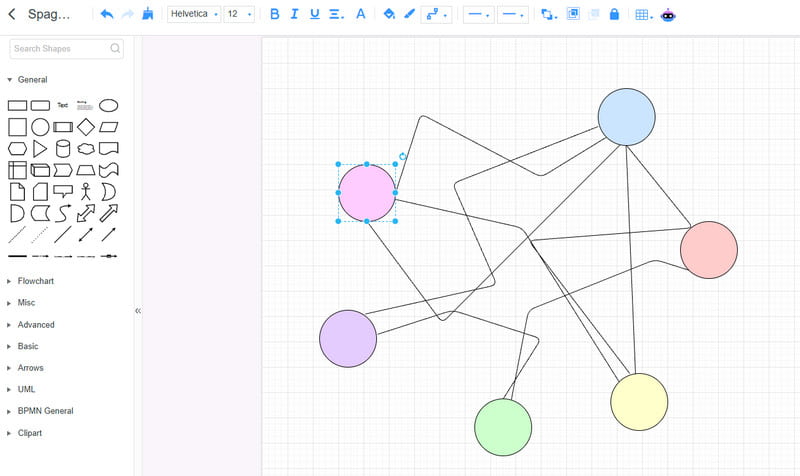
MindOnMap Flowchart Creator can even give you more benefits, like:
- • Map Workflows– The tool lets you create a floor plan or process layout and trace the actual movement path of materials, people, or documents.
- • Ready-made Spaghetti Diagram Templates – The tool can also offer templates you can access to easily and instantly create a diagram.
- • Identify Bottlenecks – It can also let you determine the bottlenecks, allowing you to instantly reveal where delays, congestion, or excessive travel occur.
- • Improve Efficiency – The tool lets you sketch and compare the before and after of the layouts, making it easy to test redesigns and demonstrate the resulting efficiency gains.
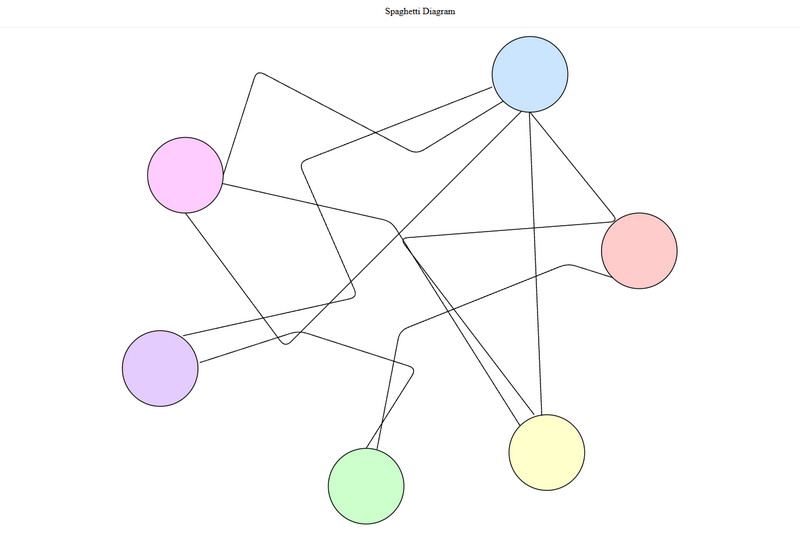
If you want to see a Spaghetti Diagram example, you can check the image below.
Secure Download
Secure Download
Part 6. FAQs about Spaghetti Diagram
Is it easy to create a Spaghetti Diagram?
It depends on the diagram maker you are using. If you want to easily create a spaghetti diagram, you can use MindOnMap since it has a comprehensive layout, making it the best tool for beginners.
How often should you update a Spaghetti Diagram?
It should be updated whenever there is a change in process and layout. This is recommended to see the latest process within the organization.
Who can use a Spaghetti Diagram?
There are various industries that can use the diagram. Some of them are in an administrative setting, healthcare, and manufacturing.
Conclusion
Now, you have learned everything about the Spaghetti Diagram, including its definition, benefits, common applications, and steps to create one. You also discovered MindOnMap as an excellent tool for visualizing processes, especially in creating a comprehensive diagram, making it the best tool for businesses and organizations. Thus, if you want to learn more about other topics, you can always check this post anytime.