Entity Relationship Diagram: Definition and Overview
An Entity Relationship Diagram, also known as ERD, is a visual representation tool designed to illustrate how entities, like concepts, people, or objects, relate to one another within a system. It acts and serves as a blueprint for creating a database by mapping out entities, their attributes, and their relationships. If you want to learn more about ERD, then it is better to read everything in this article, as we offer its detailed definition, core components, and types. After that, we will also teach you how to create the best ERD using the best tool. Thus, start reading this post and get more insights about the discussion.

- Part 1. Introduction to Entity Relationship Diagram
- Part 2. Core Components of an ERD
- Part 3. Common Types of ERD
- Part 4. How to Create an Entity Relationship Diagram
- Part 5. FAQs about Entity Relationship Diagram
Part 1. Introduction to Entity Relationship Diagram
The Entity Relationship Diagram (ERD) is a visual/graphical representation that depicts entities, such as people, concepts, or objects, and shows their relationships. Each entity is defined by its attributes, while relationships show how the entities interact within the system. By using different symbols, the diagram provides a clear and standardized way to model data structures.
Why Are ERDs Important in System and Database Design?
By providing a common visual language, ERDs are necessary in bridging the gap between technical teams and stakeholders. They aid in making sure database designs are precise, effective, and in line with business needs. ERDs lower errors, enhance communication, and establish a strong basis for scalable and well-organized systems by recognizing relationships and dependencies early in the design process.
Part 2. Core Components of an ERD
The Entity Relationship Diagram, or ERD, has various core components you must be aware of. To explore the components, check all the details below.
Entities
One of the core components of ERD is Entities. These are the fundamental building blocks that represent the real-world objects, concepts, or things on which information needs to be stored. Plus, each entity is typically shown as a rectangle and can stand alone or rely on another entity.
Attributes
Another component is Attributes. It describes the characteristics of an entity. It can provide the details that make the data meaningful. The attributes are usually represented as ovals connected to their assigned entities.
Relationships
The relationship illustrates how entities interact with one another. It shows the logical connections between different parts of the system. Plus, relationships are represented as diamonds in the diagram and are important for modeling real-world reactions.
Primary Key and Foreign Key
A Primary Key is an attribute that determines each record within an entity. This key ensures that no two rows in a table are identical, which makes it the cornerstone of data integrity in a database. On the other hand, the Foreign Key is an attribute in a specific entity that refers to the primary key of another entity. It establishes a link between the two. It is important for determining relationships within a database.
Part 3. Common Types of ERD
After learning what an Entity Relationship Diagram is, you can now proceed to explore its common types. Read all the details below and learn more about the common types of ERD.
Conceptual ERD
A Conceptual ERD offers a high-level summary of the system, emphasizing the key components and their connections. It is frequently used to share ideas between analysts, developers, and stakeholders in the early phases of system design. Before going into further in-depth modeling, it helps to guarantee that everyone has a clear knowledge of the system's scope and structure by keeping the diagram straightforward and abstract.
Logical ERD
Another type of ERD is Logical ERD. It builds the conceptual model by inserting more information. It includes primary keys, attributes, and foreign keys. It also defines the logical structure of the information, showing how relationships are enforced and how entities are identified. Logical ERD is useful for refining requirements and ensuring that the design aligns with processes and business rules.
Physical ERD
The logical design is translated into a database-specific model via a physical ERD. It includes information on table names, indexes, column types, and constraints. Additionally, it reflects how the system will be developed and run on a specific platform and is closely related to database implementation. Since they serve as the blueprint for the actual creation and optimization of databases, this type of ERD is crucial for developers and database administrators.
Part 4. How to Create an Entity Relationship Diagram
Do you want to create an Entity Relationship Diagram? Then, you must have a reliable tool that can give you all the features you need. In that case, we suggest using MindOnMap Flowchart Maker. This tool ensures that you can use all the necessary elements, such as shapes, lines, arrows, and more. You can even add color to the text and shapes if you want to. The good thing about the tool is that it is simple to use, thanks to its comprehensive user interface. It also supports the Collaboration feature, allowing you to work with other members. What's more, you can ensure that you won't lose your work since the tool supports the auto-saving feature. With that, if you want a reliable and powerful Entity Relationship Diagram maker, use MindOnMap right away.
Well, when creating an ERD, there are important steps you must consider. You have to:
- 1. Identify Entities – the first step is to determine the main concepts or objects that need to be represented in your system.
- 2. Define Relationships – for the next step, you can define the relationship. You need to establish how they interact with one another.
- 3. Add Attributes – after that, you must insert all the information for each entity.
- 4. Review – for the final step, you have to review the ERD. It is to ensure completeness, accuracy, and efficiency.
To start the method of creating ERD, you can check the simple instructions below.
Access MindOnMap on your desktop by clicking the Download buttons below. You can also use the online version if you want to.
Secure Download
Secure Download
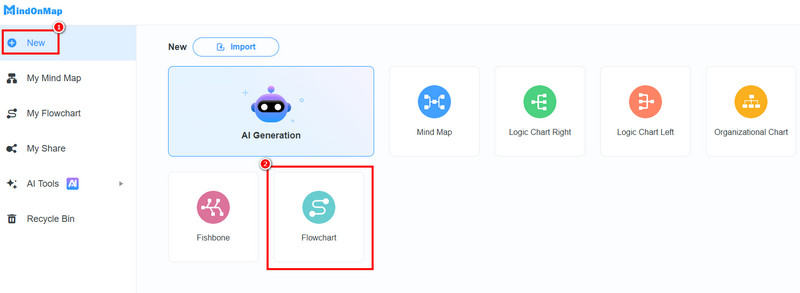
Then, start clicking the Flowchart feature under the New section. After a few seconds, the main interface will appear on your screen.
You can begin creating the ERD. Go to the General section and use all the necessary shapes. Double-click the shapes to insert the information.
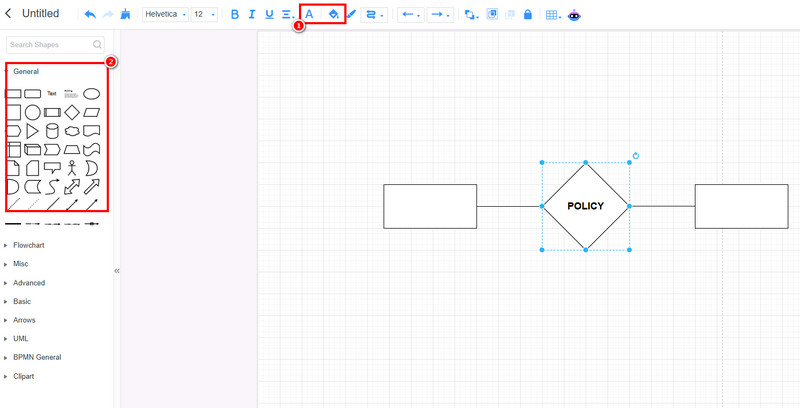
You can also use the Font and Fill Color functions to add color to the text and shapes.
Finally, hit the Save button above to keep the diagram on your MindOnMap account. Use the Export feature if you want to save the ERD in various formats.
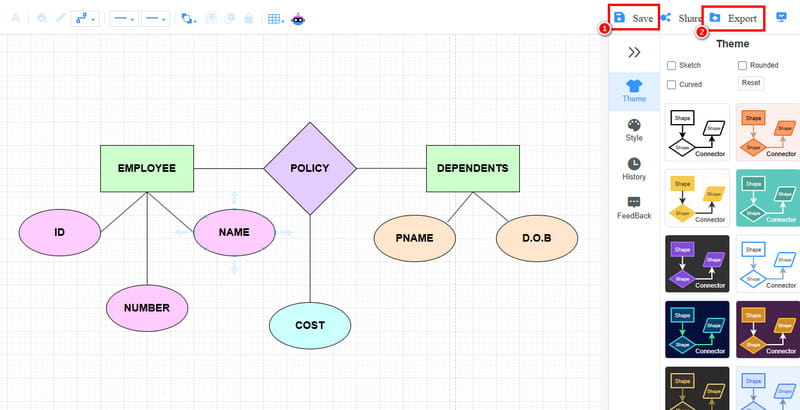
Click here to see the entire Entity Relationship Diagram designed by MindOnMap.
Part 5. FAQs about Entity Relationship Diagram
Why is an Entity Relationship Diagram important in database design?
The diagram can help simplify complicated structures by showing how entities interact. It can reduce errors and enhance communication between business stakeholders and technical teams.
Is it easy to create an ERD?
If you are using a reliable tool, creating an ERD is a piece of cake. Thus, if you want to create the diagram smoothly, we suggest using MindOnMap Flowchart Maker since it has all the features you need.
How does ERD help in system development?
The diagram can serve as a shared language between stakeholders, developers, and analysts. It is to ensure that all members understand the system's data flow.
Conclusion
Thanks to this article, you have learned everything about Entity Relationship Diagrams. You even explored its components and types. Plus, you learned how to create a comprehensive ERD using MindOnMap. Thus, always rely on this tool to create the best and most understandable visual representation.