Best Time Tracking Software to Boost Productivity and Workflow Efficiency
Tracking working hours allows a business to see project costs, enables better workload planning and allows for accurate client billing. It enables the freelancer to see how much time is being spent on each job. For remote teams it can show work patterns and help the manager to spot scheduling issues.
The right time tracking software is going to be very much dependent on what you're trying to track. Some are very basic (timers and timesheets), some go a lot further and will actually track your activities, some will track your staff and some will take your billable hours and turn them into invoices. This guide looks at five of those tools and will help you to pick the one that's right for your own workflow.

- What is time tracking software and how does it work?
- Top Time Tracking Software Solutions for Businesses and Freelancers
- FAQs
How We Test and Review Time Tracking Tools
A good comparison would look at both the accuracy of the recorded time and the usefulness of the reports. It would also look at the amount of effort required to maintain reliable records. A structured review can evaluate:
- • Time entry accuracy: do the timers, the manual entries, the edits and the time zone settings all work as they should?
- • Automation: whether background tracking, calendar imports, reminders or idle detection work as described.
- • Ease of use: How easy it is for users to start their timers, categorise their work, amend their entries and submit their timesheets.: Whether users can filter and summarize time by date, project, client, task, or team member.
- • Export and billing support: Whether records can be exported or converted into invoices and other business documents when needed.
For a hands-on comparison, reviewers can track the same set of activities over several working days, create representative projects, correct a sample entry, and generate reports for a consistent date range.
What is time tracking software and how does it work?
Time tracking software will track the amount of time people spend on tasks, projects, clients etc. It can be as simple as starting and stopping a timer or entering hours manually or it can be as sophisticated as importing calendar events or the software simply logging computer usage automatically. (For a structured approach to breaking complex work into manageable steps, see this guide to task analysis.)
Common uses include:
- • Recording of employee working hours and attendance.
- • Tracking billable hours on client projects.
- • Measuring project cost and project profitability.
- • Understanding personal productivity and distractions.
- • Preparing timesheets, invoices and payroll records.
- • Comparing the estimated effort with the actual time taken.
Time tracking software doesn't in any way measure productivity. Time spent on a task, computer usage and the quality of the output are all separate things. The metrics you pick should be the ones that actually track against your team's objectives.
Why Automated Time Tracking Matters for Remote Teams
Remote teams work in all sorts of locations, on all sorts of schedules and across all sorts of time zones. Automated time tracking will reduce the amount of admin and can help people to keep more consistent records.
It will vary depending on the software though. Automation can range from background activity tracking, calendar based entries and reminders, idle time detection to suggestions as to how you might go about completing your timesheets. Teams can also map recurring activities and handoffs with a workflow diagram to make responsibilities and process steps clearer.
These features can help teams:
- • Reduce the number of time entries which have been missed or incomplete.
- • Identify the regular meetings and working patterns.
- • Compare planned hours to actual project effort.
- • Improve coordination across distributed teams.
- • Reduce manual timesheet preparation.
Still, automated tracking should be used openly. Background monitoring, screenshots, app tracking and location data collection are all things which can give rise to privacy issues. The organisation should be upfront about what they're collecting, why they need it, who can see it and for how long they'll keep the records.
If they don't need to be actively monitoring then a timer based tool or a personal productivity tracker would be adequate.
Top Time Tracking Software Solutions for Businesses and Freelancers
The tools listed below do very different things, from visual time planning right through to automated monitoring and client invoicing. They are not mutually exclusive as each one has a very specific primary purpose.
MindOnMap
Best for: Visual time blocking, task planning and organising your day's workflow.
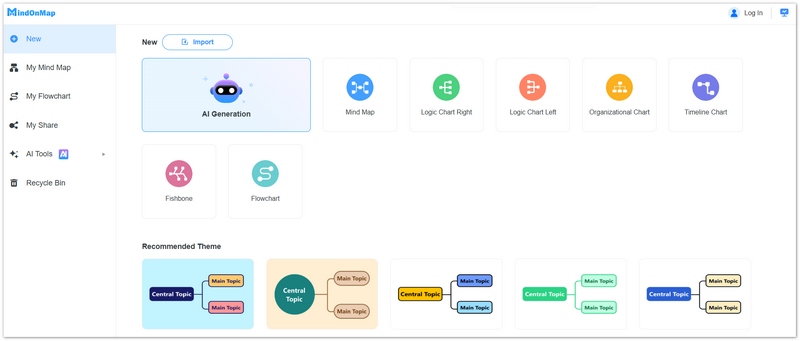
MindOnMap is a mind mapping and diagramming tool which enables you to see your tasks, set your priorities and break down large projects into smaller steps. It can be used in conjunction with time tracking to help you and your team plan the day and then track time against each task.
A freelancer working on a number of client projects could create a central daily plan and then break that down into client work, meetings, research, admin and breaks. Each of those could then be further broken down into specific activities and the whole thing would be a lot more structured as a result.
Key benefits include:
- • Visual task organisation: structure your day and break your big jobs down into smaller tasks.
- • Time blocking of support: work out when you’re going to work on the important stuff and identify the other competing priorities.
- • Project breakdowns: map the relationships between the activities, milestones and deliverables.
- • Planning the communication: share the visual plans so your colleagues can see what they’re accountable for and what their priorities are.
Secure Download
Secure Download
MindOnMap is useful for planning your work before you start and for seeing how the various tasks fit together. It enables you to produce a clear plan which will in turn inform your time management.
MindOnMap is not a time tracking system in any conventional sense. It doesn't act as a timer, an automated activity tracker, a billable hours report or a payroll timesheet. If you're looking to track hours and/or produce billing records then you should be using visual planning in conjunction with a time tracking tool.
Toggl Track
Best for: Freelancers and teams who just want some basic time logging and reporting.
Toggl Track is all about tracking time against projects, clients and tasks. You can either start and stop a timer or manually add time entries. The time you've tracked can then be viewed via reports.
Key features include:
- • One click timers and manual time entry.
- • Project, client and task organisation.
- • Calendar and time-entry views.
- • Summary and detailed reports.
- • Team reporting and integrations (depending on the plan).
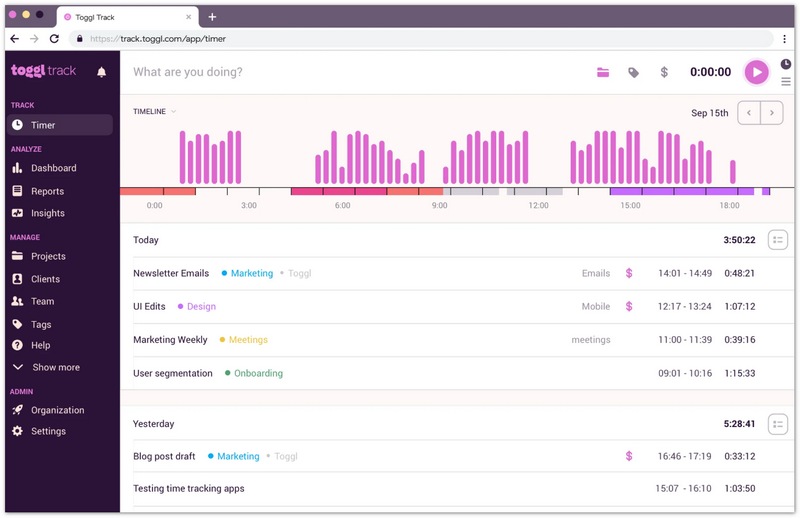
Toggl Track is perfect for freelancers who want to get a grip on how long their work takes and for teams who want to compare the amount of time spent on work across clients and projects.
Toggl Track has a very streamlined workflow and as such is actually quite easy to get up and running with. If you're in a situation where you do require payroll, GPS field tracking or the kind of granular employee monitoring that you get with a more full fledged workforce monitoring solution then you'll need to check that Toggl Track actually has those capabilities or indeed whether another tool would be a better option.
Hubstaff
Best for: Distributed and field teams who need time tracking with workforce visibility.
Hubstaff is a time tracking tool with workforce management capabilities. Depending on your subscription, the level of configuration and the device you're using, you can track working hours, create timesheets, monitor activity metrics and use location tracking for field work.
Key features include:
- • Desktop and mobile time tracking.
- • Automated timesheets and attendance records.
- • Activity indicators based on keyboard and mouse input.
- • Optional screenshots and application / website activity tracking.
- • GPS tracking and geofencing for supported field workflows.
- • Workforce and project reporting.
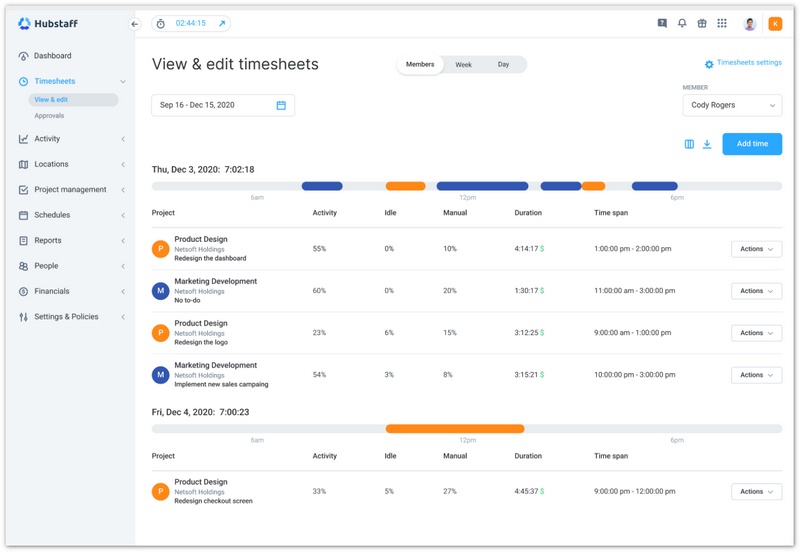
Hubstaff would be suitable for businesses that need to manage their field staff, track attendance or review time records for a geographically dispersed workforce.
Its monitoring capabilities also need to be considered carefully. Keystroke and mouse activity aren't necessarily an indicator of the quality or value of the work being carried out and screen capture/location tracking may not be suitable for every role. Monitoring should be introduced on the basis of actual business needs, the law and employee privacy.
Teams that just need a simple timer and a billable hour report are likely to be perfectly happy with a simpler tool.
Harvest
Best for: Freelancers, agencies and the like who bill by the hour.
Harvest links time tracking with project budgeting, expense tracking, reporting and invoicing. You can record time against clients and projects, view budgets and turn your approved time entries into invoices.
Key features include:
- • Timers and daily/weekly timesheets.
- • Client, project and task organisation.
- • Billable and non-billable time tracking.
- • Project budgets and cost analysis.
- • Expense tracking and invoicing.
- • Accounting and payment integrations (depending on your setup).
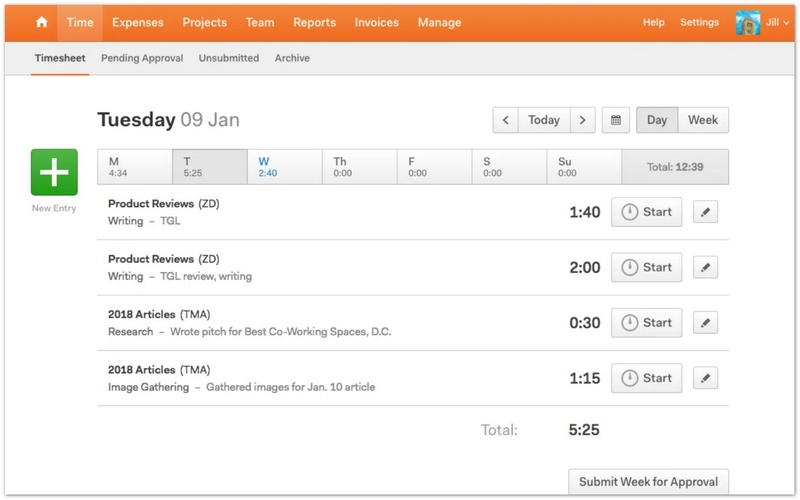
Harvest is ideal for businesses that want to be able to link their recorded hours to revenue. A design agency for example could compare the estimated hours of a project against the actual hours worked, check the remaining budget and then go on to generate an invoice from the billable entries.
Its main strength is in the ability to link time records to financial workflows. A tool that was principally about tracking computer time or automatically categorising personal productivity would be a very different thing.
RescueTime
Best for: those wanting to get a grip on their digital habits and improve their focus.
RescueTime is all about automated activity tracking and productivity insights. It tracks the amount of time you spend in various applications and websites, categorises the activities and then provides you with a report that shows the patterns.
Depending on the plan, features may include:
- • Automatic background activity tracking.
- • Reports in the Apps, Websites and Productivity categories.
- • Daily and weekly summaries.
- • Focus sessions and distraction blocking
- • Goals, alerts and activity trends.
- • Project and task tracking via the range of features and plans available.
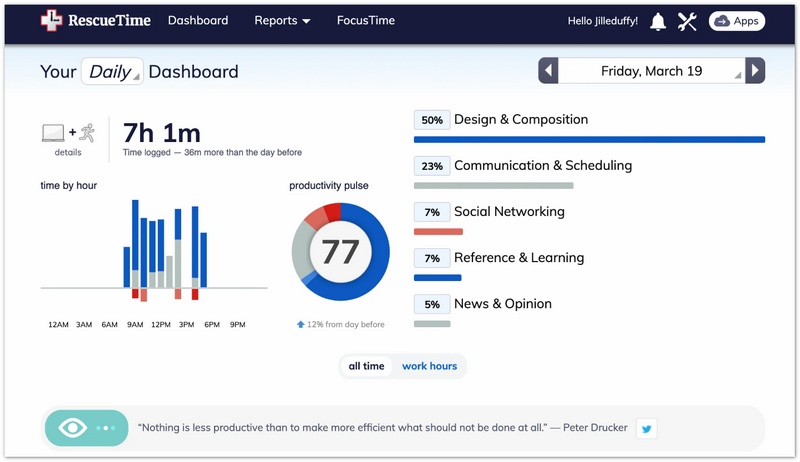
RescueTime can help you work out how much time you spend on focused work, how much on communication, how much on browsing and so on with all the various other digital activities. It can show you patterns that you simply wouldn't be able to pick up on via memory.
Activity categories and productivity scores are just indicators, not exact measures of performance. Time spent reading, time spent researching, time spent thinking etc. can all be productive even if the system doesn't classify that as productive activity in the same way as actual computer work.
RescueTime is really more in the realm of personal productivity analysis than it is for client invoicing or full fledged payroll.
Time Tracking Software Comparison
| Software | Primary Focus | Core Tracking Feature | Reporting Capabilities |
| MindOnMap | Visual planning and time-blocking | Organizing tasks and daily workflows visually | Visual task breakdowns and project structures |
| Toggl Track | Simple time logging | Timers and manual time entries | Summary, detailed, and other project reports |
| Hubstaff | Workforce time tracking | Timers, timesheets, and optional activity or location monitoring | Timesheets, attendance, activity, and workforce reports |
| Harvest | Billable hours and invoicing | Time entries linked to clients and projects | Time, budget, expense, and project profitability reports |
| RescueTime | Personal productivity insights | Automatic application and website activity tracking | Activity summaries, trends, and productivity reports |
If your main goal is to organize daily priorities rather than record hours, these time management tools offer additional options to consider.
The comparison outlines the primary use of each product. The available features, reporting options and usage limits will of course vary by subscription and configuration.
FAQs
Is automatic time tracking better than manual time tracking?
Neither approach is necessarily better. Automatic tracking can help to reduce the number of entries you miss and can give you a good picture of your digital activity. Manual tracking on the other hand gives you far more direct control over what you're recording. Some teams find that a mix of timers and automatic suggestions (or automatic entries from the calendar) is the way to go.
Is employee time tracking software legal?
Legality is a function of jurisdiction, the information being collected, how it is being used and whether the requirements of notice, consent and data protection are met. Employers should look at the relevant legislation in their jurisdiction and adopt a proportionate and transparent approach to monitoring rather than simply assume that all the tracking features they have in place are appropriate.
What is the difference between time tracking and employee monitoring?
Time tracking records working hours or time spent on tasks and projects. Employee monitoring can cover application usage, website activity, screenshots, keyboard and mouse activity and/or location. Some tools will combine both of these, but the purpose and the privacy implications of each are different.
Conclusion
Time tracking software enables people and businesses to see where their time goes, make better estimates and manage projects more effectively. The right software for you will depend on what you're looking for; are you after simple time entry, visibility of your workforce, automated productivity insights or a direct link between time and invoice?
Start with a clear objective, try out the key features and then go with a system that gives you reliable information and respects your privacy. Consistent tracking and sensible reporting are far more important than simply gathering data that you're not going to use.