What is a Dynamic Org Chart and How to Create One Easily
A Dynamic Org Chart is an interactive, real-time visualization of a business and organization's structure that automatically updates to reflect reporting lines, personnel changes, and open roles. Do you want to learn more about the dynamic org chart? Then, you must read this article. We are here to give you all the information you need, including its description, benefits, elements, how it can improve the organization, and a method for creating an org chart using MindOnMap. So, to learn everything, start reading this post.

- Part 1. What is a Dynamic Org Chart
- Part 2. Benefits of a Dynamic Org Chart
- Part 3. Key Elements of a Dynamic Org Chart
- Part 4. How a Dynamic Org Chart Improves Organizations
- Part 5. Dynamic Org Chart vs. Static Org Chart
- Part 6. Use MindOnMap to Create an Org Chart
- Part 7. FAQs about Dynamic Org Chart
Part 1. What is a Dynamic Org Chart
A Dynamic Org Chart is an interactive, real-time map of a business's entire workforce. Its organizational chart provides a visual overview of reporting relationships, departments, and roles within a company. This chart is directly plugged into the HR software to instantly reflect internal promotions, new hires, and department restructures the second they happen. In addition to listing who reports to whom, the chart lets you click the employee profiles. You can also search by skills and visually map out future team expansions. Lastly, the chart can turn a boring administrative document into an appealing, easy-to-use tool that helps teams collaborate faster and plan growth with up-to-date information.
Part 2. Benefits of Dynamic Org Chart
Want to learn more about the benefits of the dynamic org chart? Then, you can read all the details in this section.
Real-Time Updates
The good thing about the dynamic org chart is that it can offer real-time updates. It helps you reflect changes in roles, teams, reporting structures, and more without manual edits. It ensures that all employees always have access to the most accurate company/organizational information. It can even help you remove outdated data to improve transparency.
Enhanced Collaboration
Another benefit is that it makes it easier to identify roles, employees, and reporting lines. It fosters good and smooth communication and collaboration, especially in remote teams. It can even show you who to contact for a certain task or approvals, streamline workflows and reduce delays.
Better Decision-Making
With a dynamic org chart, team leaders and managers can understand the team structure, reporting hierarchies, and resource distribution. It can help determine the gaps, redundancies, and opportunities for restructuring. With a well-structured chart, managers can make easier, quicker decisions that align with business objectives.
Increased Accessibility
Compared with a static chart, a dynamic org chart is often cloud-based and accessible from multiple devices. Organization members can easily search for individuals, roles, and departments without encountering any trouble. It can even empower staff to navigate the organization efficiently, saving time and promoting productivity.
Part 3. Key Elements of Dynamic Org Chart
To get more insights about the key elements of the Dynamic Org Chart, proceed to this section.
Real-Time Integration
The dynamic org chart connects project management tools, HR systems, and employee databases. The chart ensures that any changes are instantly reflected. It can even remove manual updates, keeping the org chart reliable and accurate at all times. A data flow diagram can help teams visualize how information moves between systems, databases, and business processes.
Search and Filter Functionality
Dynamic org charts let users search for certain employees, tasks to be completed, roles, and departments. Filtering options make it easy to view specific sections, like single teams and project groups. This enhances accessibility and helps employees instantly find the information they need.
Interactive Visualization
Employees and project managers can click the nodes and insert all the details they need. They can even expand job titles, responsibilities, contact information, and view the entire chart. This shows that this org chart is not just a simple diagram. It is also a helpful and functional tool for collaboration. It can even help employees quickly understand reporting lines and organizational relationships.
Part 4. How a Dynamic Org Chart Improves Organizations
Do you know how the dynamic org chart improves organizations? To learn more, read the details below.
Boosts Efficiency
What we like about the dynamic org chart is that it reduces the time wasted on searching for reporting lines or any outdated structures. All members can instantly and easily view who is responsible for a specific task, which speeds up decision-making and approvals.
Enhance Communication
With the help of the chart, all members, such as employees, managers, and stakeholders, will have the same goal in mind. It ensures that everyone can work better without miscommunication and delays.
Support Strategic Planning
Managers and other leaders can gain visibility into the entire team structure, resource allocation, and workforce distribution. It lets them identify gaps, redundancies, or specific areas needing reinforcements. With accurate data, an organization or business can plan restructuring and scaling better.
Part 5. Dynamic Org Chart vs. Static Org Chart
Wondering about the differences between a Dynamic Org Chart and a Static Org Chart? Then, you can view the simple table below.
| Dynamic Org Chart | vs. | Static Org Chart |
| ●Easily adapts to organizational changes in real time. ●Updates automatically when roles or teams shift. | Flexibility | ●Fixed structure ●Requires manual editing to reflect changes, often leading to outdated charts. |
| Interactive features (expand/collapse, clickable profiles, search filters) enhance navigation and usability. | Interactivity | ●Non‑interactive ●Usually a flat image or document with limited navigation. |
| Can connect with HR systems, project tools, or databases for live updates. | Data Integration | ●Standalone ●No integration with external systems. |
| Best for ongoing management, collaboration, and decision-making in dynamic environments. | Use Cases | Best for presentations, reports, or simple documentation where stability is acceptable. |
Part 6. Use MindOnMap to Create an Org Chart
Do you need a dynamic org chart builder? In that case, we recommend MindOnMap Organizational Chart Maker. This tool is ideal because it offers all the elements you need. You can even create a colorful chart with its style and theme features. The best part is that the org chart maker's user interface is intuitive, making it accessible to all users. The tool can also;
- • Visualize Hierarchy – it lets you map out reporting lines, roles and team structures, making the complex organization simple to view and understand.
- • Track Team Changes – the tool lets you adjust charts quickly when there is a new hire, role shift, or any changes.
- • Improve Communication – By providing a transparent view of the organization, MindOnMap helps teams understand responsibilities, reduce confusion, and foster smoother teamwork.
To create a dynamic org chart, you can follow the simple steps below.
Access MindOnMap Organizational Chart Maker on your browser. Then, create your account to begin the process.
Secure Download
Secure Download
From the primary interface, hit the New > Organization Chart feature. Then, the main interface will appear on your screen.
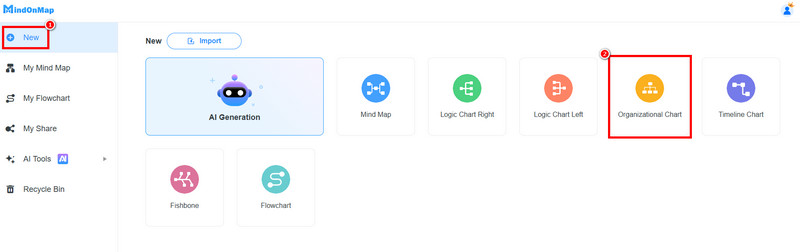
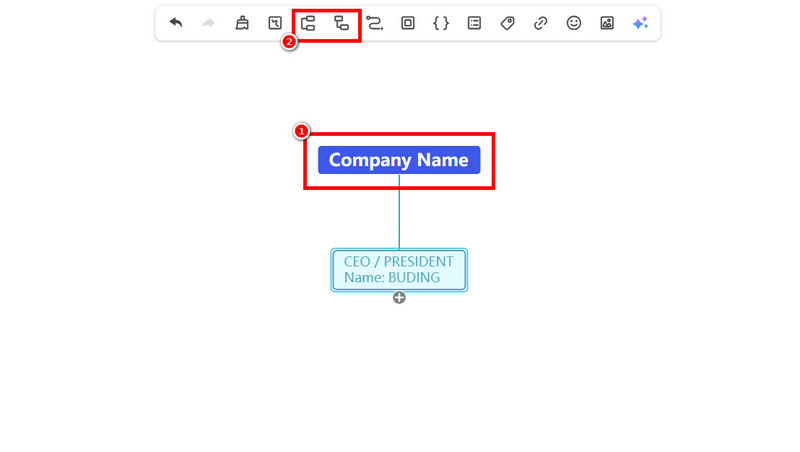
You can start creating the org chart. Type the organization or company name into the Blue box. Then, click the Nodes and subnodes functions above to insert nodes below the company name. Then, insert all the information.
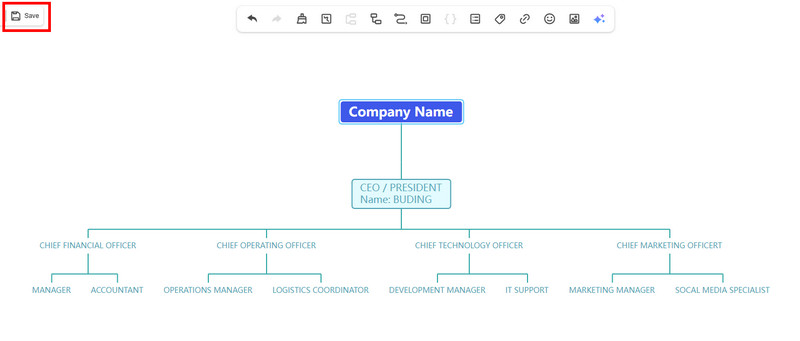
Once you are done, click the Save button above. So, to access and edit the chart, always open your MindOnMap account.
Part 7. FAQs about Dynamic Org Chart
Can you create a dynamic org chart in Excel?
Definitely, yes. However, it might be challenging since it requires some setup. You have to combine SmartArt, shapes, and links to create an effective org chart.
Is creating a dynamic org chart easy?
It depends on the chart maker you use. Some tools are complicated to operate. To easily create an org chart, it's better to use reliable, easy-to-use tools like MindOnMap. It has an intuitive layout, making it ideal for all users.
Why is a dynamic org chart useful for communication?
The dynamic org chart can provide transparency by showing who is responsible for a certain task. It makes it easier for employees to understand reporting lines, view and locate co-employees, and collaborate effectively.
Conclusion
Now, you have learned everything about the Dynamic Org Chart. You also learned more about its benefits, key elements, and how it improves the organization. Plus, you even discovered MindOnMap Organizational Chart Maker as the best tool to create an exceptional dynamic org chart. Thus, for effective org chart-making, consider using this tool to achieve the result you want.