Hybrid vs. Remote Work: What is the Best Work Model for 2026
Want to learn more about Hybrid and Remote work? These two become defining models of modern employment, reshaping how companies, organizations, and employees approach flexibility and productivity. These approaches can offer various benefits and challenges, from improved work-life balance to the need for strong communication and technology support. If you want to know more about these models, see this post, as we give their differences, advantages, and drawbacks. You will also learn how to organize all the information in a well-structured manner. Thus, start reading this post to get a clear picture of the modern workplace.

- Part 1. Introduction to Remote Work Models
- Part 2. Differences Between Hybrid and Remote Works
- Part 3. Pros and Cons of Each Model
- Part 4. How to Choose the Right Work Model
- Part 5. Organize All the Information Using MindOnMap
- Part 6. FAQs about Hybrid vs. Remote Work
Part 1. Introduction to Remote Work Models
Remote work models explain how workers use digital tools to stay connected while performing their tasks outside of traditional office environments. Depending on employee choices and organizational requirements, these models offer varying degrees of freedom. In today's changing workplace, they are made to strike a balance between productivity, teamwork, and work-life balance.
What is Hybrid Remote Work?
The Hybrid Remote work is a model that combines both remote work and in-office arrangements. Employees split their time between working remotely and working at a physical office. Think of hybrid work as the 'best of both worlds' approach. It isn't just about splitting time; it's about choosing the right environment for the task at hand, office days for brainstorming, and home days for deep focus. Plus, this work model is seen as a balanced option that supports productivity and employee satisfaction.
What is Full Remote Work?
What does full remote mean? Employees who operate fully remotely complete their tasks outside of a conventional office setting. To stay in touch with their teams and finish assignments, they rely on digital communication and collaboration technologies. People can work from any location as long as they have internet access, thanks to this paradigm, which offers the greatest freedom. Global teams and individuals who want total freedom from office-based routines would particularly benefit from full remote work.
Part 2. Differences Between Hybrid and Remote Works
Do you want to explore the differences between the two work models? Then, you can proceed to this section.
Work Flexibility
Employees can choose to divide their time according to schedules or corporate requirements thanks to hybrid work, which offers a mix between office and remote arrangements. This adaptability supports distant independence while enabling in-person collaboration when necessary. On the other hand, people who work fully remotely have the most freedom because they are not required to report to a physical office and can create a work schedule while working from any location.
Communication
In a hybrid approach, communication happens on digital platforms and face-to-face. It can strengthen the collaboration but also require careful coordination to avoid miscommunication or gaps between remote and in-office staff. In a fully remote world, your digital tools are your office. This makes clarity and consistency non-negotiable to prevent a 'digital divide' where information gets lost in the void.
Company Culture
Hybrid work contributes to the preservation of conventional office culture. It works by giving teams the space for face-to-face bonding, team-building exercises, and impromptu cooperation. It can provide flexibility and strengthen a sense of belonging. Remote work forces companies to be more intentional. You can't rely on 'watercooler chat' anymore; you have to build culture through deliberate digital recognition and virtual connection.
Part 3. Pros and Cons of Each Model
Do you want to learn more about the advantages and drawbacks of each work model? Then, check the table below and learn more about remote and hybrid work.
| Work Model | Advantages | Drawbacks |
| Hybrid Work | ●Balances flexibility with in-person collaboration. ●Supports a stronger company culture through face-to-face interactions. ●Allows employees to choose environments that best suit tasks. | ●Can create inequality between remote and in-office staff.●Requires careful scheduling and coordination.●May still involve commuting, reducing flexibility. |
| Full Remote Work | ●Offers maximum freedom to work from anywhere.●Eliminates commuting, saving time and costs.●Expands talent pool by allowing companies to hire globally. | ●Relies entirely on digital communication, which can cause isolation.●Harder to build and maintain the company culture.●Requires strong self-discipline and reliable technology. |
Part 4. How to Choose the Right Work Model
You can use the decision guide table we have provided below to determine when hybrid or full remote work is the better option.
| Factor | Best Fit: Hybrid Work | Best Fit: Full Remote Work |
| Team Collaboration | Ideal when projects require frequent brainstorming, in-person meetings, or spontaneous discussions. | Works well if collaboration can be fully managed through digital tools. |
| Nature of the Task | Suited for roles that mix independent work with tasks needing physical presence (e.g., client-facing jobs). | Best for roles that are primarily digital and can be completed independently. |
| Cost Consideration | May still involve office space and commuting expenses. | Reduces overhead costs by eliminating office space requirements. |
| Employee Flexibility Need | Provides balance, employees get flexibility, but still have structured office days. | Offers maximum flexibility, allowing employees to work from anywhere. |
Part 5. Organize All the Information Using MindOnMap
Organizing all the information about Hybrid and Full Remote work in a better and well-structured way is better. It lets you view all the information in an easier and engaging way. To keep your team on the same page, we recommend mapping out your strategy visually. MindOnMap Flowchart Creator is a fantastic way to turn these comparisons into a clear, engaging diagram that your whole team can follow. This tool is ideal if you want to turn all the information into an excellent and appealing diagram/chart. One of its helpful features is its auto-saving feature. The tool can automatically save every change during the creation process. You can even use different shapes, font styles, numerous templates, and more. You can also save the visual in various output formats, including PDF, DOCX, SVG, PNG, JPG, and more.
To start organizing the information, you can use the instructions below.
Go to the main website of MindOnMap Flowchart Creator and start creating your account.
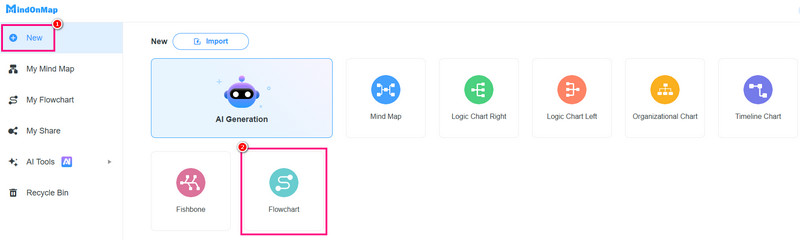
When the primary interface shows up on your screen, navigate to the New section. Then, proceed to clicking the Flowchart feature.
Once the main interface loads on your screen, start organizing all the information. You can go to the General section to use all the shapes you need.
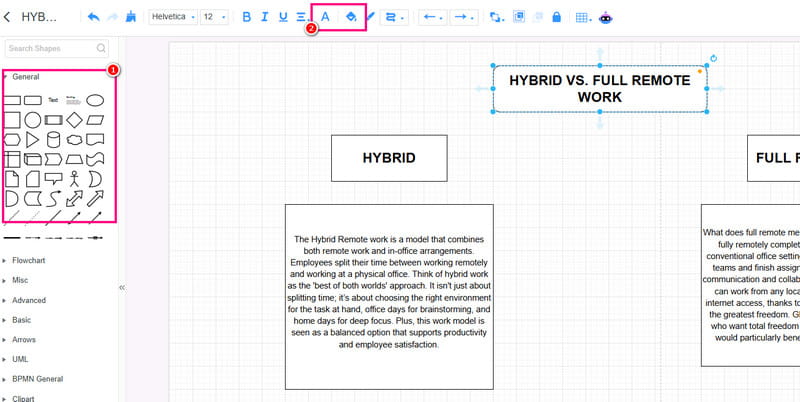
If you want to create a colorful visual, use the Fill and Font Color features.
After turning the information into a better diagram, you can tap the Save button above to save it to your account. You can also use the Export feature to save it on your device.
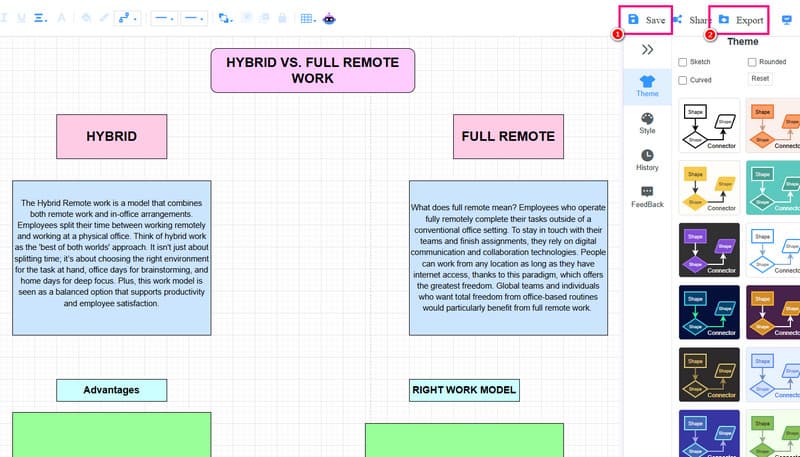
Click here to see the organized information created by MindOnMap.
Part 6. FAQs about Hybrid vs. Remote Work
Which model is better for collaboration?
Typically, hybrid wins for collaboration because it preserves that face-to-face energy. Face-to-face interaction simply removes the guesswork and reduces the risk of digital messages getting 'lost in translation.
Can all roles be done remotely?
Not always. Roles that need physical presence, such as equipment-dependent jobs or client-facing, are better for hybrid models.
Which work model supports a better work-life balance?
Remote work is better and ideal since employees save commuting time and can work from anywhere.
Conclusion
In this post that tackles Hybrid vs. Remote work, you have learned about their differences, advantages, and cons. You also get enough insights on how to select the right model. Plus, if you are interested in organizing all the information and turning it into a well-structured visual, we recommend using MindOnMap. This tool can offer all the tools you need, allowing you to achieve your preferred result after the creation procedure. In addition, it can also be used to make a family tree diagram, helping you visually organize and present complex family relationships in a clear and structured way.