Presentation on Mind Mapping: Create a Map with a Great Tool
If you are interested in making complex concepts easier to present, a mind mapping presentation is a great way to do so. It helps improve understanding and boost audience engagement by organizing ideas into a clear visual structure. In this article, we will explore the key elements of mind map presentations, common challenges, and a great tool for creating a better visual format. Let's create an impactful, well-structured presentation.

- Part 1: What Is a Mind Mapping Presentation
- Part 2: Benefits of Using Mind Maps in Presentations
- Part 3: Key Elements of an Effective Mind Mapping Presentation
- Part 4: Common Presentation Planning Challenges
- Part 5: Use MindOnMap to Create Better Presentations
- FAQs about Presentation on Mind Mapping
Quick Answer: A mind mapping presentation uses a central topic and connected branches to organize ideas visually. To create an effective one, define your main message, arrange related points hierarchically, and use consistent colors and keywords. Tools like MindOnMap can help you build clear, engaging mind maps for presentations.
Part 1: What Is a Mind Mapping Presentation
A mind mapping presentation is a visual way to present your ideas (Using concept maps can also help you visualize your idea). In this format, a central topic sits at the center of the diagram, with branches extending outward to related concepts. This approach helps audiences see the topic's connections, flow, and structure more easily. This kind of presentation helps with teaching, brainstorming, planning, and simplifying complicated topics.
Part 2: Benefits of Using Mind Maps in Presentations
Mind maps offer several benefits in a presentation. For that, here are some common benefits we can enjoy from it:
- • Clear Presentation: This can help you show how ideas connect and create a detailed a idea map, which can reduce confusion for the audience.
- • Audience Engagement: The visual formats can capture and hold the audience’s interest.
- • High Memory Retention: The colors, keywords, and images you use in your visual will help the audience recall certain points more easily.
Mind Map Presentations for Different Scenarios
The best mind map presentation format depends on your goal and audience:
- • Teaching: Organize lessons into main topics and subtopics to help students understand concepts and review key information.
- • Sales: Highlight customer needs, product benefits, and proposed solutions to make your pitch easier to follow.
- • Project Reporting: Show project goals, tasks, milestones, and dependencies to help team members understand progress and next steps.
Part 3: Key Elements of an Effective Mind Mapping Presentation
As we learn more about mind map presentations, there are three common elements we need to know. These are Visual Structure, Topic Hierarchy, and Design Consistency. All three elements are essential for creating a clear, organized, and professional mind map presentation.
Visual Structure
A mind map for a presentation gives you a clear, organized layout, with branches radiating from your central idea to ensure the information flows logically and is easy for the audience to understand.
Topic Hierarchy
In your mind map presentation, prioritize your main idea in the primary branches, with supporting details underneath. Moreover, the main purpose is to ensure the visual creates a natural progression of ideas.
Design Consistency
Using uniform colors, fonts, elements, icons, and design across the maps will prevent distractions for the audience. This makes your presentation look more professional.
Part 4: Common Presentation Planning Challenges
Creating a mind map for your presentation offers many benefits if we learn to do it properly. Some users don't fully use it because of common challenges and mistakes. These challenges are the following:
- • Unclear Objectives. The absence of a clear purpose or key message can put your presentation at risk. This might leave the audience unsure of what you are talking about.
- • Overloading with Information. Packing too much information is a mistake that can overwhelm the audience or viewers. This will easily reduce clarity and retention of your presentation.
- • Mismanagement of Time. Poor pacing can lead you to skip points or even exceed the allotted time. Poor time management can also affect how successful your presentation is with your audience.
Part 5: Use MindOnMap to Create Better Presentations
MindOnMap helps you turn complex ideas into clear, organized visual maps for presentations. It offers mind maps, flowcharts, customizable themes, and a variety of shapes and icons to help you structure information and highlight key points. You can also share your maps through links, making it easier to collaborate with others. Follow the steps below to create a mind map for your next presentation.
Key Features
- • Different mapping options, like flowcharts, mind maps, and more.
- • Wide elements, icons, and shapes to use.
- • Ready-to-use themes.
- • Collaboration via sharing of links.
Steps to Use MindOnMap
Get the amazing MindOnMap tool for free on its official website, or use the download button below. Then install it immediately on your computer.
Secure Download
Secure Download
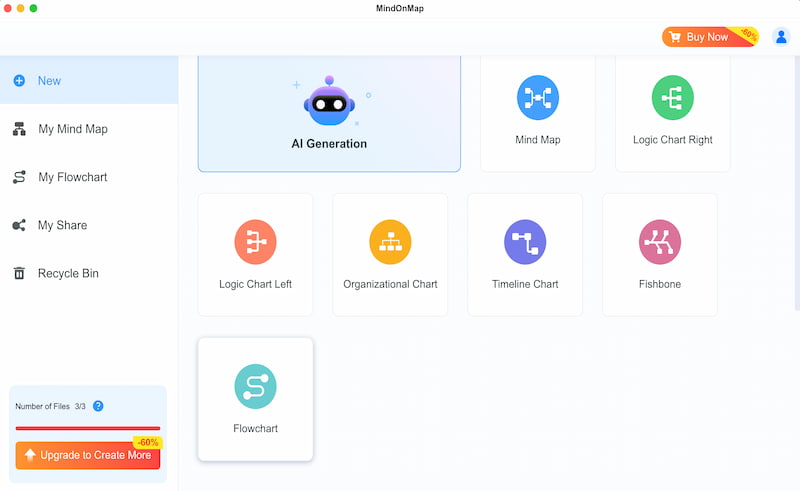
Next, open the main interface and use the Flowchart feature to create a great mind map for your presentation.
Create the foundation of your design using the different shapes. Start laying out your map to represent the information you will add later.
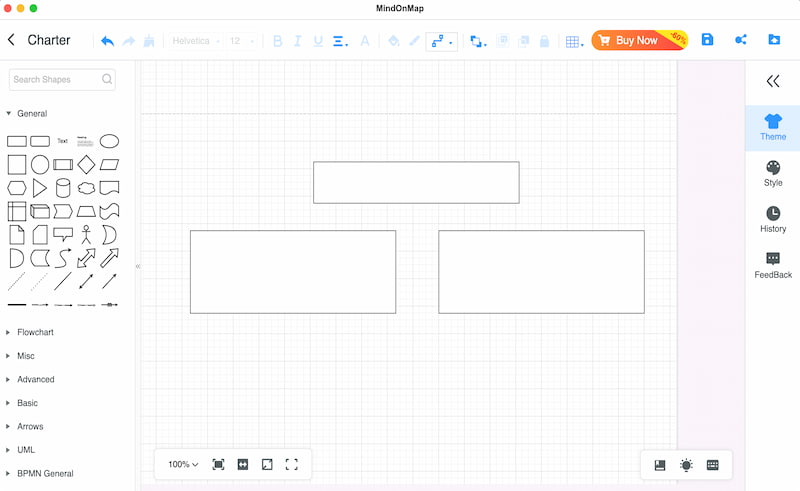
Now add details, information, and points to the shapes you added. Please use the Text feature to add these details.
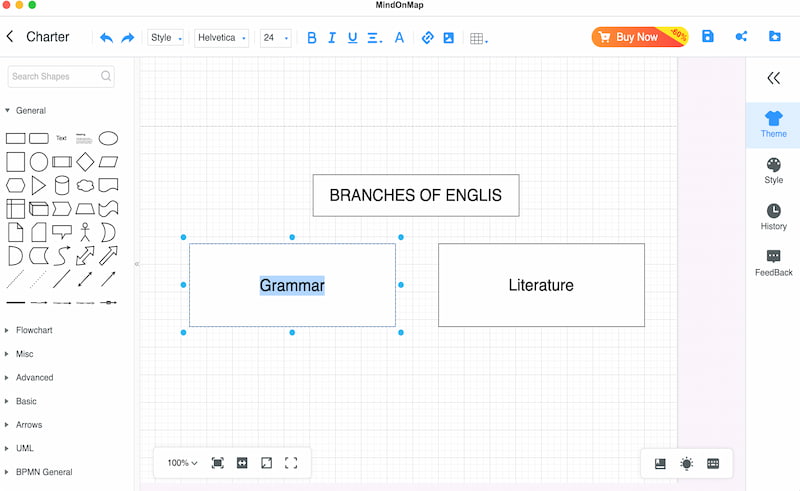
Finalize the map and choose a theme for its overall look. Click Export and save your mind map to be ready for presentations.
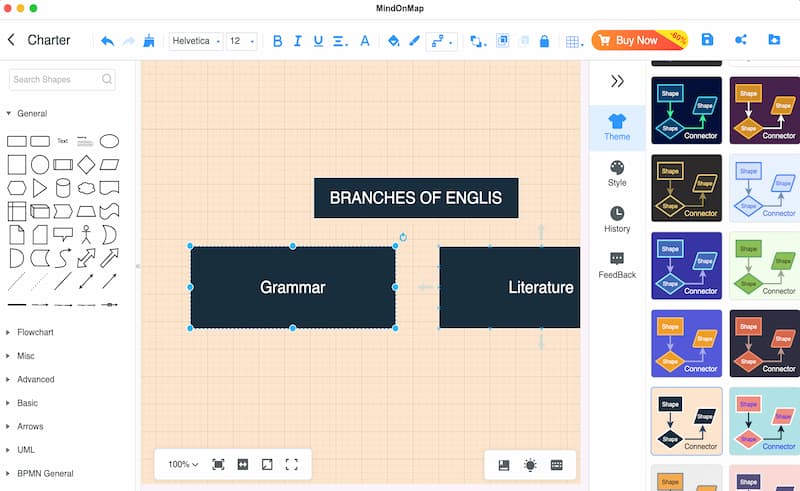
There you have it: a simple, effective way to create a mind map for your presentation. MindOnMap is easy to use yet offers the key features you need.
If you want to add animations or presenter-view features to your mind map presentation, you can combine MindOnMap with tools like PowerPoint or Canva to create more dynamic and engaging slides.
FAQs about Presentation on Mind Mapping
Q: What is the biggest mistake in creating mind maps for presentations?
A: Adding too many branches and failing to prioritize the main topic is the biggest mistake that many people make. Always focus on the topic and add only the most important branches to create a successful presentation.
Q: What useful element to use for keeping audience retention?
A: Combine using keywords, color codes, and icons. Ensure that they are cohesive to prevent distraction. These elements can make the topic more engaging and help you keep the audience interested longer.
Q: Is PowerPoint creating mind maps for presentation effective?
A: PowerPoint can be effective in creating mind maps for your presentation. Yet many users find it overwhelming because of its many advanced editing features. That is why using some tools that can offer a much simpler interface like MindOnMap is the best thing to use.
Q: How can I start mapping presentations?
A: Always start with your main topic. It is really the center of everything you will tackle. Then branch it out with sub-topics that are essential with the main one. For presenting details, you can use keywords instead of long sentences that can keep your map clean and easy to understand.
Conclusion
In conclusion, creating a presentation with a mind map can help us do better and be more effective. MindOnMaps also makes it easy to create these visual elements with its wide range of features and icons. More than that, the tool offers a simple way of creating your own mind maps. You can use it now and create yours too.