The Ultimate Guide to Choosing and Using a Sprint Planner for Agile Teams
If the Product Owner doesn't take the time to plan out what the upcoming tasks and projects are going to be then the team members are going to be completely lost, confused and will have no idea what to work on or what to prioritise on their current tasks. This is particularly the case when the current work is in any way linked to the work that is to come. It's therefore very important that you understand what a Sprint Planner is for the Product Owner as it will go a long way to improving your management style. Let's now define exactly how a Sprint Planner can assist you. Read this article now and you'll have all the information you need.

- What Is a Sprint Planner and Why Your Team Needs One
- Top Sprint Planning Tools and Methods for Agile Workflows
- FAQs about Sprint Planner
What Is a Sprint Planner and Why Your Team Needs One
A sprint planner is a tool / a workspace in which the team can plan their work for the sprint. It's a place where you can put the tasks, work out the sizing of the work, assign the work to people and track progress through the sprint. In the context of Scrum, a sprint is a fixed length of time (usually one to four weeks) in which the team is working towards a particular goal.
A digital sprint planner brings the sprint objectives, the backlog items, the task assignments and the progress updates all into one shared space. Rather than having to piece together the information from a variety of sources such as spreadsheets, chat messages and meeting notes, the team can all see in one place what needs to be done and who is accountable for each task.
Core Benefits of Modern Sprint Planning Tools
1. Better task visibility: a shared sprint board makes it far easier to see which tasks are waiting, which are in progress, which are blocked and which are complete. Everyone on the team can therefore spot the bottlenecks before they impact the sprint goal. Teams can also use a workflow diagram to visualize task sequences and identify process bottlenecks.
2. More realistic workload planning: teams can compare planned work against actual capacity (taking into account holidays, meetings, support requests etc). This prevents overcommitment. Breaking complex activities into smaller steps through task analysis can make effort estimation and workload planning more manageable.
3. Improved collaboration: Task descriptions, comments, attachments and status updates all live in the same place so project information is always accessible. Team members can discuss the work in context rather than having to go hunting through a myriad of separate conversations.
4. More consistent sprint reviews: With the completed work and outstanding work both recorded during the sprint, the team will have a much clearer basis on which to review the results and discuss what should be different in the next sprint.
5. Greater accountability: task owners, due dates and progress indicators all clarify who is responsible. They don't in any way guarantee that a sprint will succeed, but they do make it far easier to spot when things are falling behind and to respond appropriately.
Top Sprint Planning Tools and Methods for Agile Workflows
How We Test and Review Sprint Planners
- • Planning capabilities: Can the user create backlogs, prioritise the work, estimate the effort and set sprint goals?
- • Workflow flexibility: Can the team configure the task statuses, fields, boards and planning views?
- • Progress visibility: Are the uncompleted tasks, the blocked work and the sprint outcomes all easy to see?
- • Learning curve: Can new members of the team get to grips with the interface without a huge amount of training?
- • Scalability: will the tool stay manageable as the projects, teams and dependencies grow?
The best sprint planning software is going to be very much dependent on the size of your team, your workflow, your technical needs and the way you prefer to plan. Some platforms are very Scrum focused, others are more generalist in their approach and provide a range of task management and visual collaboration features.
The following is a comparison of the primary use case and key collaboration features of the five tools.
| Tool | Best For | Key Collaboration Feature | Ease of Use |
| MindOnMap | Visual backlogs and brainstorming | Shared visual diagrams and mind maps | High for visual planning |
| Jira | Software engineering teams | Issue tracking, Scrum backlogs, and sprint boards | Medium |
| monday.com | Customizable team workflows | Shared boards, automations, and status updates | High |
| ClickUp | Consolidated project management | Tasks, Docs, goals, and sprint views | Medium |
| Asana | Cross-functional task management | Shared projects, workload views, and timeline tracking | High |
MindOnMap: Visualize Sprint Goals and Backlogs
MindOnMap is a visual planning tool which helps teams to organise their ideas, break down their goals and show the relationships between the various tasks. It's not a Scrum sprint management tool per se, it's more of a tool that can be used to support the planning that takes place prior to the sprint backlog being locked down.
Teams can use mind maps to work through sprint goals, to group user stories into themes, to identify dependencies and to break down a complex objective into a series of smaller tasks. They're particularly useful when you're trying to explore different options or to get a feel for how the individual tasks fit together to deliver the overall outcome.
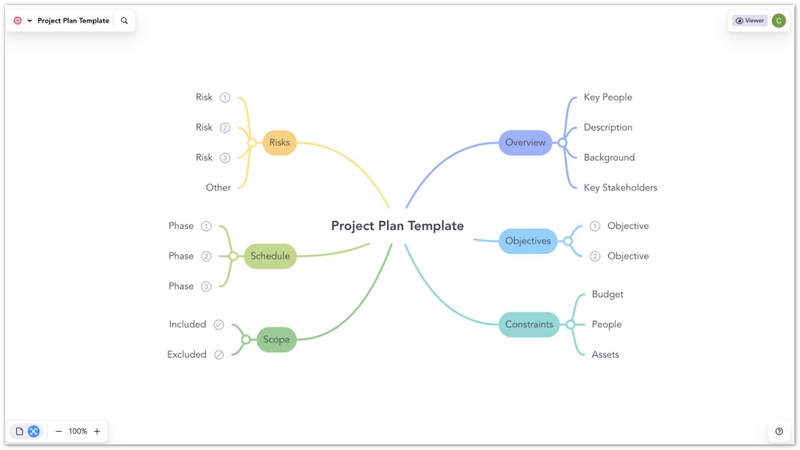
Key features for sprint planning:
- • Mind maps for sprint goals and the associated tasks.
- • Visual diagrams for exploring workflows and dependencies.
- • Shared or exported planning materials for use in team discussions.
- • A high level overview of the ideas prior to the tasks being entered into the project management system.
Secure Download
Secure Download
Best for: Small teams, project managers and agile facilitators who want a visual workspace to work in to brain storm and organise their sprint ideas.
Limitation: MindOnMap should not be viewed as a substitute for dedicated sprint execution functionality such as Scrum backlog management, sprint burndown reporting or automated velocity tracking. It can be used in conjunction with Jira or some other project management tool for implementation and progress tracking.
Jira: Manage Technical Backlogs and Sprint Execution
Jira is for teams that want issue tracking and project management in a structured way. The Scrum workflows enable you to have a backlog, create sprints, assign work items, set sprint goals and then track the execution of that work on your active sprint board.
Teams can use Jira to prioritise user stories, track bugs, manage dependencies and review sprint progress. The reporting capabilities can be used to look at burndown, velocity and changes to sprint scope. For projects with complex task dependencies, the Critical Path Method can help identify activities that may affect the overall delivery timeline.
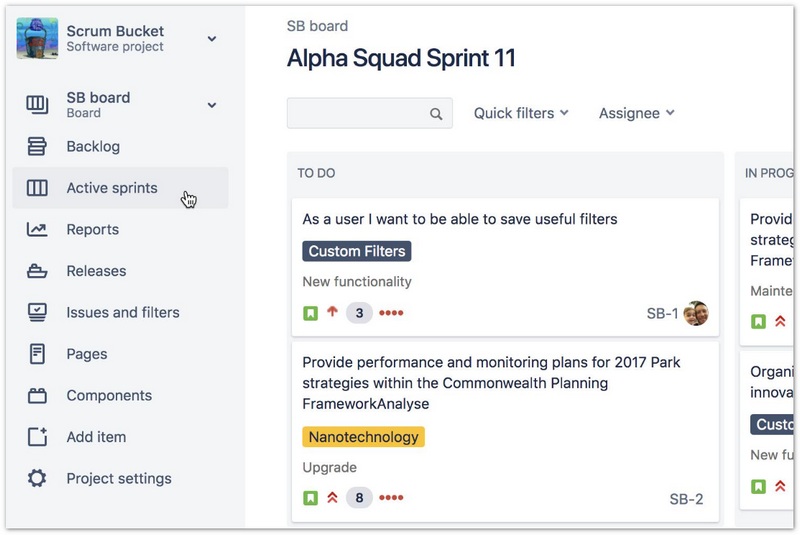
Key features for sprint planning:
- • Scrum backlogs for prioritisation and selection of work.
- • Sprint goals, dates and assigned work items.
- • Active sprint boards for tracking task status.
- • Reporting tools to look at sprint progress.
- • Integrations with development and documentation workflows.
Best for: Software development teams who want detailed issue tracking, a very disciplined Scrum process and visibility into what the engineering team are actually doing.
Limitation: Jira's configuration options and the associated terminology can take a while to get to grips with. A team with a very simple list of tasks may well find a lighter weight planner to be easier to maintain.
monday.com: Customize Sprint Workflows for Different Teams
Monday.com provides configurable boards for tasks, owners, deadlines, status and project info. The flexibility of the structure can be used to enable teams to create a sprint-style workflow without necessarily having every department doing it the same way.
A team might create groups for the work that's coming up, the current sprint, the blocked items and the completed work. Automations and notifications can be used to eliminate a lot of the repetitive updating and dashboards can be used by managers to monitor the work across the various projects.
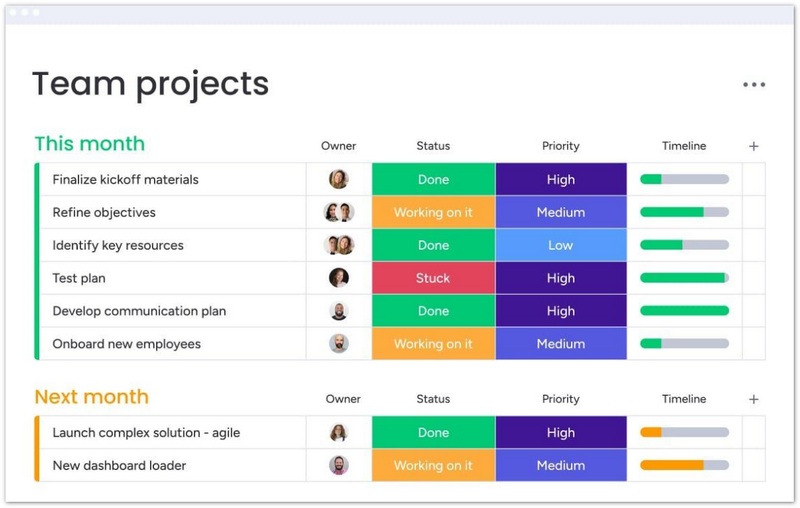
Key features for sprint planning:
- • Custom columns and task status tracking.
- • Visual boards for work organisation.
- • Workflow automations and notifications.
- • Dashboards for summarising project activity.
- • Integrations with the various work applications people are already using.
Best for: Cross functional teams who want the ability to tailor their workflows for marketing, product development, operations or whatever other type of project they're working on.
Limitation: if you're a team that needs some very specific Scrum metrics or complex engineering issue relationships then you should check the features and restrictions available before you go down the route of using monday.com as your primary sprint planning tool.
ClickUp: Combine Sprint Planning With Daily Project Management
ClickUp is all about task management with documentation, goals and a number of project views. It's a tool that can be used to manage sprint activities as well as work that doesn't quite fit on a single development board.
Teams can create tasks, assign owners, set priorities and review work via the various views that are supported. Depending on the configuration and plan in place, sprint capabilities can also be used to help teams track workload and plan their iterative delivery.
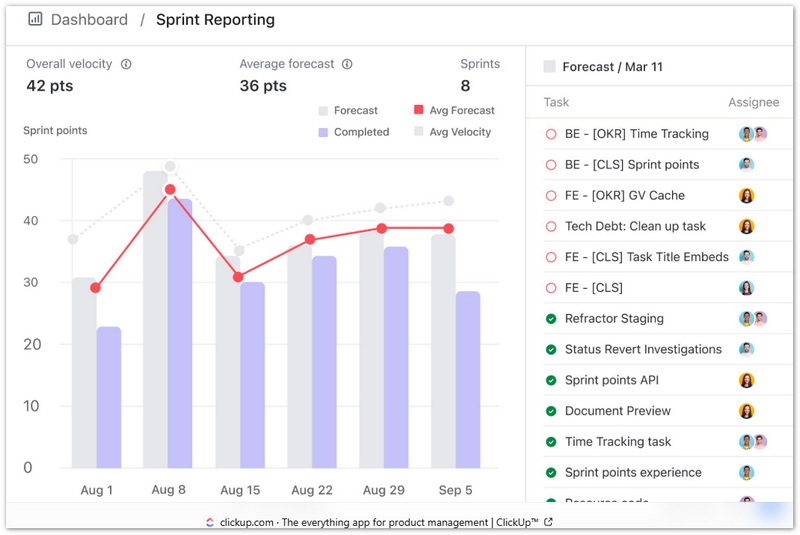
Key features for sprint planning:
- • Task lists, boards and other project views.
- • Task priorities, task assignments and task dependencies.
- • Docs and shared project info.
- • Goals and progress tracking.
- • Sprint related workflows and reporting options.
Best for: Teams who want to manage their ongoing projects, their sprints, their documentation and all sorts of other business work in one place.
Limitation: With ClickUp's sheer number of features comes a certain level of setup complexity. You need to have a consistent workspace structure and make sure you know what sprint-specific features are actually included in your plan.
Asana: Coordinate Sprint Tasks and Team Workloads
Asana is good for project and task management and is therefore useful for teams who need to coordinate work across functions. It has sprint planning workflows which can be used to manage backlogs, current sprints, retrospectives and incoming requests and it has workload views which can be used to look at assignment capacity.
Teams can use shared projects to track ownership and deadlines, link related work and make progress visible to stakeholders. This is particularly useful when product, design, marketing and engineering teams need to coordinate their deliverables.
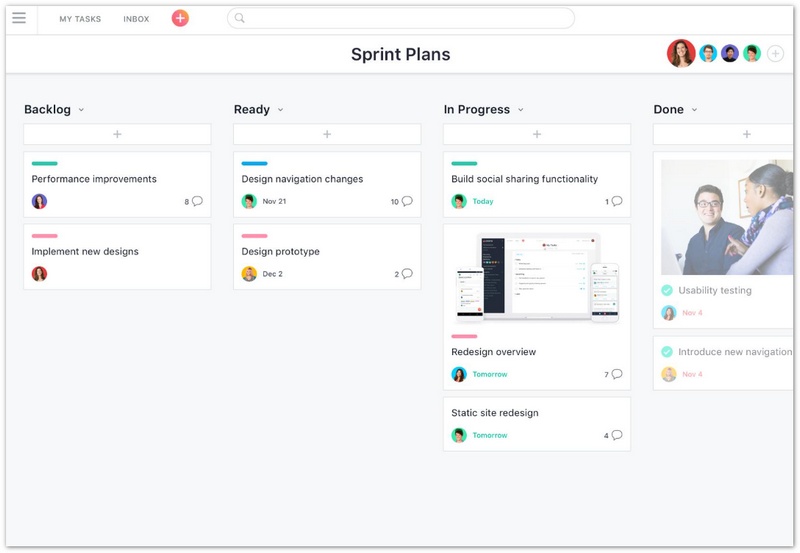
Key features for sprint planning:
- • Shared projects and shared tasks.
- • Custom fields and status tracking.
- • Timeline and workload views.
- • Project-level collaboration and updates.
- • Sprint workflow for eligible plans.
Best for: Cross functional teams who want to focus on task coordination, ownership and project visibility.
Limitation: teams should check their subscription level and workflow requirements before assuming that every one of the advanced sprint planning features is available.
FAQs about Sunburst Chart
What is the best sprint planner for agile teams?
The best sprint planner is going to be the one that works for your workflow. Jira is a very good option for a software team that needs a good level of Scrum and backlog management. ClickUp is good for a team that wants sprint specific functionality as well as a more general project management capability. Monday.com and Asana are good for teams that need a lot of customisability and the ability to coordinate across functions. MindOnMap is good for visualisation of the brainstorming and task breakdown.
Can you use a mind map for sprint planning?
Yes, a mind map can be used to take a sprint goal and break it down into features, tasks and dependencies prior to deciding which of those items you actually take into the sprint. That said, if you're a team that needs some form of automated sprint tracking, story point calculation or burndown charts then you'll probably also want a dedicated Agile management tool.
How long should a sprint be?
Many Scrum teams will be using one or two week sprints (though of course the sprint length will be dependent on the team's context). A consistent and relatively short cycle will provide frequent feedback without making the planning and review meetings too onerous.
What is the difference between a Sprint Planner and a project management tool?
A sprint planner is all about picking the work, estimating it and then tracking it within the confines of a given iteration. A more general project management tool would cover a much wider range of activities (long term roadmaps, resource planning, milestones, budgets, cross functional projects etc). Some tools do offer both.
What should a sprint planning meeting include?
A sprint planning meeting should set the sprint goal, go through the top backlog items, assess team capacity, estimate the effort involved, identify any dependencies and agree on a realistic scope. The team should all leave the meeting with a clear understanding of what they're aiming to achieve and how they're going to go about it.
Do small teams actually need dedicated sprint planning software?
Not necessarily. A small team could well get off the ground with a shared board, a shared spreadsheet or some other form of visual planning tool. The value of dedicated sprint software tends to increase as you move into situations where you have recurring sprints, a structured backlog, the need for reporting, integrations and/or multiple people working on the same thing.
Conclusion
Choosing a sprint planner is about matching the tool to your workflow—not chasing the longest feature list. Start by clarifying whether you need visual brainstorming, complex engineering backlog management, or approachable cross-functional planning. MindOnMap excels at the visual front end, Jira dominates complex engineering, monday.com and ClickUp offer flexible platforms, and Asana keeps task tracking simple. Whichever sprint planning tool you choose, commit to consistent rituals—grooming, planning, standups, and retrospectives—and let the tool support the process rather than replace it.