Backlog Grooming Meeting Agenda: Definition and Overview
A Backlog Grooming Meeting Agenda is a well-structured plan that guides teams in refining and prioritizing items in the product backlog. It mainly outlines key activities, such as clarifying requirements, breaking down tasks, and reviewing user stories. By creating a clear agenda, teams can keep the meeting or discussion focused and maintain a well-organized backlog. If you want to learn more about the Backlog Grooming Meeting Agenda, you must read everything here in this post. We will cover its definition, purpose, importance, how to run it, and more. You will also learn how to create a Backlog workflow using MindOnMap. Without anything else, check this post and learn more.

- Part 1. What is Backlog Grooming
- Part 2. How to Run a Backlog Grooming Agenda
- Part 3. Common Mistakes, Tips, Pros, and Cons
- Part 4. Create a Backlog Workflow Using MindOnMap
- Part 5. FAQs about Backlog Grooming Meeting Agenda
Part 1. What is Backlog Grooming
Backlog Grooming, also known as the backlog refinement agenda, is a method for updating and reviewing the product backlog in Agile projects.Backlog refinement is part of a broader Scrum workflow that helps teams organize product requirements and prepare work for upcoming sprints. This process involves clarifying stories, re-ordering tasks, and estimating effort. This way, the teams know what to work on next. The backlog also lets teams remove outdated or unclear items, keeping it organized and relevant. It can even help the team sprint more effectively and stay aligned with the project objectives.
Purpose of Backlog Grooming Meeting Agenda
Backlog grooming serves several purposes. Some of them are:
- • Keep the Backlog Current – It ensures that the tasks reflect the latest target needs and business priorities.
- • Improve Clarity – Another purpose of the backlog is to improve clarity on everything. Break oversized stories into smaller, actionable tasks.
- • Prepare for Sprints – Refine and prepare the top items for immediate development.
- • Boosts Collaboration – This improves collaboration, helping the team learn to work together to achieve the same goals.
Importance of Backlog Grooming in Agile
- • Enhances Sprint Planning – A well-refined backlog makes sprint planning faster and more effective.
- • Supports Adaptability – It keeps the backlog dynamic, letting teams respond instantly to changing requirements.
- • Prevents Clutter – It can easily avoid backlog inflation, such as outdated or irrelevant items.
Part 2. How to Run a Backlog Grooming Agenda
Want to learn how to run a backlog refinement meeting agenda? Then use the guides we provided in this section.
Step 1. Set the Objective
First, define your main objective, since it will be the foundation of your agenda. Refine backlog items for upcoming sprints.
Example: 'Tonight, we will clarify the top 5 user stories for Sprint 12.'
Step 2. Review the High-Priority Items
Next, review the high-priority items. Go to the backlog and review the top items.
Example: Address the feature request, approve requirements, and confirm the request is relevant.
Step 3. Clarify and Simplify Stories
Clarifying and breaking down or simplifying stories is necessary. Split large or vague items into actionable, manageable, and smaller tasks for clarity.
Example: Break 'Improve login system' into 'Add two-factor authentication' and 'Update password reset flow.'
Step 4. Estimate Effort
You can use story points or time estimates to size a certain task.
Example: The group agrees a feature is 6 story points based on level/complexity.
Step 5. Reorder and Prioritize
Next, adjust the backlog order based on business value, dependencies, and urgency.
Example: Move 'Fix checkout bug' above 'Add wishlist feature' since it impacts revenue.
Step 6. Eliminate or Archive Irrelevant Items
The next procedure is clearing outdated and duplicated tasks for better results.
Example: Eliminate 'Support Internet Explorer' if no longer necessary.
Step 7. Approve Readiness for Sprint Planning
Ensure that the top items are already clear, prioritized, and estimated.
Example: The product owner approves that the backlog is sprint-ready.
Part 3. Common Mistakes, Tips, Pros, and Cons
If you are interested in learning about the common mistakes in backlog grooming, tips for effective backlog grooming, pros, and cons, start reading everything in this section.
Common Mistakes in Backlog Grooming
- • Overloading the Meeting – One mistake is overloading the agenda. It is better to focus on a few backlog items in one session to make everything clear.
- • Skipping Estimation – Skipping estimation or leaving a task without sizing will affect sprint planning.
- • Lack of Preparation – If the product owner or the team doesn’t have a plan and doesn’t review the items, it will be challenging to manage the backlog.
- • Ignoring Stakeholders – Not involving the stakeholders or the right people can also lead to unclear priorities.
Tips for Better Grooming
- • Limit the Scope – When dealing with the backlog, it is better not to focus on everything. It is suggested to focus on10 to 15 items.
- • Prepare in Advance – For reviewing, the product owner must pre-select items.
- • Use Clear Criteria – To decide whether an item is sprint-ready, apply the ‘Definition of Ready.’
- • Encourage Collaboration – For clarity, work with testers, stakeholders, and developers.
PROS
- In agile backlog refinement, all teams can enter planning with clear, prioritized items.
- It can also enhance clarity since stories are actionable and well-defined.
- Backlog grooming reflects customer needs and current priorities.
CONS
- It is time-consuming. It can also be time-consuming if not well-managed.
- Some team members might lose interest if the discussion runs too long.
- The meeting loses its value if the product owner is not prepared.
Part 4. Create a Backlog Workflow Using MindOnMap
Do you want to create a backlog workflow? If so, you can use MindOnMap Flowchart Creator. This tool is perfect for creating a workflow because it gives you all the features you need. You can visually organize tasks and priorities in a clear, structured way. Plus, it can help you break down complicated backlog items into manageable branches, making responsibilities easier to understand. The tool can even offer templates, themes, and various shapes to help you produce exceptional output. To start a backlog workflow, follow the steps below.
Access MindOnMap Flowchart Creator in your browser. Then, start creating your account. You can also use the button below to access the tool's offline version.
Secure Download
Secure Download
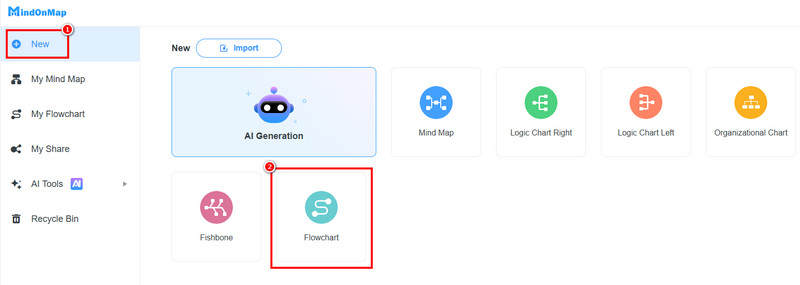
From the primary interface, click the New section. Then, select the Flowchart feature. The main interface will then pop up on your screen.
You can now start creating a backlog workflow. Go to the General section and choose your preferred shapes. Double-click the shapes to add text inside.
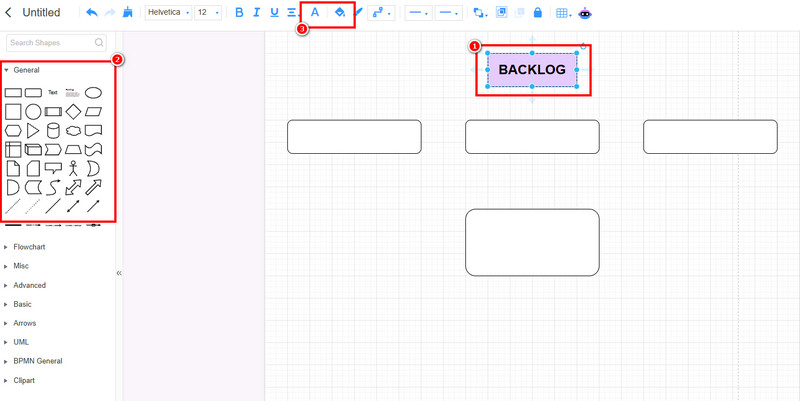
Use the Font and Fill Color features to add color to the font and shapes.
After creating the workflow, click Save to save it to your account. Tap Export to save the workflow on your device.
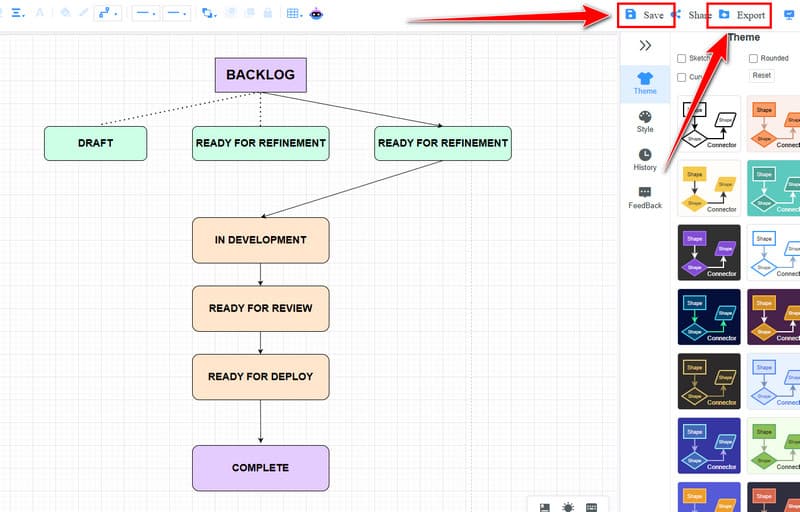
Click here to view the complete backlog workflow designed by MindOnMap.
Part 5. FAQs about Backlog Grooming Meeting Agenda
Can I use the Jira backlog refinement tool?
Definitely, yes. This tool is used by teams to manage projects. It can help teams organize and update backlog items effectively and efficiently.
What is product backlog refinement?
It is a practice of updating and reviewing the product backlog. Its main purpose is to keep it clear, prioritized, and ready for development.
Who must attend the backlog grooming meeting?
Attendees must include the Product Owner, development team members, and Scrum Master. They ensure alignment, clarity, and accurate task estimates.
Conclusion
In this post, you learned everything about the Backlog Grooming Meeting Agenda. You also explored its definition, purpose, importance, common mistakes, improvement tips, how to run it, and more. Plus, you discovered MindOnMap as an excellent tool for creating an effective backlog workflow. It even offers all the necessary features, making it the best tool for teams that manage the backlog.