Resource Planning Software: Key Features & Challenges
Want to learn what resource planning software is? Well, it is a tool designed to help users organize their resources, such as equipment, budget, time, and people. The tool can provide features for tracking availability, forecasting demand, and optimizing usage to ensure tasks or projects run smoothly. So, if you want to learn more about resource planning software, its importance, features, and challenges, we suggest you read all the information in this article.

- Part 1. What is Resource Planning Software
- Part 2. Why Resource Planning Software Matters
- Part 3. Key Features of Resource Planning Software
- Part 4. Common Resource Planning Challenges
- Part 5. Use MindOnMap to Organize Resource Planning Clearly
- Part 6. FAQs about Resource Planning Software
Part 1. What is Resource Planning Software
Resource planning software is a tool that helps people organize, manage, and allocate their resources effectively. These tools can track the availability of people, budget, time, and equipment to ensure that all projects run smoothly. By optimizing usage and forecasting needs, it reduces waste and prevents limitations. The tools can also support better decision-making and keep operations aligned with the business objectives.
Furthermore, resource planning software is not just ideal for basic allocation. It can also integrate with project management systems to provide real-time visibility into schedules and workloads. It helps identify resource conflicts, automate repetitive tasks, and suggest adjustments to improve resource allocation efficiency and save valuable time. With these capabilities, resource planning software becomes a powerful solution for the long-term growth of any organization.
Part 2. Why Resource Planning Software Matters
The software for resource management is important since it can help businesses use their resources wisely, avoid inefficiencies, and keep projects aligned with the organization's primary objectives. For more ideas on why resource planning software matters, see the information below.
- • Efficient Allocation – The tool ensures that people, budget, and time are distributed appropriately. With that, it can prevent both the underuse and the overuse of resources.
- • Visibility and Control – Managers or stakeholders can gain a clear view of resource availability, making it easy to identify issues and adjust the plan instantly.
- • Forecasting Needs – The resource planning software can help you predict future demands. It lets organizations prepare and allocate resources strategically.
- • Cost Reduction – By optimizing usage, it lowers expenses while boosting the overall productivity.
- • Strategic Alignment – The tools can keep the resources aligned with business objectives/goals, ensuring the project contributes to long-term success.
Part 3. Key Features of Resource Planning Software
Consulting resource management software can also offer a range of features. If you want to learn more about the tool's capabilities, you can read everything in this section.
Task Allocation
Task Allocation is a feature of resource planning software. It ensures that tasks are assigned to the right people based on their availability, skills, and workload. Through task analysis, managers can better understand task requirements, complexity, and resource needs before making assignments. This feature helps prevent overloading certain members while keeping tasks or projects on track. By allocating tasks effectively, an organization can maximize productivity and efficiency.
Capacity Planning
Another helpful feature you might encounter in every resource planning software is capacity planning. It evaluates the available resources against upcoming demands to determine whether the business can meet the project requirements. It helps managers and other people in higher positions to avoid resource shortages and identify gaps. That way, they can plan for hiring or any adjustments. It ensures that the project is realistic and achievable with the resources at hand.
Resource Scheduling
The good thing about this feature is that it manages and organizes when and how resources will be used across different projects. The feature can also offer a timeline that aligns people, tasks, and tools to avoid downtime or any conflicts. With appropriate scheduling, teams can maintain a smoother workflow and deliver the project on time. Thus, to make everything organized and comprehensive, scheduling is necessary in every project.
Part 4. Common Resource Planning Challenges
Here are some of the challenges in resource planning.
Limited Resources
Some organizations or businesses don't have enough resources, like people, budget, or time to cover each task. This leads to tough prioritization and delays.
Overallocation
Team members can become overloaded when too many tasks are assigned at once. This struggle can reduce productivity and even increase burnout.
Changing Priorities
Projects may change focus or priority, leaving some tasks under-resourced. Without flexibility, each member of the organization may struggle to adapt to new demands.
Lack of Visibility
Without proper or accurate tracking tools, managers may not see resource limitations and other bottlenecks until it is too late. It can also make planning challenging.
Poor Communication
Another challenge you might encounter is poor communication. In planning, it is normal to have misunderstandings, especially when distributing tasks. Take note that clear communication is necessary to keep everyone aligned and achieve the desired goal.
Part 5. Use MindOnMap to Organize Resource Planning Clearly
Are you looking for an excellent tool that can help you organize your resource planning? In that case, you can use MindOnMap Flowchart Creator. This tool is perfect because it provides all the features you need. You can even use all the elements you want, such as tables, colors, font styles, connecting lines, and more. The best part about the tool is that it can:
- • Map Team Workloads – the tool lets managers visually assign or distribute tasks and responsibilities, making it easier to know who is responsible for handling them. It ensures a balanced distribution of tasks across the team.
- • Track Project Resources – with the tool’s mapping feature, you can track everything. You can monitor all resources, such as time, budget, and people. This tool helps managers identify gaps and keep tasks and projects running smoothly.
- • Improve Cross-Team Collaboration – The good thing about the tool is that it lets you share your map with other members. It is ideal if you want others to keep on track with the project. Clarifying responsibilities and showing connections enhances communication and avoids misunderstandings.
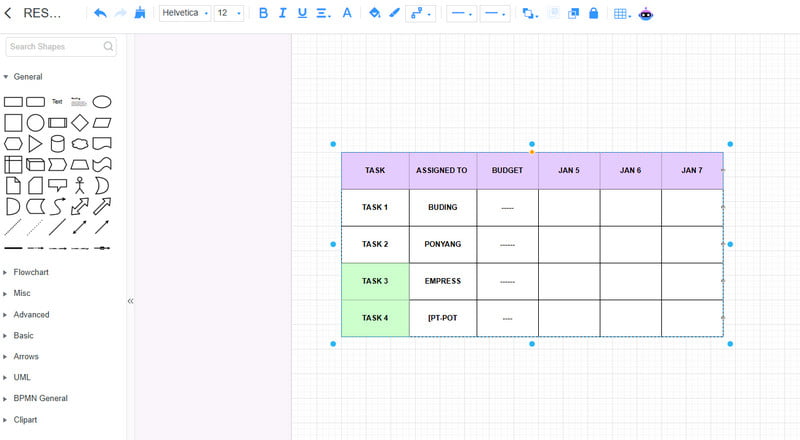
With the help of MindOnMap, you can ensure that organizing your resource plan is feasible. You can even save your plan on your device using the Export feature. With that, for better organization, always rely on this tool.
Part 6. FAQs about Resource Planning Software
Who uses resource planning software?
Various people can use resource planning software. Some of them are project managers, team leaders, business stakeholders, and business executives. These tools ensure that the project runs smoothly and prevent bottlenecks.
Is it necessary to use resource planning software?
Absolutely, yes. Resource planning software is ideal if you want to keep everything on record. It lets you see all your resources, such as time, budget, people, and more. With these tools, you can ensure that everything is aligned to achieve the desired goal.
What is the best tool to organize my resource plan?
If you need the best tool, you can try using MindOnMap. This tool can offer all the features and elements you need to create a well-structured and comprehensive output.
Conclusion
Thanks to this post, you have learned everything about Resource Planning Software, including its importance, key features, and challenges. Plus, you discovered MindOnMap as an exceptional tool for organizing your resource plan. It can also provide all the necessary features, making it the best tool for users.