What is a Pugh Matrix: Best Guide for Smart Decision-Making
The Pugh Matrix, also known as a decision matrix, is a reliable and powerful tool that is designed for evaluating and comparing multiple options against a set of criteria. By scoring alternatives relative to a baseline, it assists teams in creating a structured and objective decision maker that does not depend on intuition alone. So, if you want to learn more about this matrix, visit this post. You will also explore its benefits, importance, steps, scoring, and more. Plus, you will get more insight into how to create the best decision framework using an excellent tool. Thus, read everything here and get more information about the discussion.

- Part 1. Why Multi-Option Evaluation is Important
- Part 2. How to Create a Pugh Matrix
- Part 3. Create a Decision Framework Using MindOnMap
- Part 4. FAQs about Pugh Matrix
Part 1. Why Multi-Option Evaluation is Important
When encountering a complex decision, evaluating multiple options ensures that options or choices are not based on a limited perspective. It lets decision-makers compare alternatives systematically, revealing hidden strengths and weaknesses. It can even let them avoid settling for suboptimal solutions. With this type of structured approach, it will increase confidence in choosing the most effective path forward.
What is the Pugh Matrix?
The Pugh Selection Matrix is a simple decision-making tool used to compare various options against a set of criteria. Instead of depending on intuition or gut feeling, the tool provides a structured way to evaluate options/choices by scoring each option relative to the baseline. With this method, it will become easier to see which alternatives perform better overall and which ones fall short.
In addition, the Pugh Decision Matrix's primary goal is to increase the objectivity and transparency of difficult judgments. Teams or individuals can more easily recognize strengths, limitations, and trade-offs when options are arranged side by side. Decisions consequently become more cooperative, balanced, and in line with the objectives at hand.
Benefits of the Pugh Matrix in Decision Making
The Pugh Matrix can give various benefits in decision-making. To learn some of them, you can check the information below.
- • Structured Comparison – It provides a clear framework to evaluate multiple choices side by side. This reduces confusion and ensures that decisions are based on the given criteria rather than a limited perspective. Plus, by organizing options systematically, complex decisions will be easier to handle.
- • Clarity in Trade-Offs – It draws attention to each alternative’s pros and drawbacks in comparison to a baseline. It aids decision-makers in determining the strengths and weaknesses of each option. Trade-offs become clearer and simpler to consider as a result.
- • Motivates Collaboration – Since the scoring process is easy to follow, teams can participate together. This way, it will reduce bias from individuals and foster group consensus. Collaboration can also lead to a balanced and accepted result.
- • Supports Objective Decision – With the use of a scoring system, the Pugh matrix minimizes personal preferences and emotional bias. The decisions are based on criteria that increase reliability and fairness.
Pugh Matrix vs Decision Matrix
| Feature | Pugh Matrix | Decision Matrix |
| Baseline comparison | Yes | No |
| Scoring style | Relative | Weighted |
| Complexity | Simple | Medium |
| Best for | Concept evaluation | Numerical ranking |
Part 2. How to Create a Pugh Matrix
Want the best way to create a Pugh concept selection matrix? Then, you can get all the information you need in this section, along with the example and best tips for accuracy.
Steps to Create a Pugh Matrix
Identify the Decision Criteria
You can begin by listing/writing the factors that matter most in your decision. You can consider the usability, cost, quality, and more. These criteria must be measurable, clear, and relevant to the problem.
Select a Baseline Option
You can choose one option as the reference point, often the current standard choice. The baseline will serve as the benchmark against which all other alternatives are compared.
Write All Alternatives
After that, you can start listing or writing all the options you want to evaluate. It could be strategies, products, or solutions depending on the context. Having various alternatives ensures that you won't miss out on any potential choices.
Score each option against the Baseline
You can use a simple scoring system to compare each alternative. The scores can be:
+1 = better than baseline
0 = same as baseline
-1 = worse than baseline
Calculate Total Scores
You can start calculating the total scores for each alternative. The option with the highest score is the strongest candidate.
Example
You can view the example below to get more ideas about the matrix.
Case: Choosing a New Laptop
Criteria: Price, Battery Life, Performance, Portability
Baseline Option: Current Laptop
| Criteria | Baseline | Laptop A | Laptop B | Laptop C |
| Price | 0 | +1 | -1 | 0 |
| Battery Life | 0 | +1 | 0 | +1 |
| Performance | 0 | 0 | +1 | -1 |
| Portability | 0 | +1 | 0 | +1 |
| Total Score | 0 | +3 | 0 | +1 |
Interpretation:
- • Laptop A has the highest score and outperforms the baseline in most criteria.
- • Laptop B balances the performance but loses points in price, making it less attractive.
- • Laptop C has a weaker performance.
Tips for Accuracy
For better accuracy, you can follow the steps provided below.
- • Always use measurable and clear criteria to avoid vague decisions.
- • It would be better to involve multiple members to lessen bias and get more perspectives.
- • You must make the scoring consistent across all options.
- • Always review the result critically.
Part 3. Create a Decision Framework Using MindOnMap
Do you want to create your decision framework? Then, you can use MindOnMap Flowchart Maker. This tool is perfect since it provides all the elements you need. You can use tables, shapes, colors, font styles, arrows, and more. It also comes with an auto-saving feature, allowing your work to be saved automatically and helping prevent data loss.
What we like about this tool is its simple user interface, ready-made templates, and built-in themes. Whether you are designing a Pugh Matrix, a Communication Matrix, or other comparison frameworks, the tool helps you create professional diagrams easily and efficiently.
To start the process, follow the steps below.
Step 1. You can start downloading MindOnMap on your device and create your account.
Secure Download
Secure Download
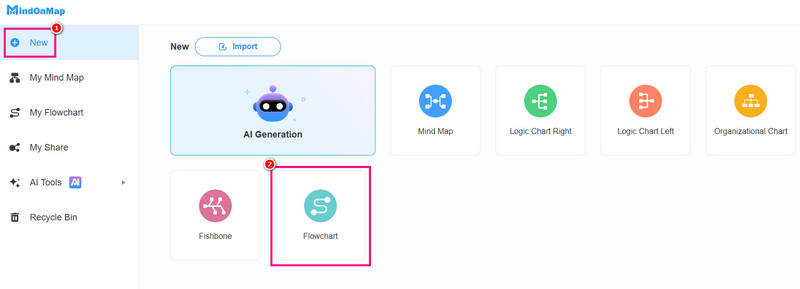
Step 2. Then, from the primary interface, click the Flowchart feature under the New section.
Step 3. You can start creating your framework. You can attach a table using the Table function above. You can even use the Fill and Font Color tools to add color to the text and table.
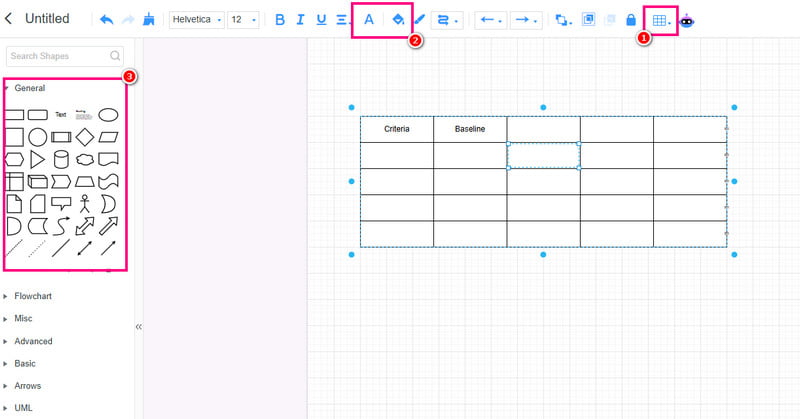
You can also go to the General section to use various shapes if you want to.
Step 4. Finally, you can start saving the decision framework by hitting the Save button. You can also tap the Share feature if you want to send your framework to other users.
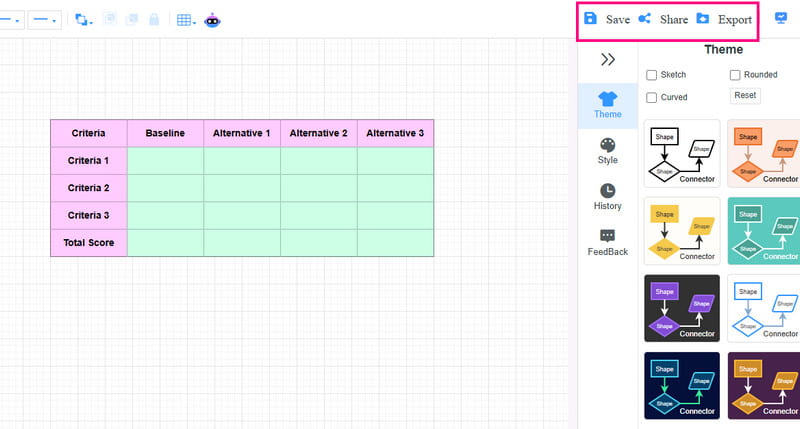
Tap Export to save the framework based on your desired format.
You can click here to see the framework designed by MindOnMap.
Part 4. FAQs about Pugh Matrix
Why is it called the Pugh Matrix?
It is because it was Dr. Stuart Pugh who developed the matrix. He is the one who introduced it as a structured method to evaluate design and engineering options.
How does scoring work in the Pugh Matrix?
The matrix has a simple scale. The +1 means better, 0 means the same, and -1 means worse. Giving a score with a criterion can help members make a better decision.
Can the Pugh Matrix be used outside engineering?
Definitely, yes. You can use the matrix in various fields, such as production selection, business strategy, project management, and more, where multiple options need to be evaluated and analyzed.
Is there a Pugh concept selection matrix template that I can use?
Absolutely, yes. You can access templates from various tools, such as MS Word, Excel, PowerPoint, Google Sheets, and other Collaboration tools.
Conclusion
Pugh Matrix is a helpful tool that can help you make better decisions for problem-solving. You can even create criteria for better output. Thanks to this post, you have learned everything about the matrix, including its importance, benefits, steps, and scoring. Plus, if you want to create your decision framework, you can use MindOnMap. This tool ensures that you have all the elements you need, allowing you to achieve your preferred result after the process.