



WBS in Project Management: Key Elements and How to Create
What is WBS in project management? Well, it is a visual framework that breaks down a project into smaller and more manageable components. It arranges tasks into levels, from the overall objective down to detailed deliverables, making it smoother to plan, identify, and assign responsibilities, and monitor progress. If you want to get more insights about WBS, this article covers everything you need to get started. We'll also walk you through the creation process using a reliable tool.

- Part 1. Introduction to WBS
- Part 2. Key Elements of WBS
- Part 3. How to Create a WBS Using MindOnMap
- Part 4. Common WBS Mistakes
- Part 5. FAQs about What is a WBS
Part 1. Introduction to WBS
What is a project WBS? A Work Breakdown Structure (WBS) is a project management tool that divides a big project into smaller, more manageable sections. Starting with the overarching objective and breaking it down into activities and deliverables, it displays the project in a hierarchical structure. Teams find it easier to comprehend what needs to be done and how each component affects the outcome.
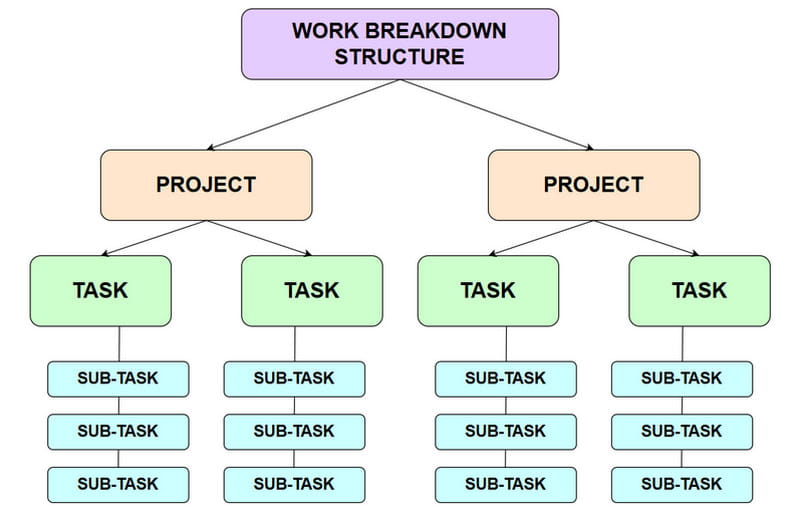
By using a WBS, project managers can assign responsibilities clearly. They can even track progress more effectively. It helps avoid confusion by ensuring that every task is accounted for and nothing is overlooked. With all of that, it’s clear that a WBS provides structure. Without it, complex projects fall apart.
Why is WBS Important?
A WBS is important since it can bring organization, clarity, and control to projects, guiding teams to avoid confusion, deliver results on time, and manage scope. Plus, it ensures that each task is accounted for, resources are used efficiently, and responsibilities are clear. To get more reasons why WBS is important, check all the details below.
- • Clarifies project scope by defining clear boundaries and breaking them into smaller deliverables.
- • It can offer a structured roadmap for scheduling, resource allocation, and cost estimation.
- • Enhances accountability by assigning each specific task to a dedicated team member.
- • This project management tool can also reduce risks by decomposing complex projects.
Part 2. Key Elements of WBS
After knowing what a work breakdown structure is, you also need to know that there are key elements. See this section and explore all the elements of the WBS.
Deliverables
Deliverables are the primary outputs or end goals a project must produce. These include tangible items like reports and finished products, as well as intangible services. Positioned at the top level of the WBS, deliverables provide a clear vision of what the team is working toward, helping to guide all subsequent tasks and ensure a shared definition of success.
Tasks
Another element from WBS is Tasks. These are the particular actions needed to complete each deliverable. They make it easier for team members to comprehend what needs to be done by breaking the job down into manageable pieces. Tasks improve the organization of duties and guarantee that progress may be monitored in great detail. The project keeps everyone on the same page and prevents confusion by explicitly identifying tasks.
Work Packages
The last element is Work Packages. These are considered the smallest units of work in WBS. They merge related tasks into manageable chunks that can be scheduled, measured, and assigned. Every work package has adequate information to monitor expenses, progress, and completion status. They are therefore crucial for keeping an eye on performance and guaranteeing project responsibility.
Part 3. How to Create a WBS Using MindOnMap
Are you looking for an excellent tool that can help you create a WBS? In that case, we suggest using MindOnMap Flowchart Creator. When it comes to creating a visual presentation, it is a straightforward option if you don't want to spend hours fighting with complex design software. You can even access all the elements, including basic and advanced shapes, arrows, connecting lines, colors, font styles, and more. The best part here is that it can provide a comprehensive user interface, ready-made templates, and themes, allowing you to create an appealing outcome. Lastly, you can also save your WBS in many ways. You can save it on your account to keep and preserve it. You can also save it on your device in various formats, such as JPG, SVG, PNG, DOCX, PDF, and more. Thus, we can tell that MindOnMap is the most powerful tool you can rely on when making a WBS successfully.
To start creating a WBS using MindOnMap, you can follow the simple process below.
You can download MindOnMap on your desktop by hitting the Free Download buttons below. After that, start creating your account to proceed to the primary interface.
Secure Download
Secure Download
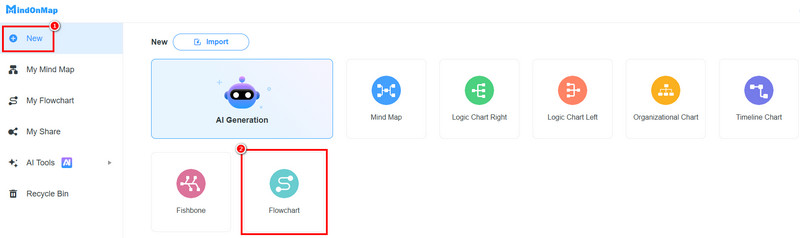
Then, you can go to the New section from the left interface and tap the Flowchart feature. Once done, the main interface will appear on your screen.
Now, you can begin creating your WBS. You can use various shapes from the General section. Double-click the shapes to insert the information.
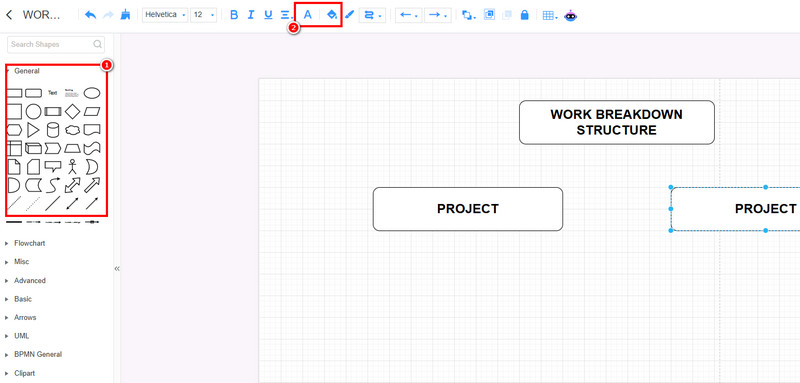
To change the color of your font and shapes, rely on the Fill and Font Color features above.
For the last process, tap the Save button above. You can also save the WBS on your device by using the Export feature.
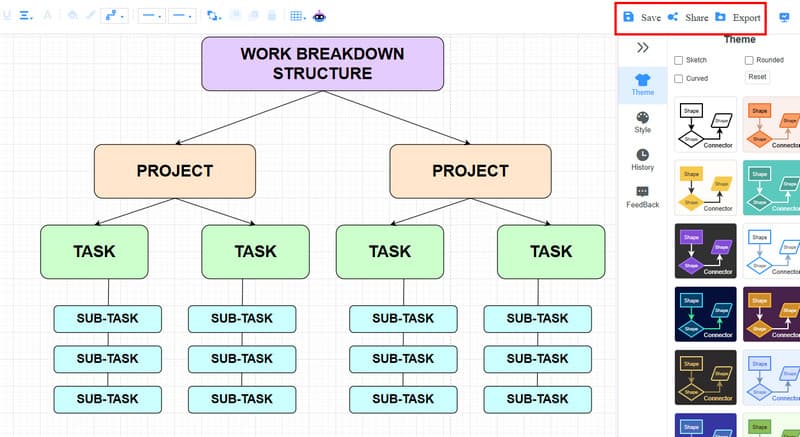
You can also use the Share section if you want to share the link of your output.
Click here to see the entire WBS designed by MindOnMap.
Part 4. Common WBS Mistakes
Some mistakes on the WBS can lead to scope creep, confusion, and inefficiency. Check the details below to learn more.
- • Overcomplicating the Structure – Some teams add too many levels, which can make the WBS overwhelming.
- • Not Providing Enough Details – Providing insufficient information can leave the team unsure of what to do.
- • Neglecting Change Control – Updating the WBS without formal change management can lead to uncontrolled scope changes.
Part 5. FAQs about What is a WBS
How does WBS improve project planning?
It can offer a precise blueprint for budgeting, resource allocation, and scheduling. By breaking down components, managers can predict schedules and costs.
Can WBS be used for any type of project?
Absolutely, yes. WBS can be applied to projects of any industry. You can use it for event planning, software development, and construction. It ensures that it can help you organize work clearly.
Is creating a WBS simple?
Creating a WBS is easy as long as you are using the right tool, like MindOnMap. With this tool, you can ensure that you can organize all the information you need, making it a reliable tool for all users.
How does a WBS help with task analysis?
A WBS provides a structured overview of project components, making it easier to perform task analysis. By breaking projects into smaller tasks, teams can identify responsibilities, estimate resources, and understand the steps required to complete each activity.
What are the main steps to create a WBS?
The main steps to create a WBS include defining the project goal, identifying major deliverables, breaking deliverables into smaller tasks, organizing work packages, and assigning responsibilities. This process helps teams improve planning and project execution.
Conclusion
You should now have a clear understanding of what a WBS is. Hopefully, this guide has given you a clear look at the importance and key elements of a WBS. If you're ready to start your own, MindOnMap is a great place to begin. This tool can give you all the necessary elements, such as shapes, lines, font styles, and more, making it a highly effective choice for creating professional diagrams.




