Create a Meeting Agenda: Description, Elements, & Importance
Creating a meeting agenda template is a simple yet ideal method to ensure that discussions start organized and productive. By outlining the main and subtopics, assigning time slots, and giving clear responsibilities, the whole team can avoid unnecessary detours. In this guide, we will teach you how to create an exceptional agenda template using the best tool. You will also explore the Agenda's importance and its key elements. So, if you want to learn more, read here right away.

- Part 1: What is a Meeting Agenda
- Part 2: Why Meeting Agendas Are Important
- Part 3: Key Elements of a Meeting Agenda Template
- Part 4: How to Create a Professional Meeting Agenda Template
- Part 5: Use MindOnMap to Plan Meeting Agendas Visually
- Part 6. FAQs about How to Create a Meeting Agenda Template
Part 1: What is a Meeting Agenda
A meeting agenda is a formal framework that directs the conversation during a meeting. The subjects to be covered, the sequence in which they will be discussed, and the amount of time allotted for each item are usually included. The agenda guarantees that significant issues are not missed and helps participants stay focused by offering this framework.
Aside from organizing everything, a meeting agenda also serves as a communication tool that can set expectations for attendees. It can highlight objectives, clarify roles, and let participants prepare in advance. This preparation encourages meaningful contributions, fosters efficiency, and leads to more productive and goal-oriented meetings.
Part 2: Why Meeting Agendas Are Important
Meeting agendas are important since they can provide structure and direction for discussion. By structuring/organizing topics, time allocations, and responsibilities, they can help prevent meetings from becoming unfocused and lengthy. Organizing everything ensures that all issues are addressed efficiently within the allotted time.
Additionally, agendas also enhance collaboration by setting expectations and letting participants prepare. When each member of the team knows the objectives and their role in the discussion, meetings become more goal-oriented and productive. Lastly, a well-prepared agenda, especially when visualized through a mind map, ensures that everything will be organized and successful.
Part 3: Key Elements of a Meeting Agenda Template
When creating agendas, you must also know that there are various key elements that you must be aware of. These are:
Meeting Details
One of the key elements of the meeting agenda is the meeting details. This includes the location, time, date, and participants to set expectations. It ensures that everyone knows when and where the meeting takes place and who the participants are.
Objectives
This is the purpose of the meeting and the goals to be achieved. Having a clear goal can help participants stay focused and understand the desired outcomes.
Agenda Items
In this part, you have to list all the topics that must be discussed in the meeting. Having a structured sequence keeps the meeting smooth and organized. It can even prevent important issues from being overlooked.
Time Allocation
Assign specific time slots for each agenda. This way, you can organize the meeting efficiently. It also ensures that the discussion won't get longer.
Roles and Responsibilities
In a meeting, you have to assign a role. You must identify who will lead or present the information. This way, you can promote accountability and encourage active participation.
Part 4: How to Create a Professional Meeting Agenda Template
Making a meeting agenda template is not that complicated. If you want a simple guide, you can use the steps below.
Define the Meeting Purpose
You have to start clarifying why you need a meeting. You can write a short statement of objectives to keep discussions focused.
List Agenda Items
In this part, you have to break down topics into various discussion points. You can arrange them in order of priority, ensuring that all issues are addressed.
Assign Time Slots
Allocate a realistic amount of time for each meeting/agenda. It will help you prevent having a longer discussion on a certain topic.
Identify Roles and Responsibilities
Insert in your template who will discuss and lead the topic. Assigning roles can help you get insights into who will present the information during the meeting.
Insert all the Meeting Details
On your template, you have to include all the necessary information. You can add the exact date, time, location, and participants' names.
Part 5: Use MindOnMap to Plan Meeting Agendas Visually
Do you want to plan meeting agendas visually? In that case, you can try using MindOnMap Flowchart Creator. This tool can help you turn your text-based information into a well-structured chart. The best part about the tool is that it can give you all the features you need. You can use various shapes, lines, font styles, colors, and more. It ensures that you can insert all the information without any issues.
Additionally, MindOnMap ensures that you can achieve your desired goals. You can structure and map out discussion points in a comprehensive manner that looks appealing to participants and viewers. As one of the useful real-time collaboration tools, it allows teams to work together more efficiently when organizing meeting agendas, sharing ideas, and refining discussion points. You can also set time allocations directly in your chart, ensuring that all topics are discussed within the given timeframe. Lastly, the tool can improve meeting efficiency and enhance communication among participants. After mapping out your meeting agenda, you can export your chart in various formats, such as PDF, PNG, JPG, SVG, and more. So, if you want to visualize your meeting agenda and create the best template, you can rely on this tool.
Go to your browser and access MindOnMap Flowchart Creator. You can also use the desktop version by hitting the buttons below.
Secure Download
Secure Download
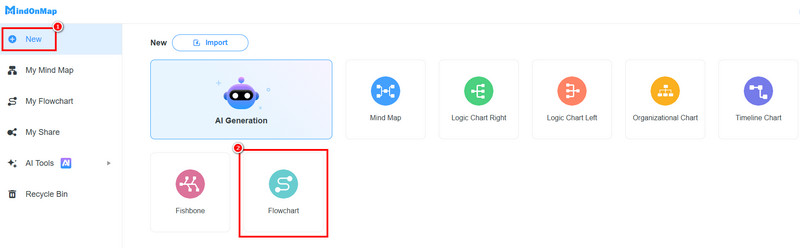
After you launch the interface, go to the New section and select the Flowchart feature. Then, the main UI will show up on your screen.
You can go to the General section to add shapes, text, and other elements to the blank canvas. Double-click the shapes to add the information.
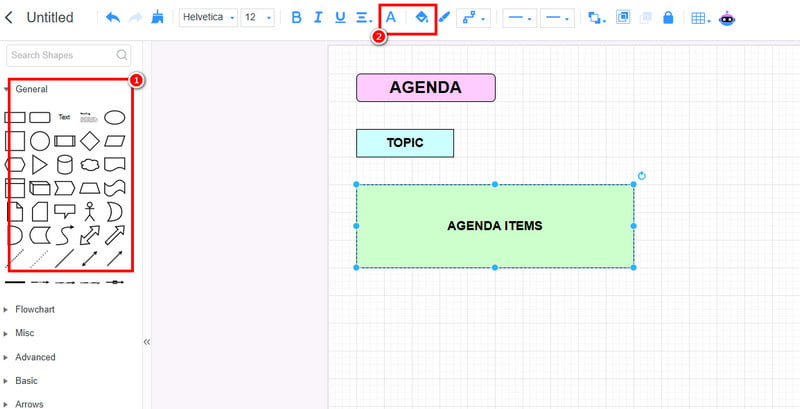
You can use the Fill and Font Color functions to add color to the shapes and text.
After the process, you can start saving it by hitting the Save button. You can also use the Export feature to save your chart on your device.
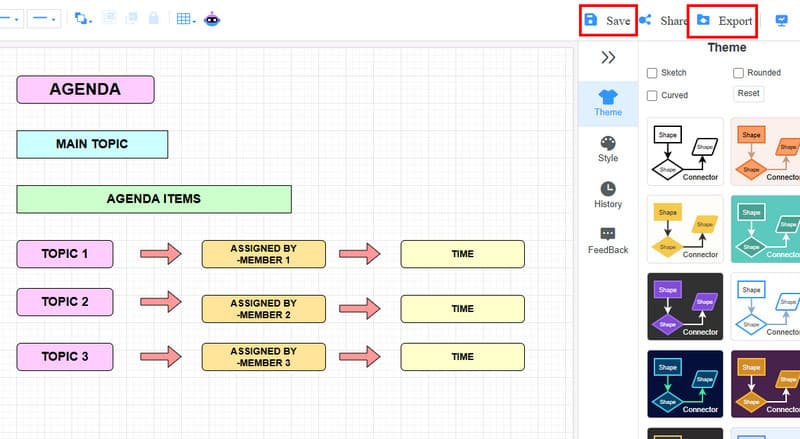
Click here to see the meeting agenda designed by MindOnMap.
Part 6. FAQs about How to Create a Meeting Agenda Template
How to set up an agenda for the meeting?
To set up an agenda, you have to know your main topic first. Then, it will be followed by the time slots, roles, and all the meeting details.
Can I create a meeting agenda template?
Absolutely, yes. You can create your template, since it will be helpful if you want to set another meeting with another topic.
What is the best tool for visualizing a meeting agenda?
There is no doubt that MindOnMap is the ideal tool you can rely on to help you visualize your meeting agenda. It can even give you all the elements you need, making it the best tool for you.
Conclusion
Creating a meeting agenda template is ideal if you want to have an organized discussion. It lets you see all the necessary information, such as the main topics, time, roles, and others. With this post, you have learned everything about meeting agenda templates. Plus, if you want to plan a meeting agenda visually, you can use MindOnMap. This tool can help you turn all the information into a well-structured output, making it the best visual representation maker for all users.