Off-Premise vs. On-Premise: Differences, Pros, Cons, etc.
Want to learn about Off-Premise vs. On-Premise? These are solutions that represent two different approaches to managing and dealing with IT infrastructure and business operations. On-premises is about systems hosted locally within a business's physical facilities, offering direct control that also requires significant maintenance. On the other hand, off-premises is about external hosting, such as providing scalability, cloud services, flexibility, and reducing infrastructure costs. So, are you interested in learning more about these two? If so, read here, as we offer their detailed definition, differences, use cases, pros, cons, and other necessary information.

- Part 1. What is Off-Premise and On-Premise
- Part 2. How to Choose Between Off-Premise and On-Premise Solutions
- Part 3. Off-Premise vs. On-Premise: Pros, Cons, Costs, and Common Considerations
- Part 4. Compare Off-Premise vs. On-Premise with MindOnMap
- Part 5. FAQs about Off-Premise vs. On-Premise
Part 1. What is Off-Premise and On-Premise
On-premise refers to software, hardware, and IT infrastructure that is physically hosted and managed within the company's own facilities. The business has full control over security, data, and customization. Plus, it is also responsible for maintenance, upfront costs, and upgrades. It also requires dedicated IT staff and investment in networking, servers, and storage. This model is best suited for companies that prioritize control and compliance over flexibility.
On the other hand, off-premises is a solution hosted externally. It is physically hosted through cloud providers or third-party data centers. Organizations/Companies access resources through the internet, lowering maintenance costs and reducing the need for physical infrastructure. The good thing about this model is that it provides scalability, flexibility, and instant deployment. However, it relies on external providers for uptime and security. It is also suitable for organizations seeking cost efficiency, agility, and remote accessibility.
On-Premise vs. Off-Premise: What are the Differences?
So you want to learn more about the differences between on-premise and Off-premise? Then, you can check all the information in the provided table below.
| On-Premise | vs. | Off-Premise |
| Full control over systems and data | Control | Limited control, managed by provider |
| High upfront investment, ongoing maintenance | Cost Structure | Subscription-based, lower upfront costs |
| Limited, requires hardware upgrades | Scalability | Highly scalable, on-demand resources |
| Managed internally, customizable | Security | Provider-managed, standardized protocols |
| Local access, limited remote use | Accessibility | Accessible anywhere via the internet |
Off-Premise vs. On-Premise: Use Cases
In this part, we will highlight some practical scenarios where On-Premise and off-premise solutions are most effective. They show how the two align with a certain company's needs, whether it is control and compliance or scalability and flexibility.
On-Premise
- Financial Institutions like banks need strict compliance and control.
- Businesses dealing with highly sensitive data, like government agencies.
- Big enterprises with existing dedicated IT teams and infrastructures.
Off-Premise
- Organizations or businesses running dynamic workloads, such as SaaS platforms and e-commerce.
- Companies with remote or distributed teams needing simple and easy access.
- Startups needing cost-effective and scalable solutions.
Part 2. How to Choose Between Off-Premise and On-Premise Solutions
Wondering how to choose between Off-premise and On-premise solutions? Well, choosing between the two depends on the organization's priorities, resources, and long-term strategies. On-premises is ideal when control, compliance, and data security are non-negotiable. But you must know that it requires higher upfront costs and dedicated IT support. Off-premises stands out when scalability, cost-efficiency, and flexibility are the main objectives. It is perfect for businesses with remote teams or dynamic workloads. Well, in the end, the right choice often comes down to evaluating and determining budget, regulatory requirements, technical expertise, and how much agility the company requires for future growth.
To get more insights about the two, especially on how to choose, you can check the table below.
| Best Fit: On-Premise | Business Priority | Best Fit: Off-Premise |
| Not ideal (high upfront costs) | Budget Constraints | Strong fit (subscription, lower initial spend) |
| Strong fit (full data control, customizable security) | Compliance and Control | Limited fit (depends on provider’s compliance standards) |
| Limited (requires hardware upgrades) | Scalability Needs | Strong fit (elastic scaling, pay-as-you-go) |
| Requires dedicated in-house team | IT Expertise | Minimal in-house IT needed; provider handles maintenance |
| Localized, harder for remote teams | Accessibility | Strong fit (internet-based, global access) |
Part 3. Off-Premise vs. On-Premise: Pros, Cons, Costs, and Common Considerations
To learn more about Off-Premise and On-Premise, you must read all the details in this section, as we offer their pros, cons, costs, and common considerations.
Pros
On-Premise Application
- • It has full control over data and infrastructure.
- • Perfect for organizations with strict regulatory requirements.
- • Customizable security and compliance measures.
Off-Premise
- • It is highly scalable and flexible for dynamic workloads.
- • Lower costs with various subscription models.
- • Accessible anywhere, which is suitable for remote teams.
Cons
On-Premise
- • Scalability is limited with this approach.
- • It needs dedicated maintenance or IT staff.
Off-Premise
- • Less direct control over systems and data.
- • There might be potential compliance challenges in regulated industries.
Costs
To learn about the cost of On-Premise and Off-Premise, see the details in the table below.
| Cost Factor | On-Premise | Off-Premise |
| Initial Investment | High (servers, licenses, setup) | Low (subscription-based) |
| Maintenance | Ongoing IT staff and upgrades | Included in provider’s service |
| Scalability Costs | Hardware expansion required | Pay-as-you-go, elastic scaling |
| Long-Term Expenses | Higher due to infrastructure upkeep | Lower if usage is optimized |
Common Considerations
- • Scalability – On-premise requires physical expansion, while Off-premise adapts instantly to growth.
- • Compliance and Security – Off-premise always depends on provider standards, while On-premise can offer more control.
- • Budget – On-premise suits enterprises with resources. On the other hand, Off-Premise is cost-efficient for startups.
Part 4. Compare Off-Premise vs. On-Premise with MindOnMap
Do you want to compare Off-Premise and On-Premise in a well-structured and comprehensive visual presentation? In that case, you can use MindOnMap Flowchart Creator. This tool is perfect since it can give you all the necessary elements for creating the best visual presentation. You can access shapes, connecting lines, fonts, and more. You can also use various ready-made templates to create your diagram or chart instantly. What we like about MindOnMap is its intuitive interface, which makes it easy to organize information and create the desired output. Whether you're conducting a task analysis or comparing Off-Premise and On-Premise solutions, you can quickly visualize complex information. Once finished, you can save your work in various formats, including PNG, JPG, and PDF. To begin comparing Off-Premise and On-Premise using MindOnMap, follow the steps below.
Access the MindOnMap Flowchart Creator in your browser and create your account. You can also use the button below to access its desktop version.
Secure Download
Secure Download
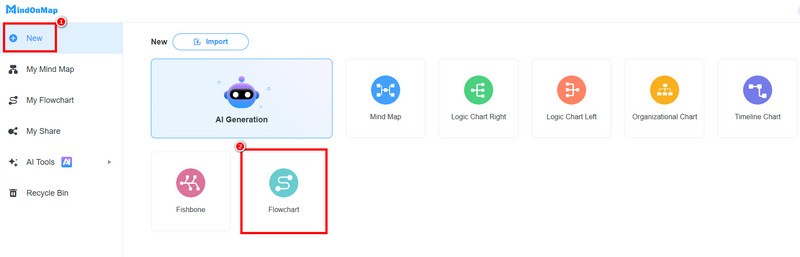
After you load the primary interface, proceed to New > Flowchart options to open the tool's main interface.
Start comparing On-Premise and Off-Premise. You can use various shapes and connecting lines from the General section. To insert text, double-click the shapes.
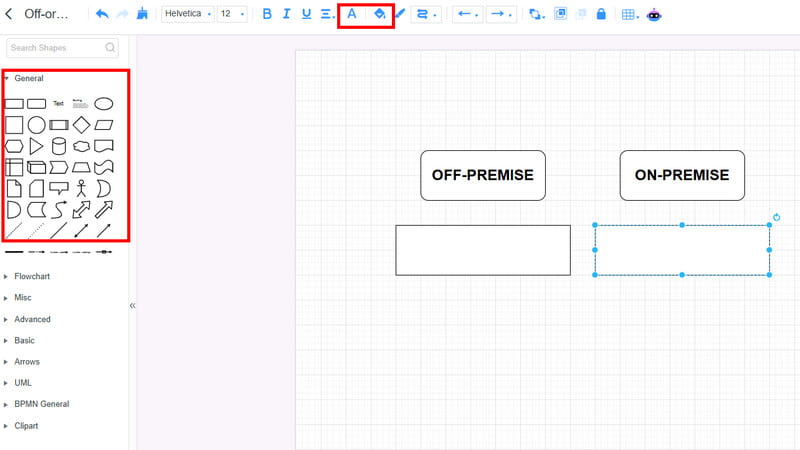
To make your output colorful, use the Font and Fill Color tools.
After creating the visual presentation, you can start clicking the Save button above to keep it on your account.
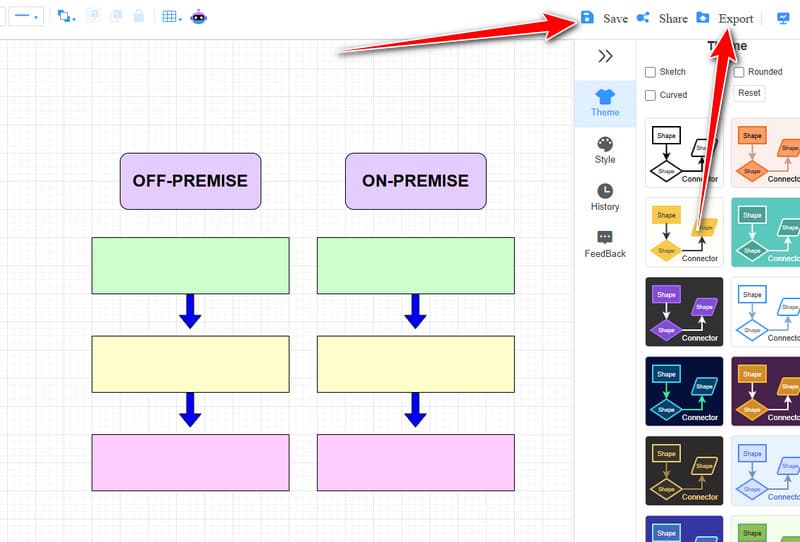
You can also use/tap the Export function to save the mind map on your device.
Part 5. FAQs about Off-Premise vs. On-Premise
Which model can offer better security?
If you want better security, then there is no doubt that the answer is On-Premise since it allows full control and customization.
Can off-premise solutions scale faster than on-premise?
Definitely, yes. It is highly scalable with on-demand resources. On the other hand, on-premise scaling needs physical hardware upgrades.
What is the best on-premises software?
There are various software options you can rely on. Some of them are Mattermost and Rocket. Chat, Jira Software, Qlik Sense Enterprise, and more. These tools are among the best options for teams that need local deployment, strict compliance, and full control over infrastructure.
Conclusion
In the discussion about Off-Premise vs. On-Premise, you have learned all the information you need. You have explored their definition, differences, use cases, pros, cons, and other details. Plus, you can even compare the two using MindOnMap Flowchart Creator as your main tool, since it can give you all the features you need to achieve the result you need. Thus, to obtain all the information about the topic, it would be best to use this post as your reference!